






ansible playbook 配置任务超时中断主要通过设置 timeout 参数来实现,该参数用于控制单个模块(如 shell、command、script)在远程主机上执行的最长时间。当任务运行时间超过设定的秒数时,ansible 会强制终止该进程并标记为失败。需要注意的是,timeout 仅对支持超时的模块有效,且默认情况下 ansible 的 ssh 连接超时由 ansible_ssh_timeout 控制,这与任务执行超时是两个不同的概念。

timeout 参数如何作用于具体模块?
timeout 参数直接传递给被调用的模块,指定其等待操作完成的秒数。例如,在使用 shell 模块时,如果命令未在指定时间内完成,Ansible 将发送信号终止该命令。此参数必须在任务级别或模块级别显式声明,否则不会生效。
---
- name: Test timeout on shell module
  hosts: all
  tasks:
    - name: Run a long-running command with timeout
      ansible.builtin.shell: sleep 60
      timeout: 10
      register: result
    - name: Show result
      ansible.builtin.debug:
        var: result
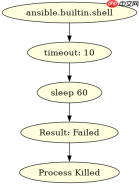
在上述代码中,sleep 60 命令预期运行 60 秒,但由于设置了 timeout: 10,Ansible 会在 10 秒后强制杀死该进程。任务状态将变为 failed,并且 result 变量中将包含错误信息。如果未设置 timeout,任务将等待直到命令自然结束或达到 SSH 连接超时。
如何区分任务超时与 SSH 连接超时?
任务超时(timeout)和 SSH 连接超时(ansible_ssh_timeout)处理的是不同阶段的问题。ansible_ssh_timeout 控制 Ansible 建立 SSH 连接到目标主机的最长时间,而 timeout 控制模块在远程主机上执行的具体命令或脚本的最长时间。如果 SSH 连接建立失败,任务甚至不会开始执行,因此 timeout 参数在此时无效。

---
- name: Test SSH connection timeout
  hosts: all
  gather_facts: no
  vars:
    ansible_ssh_timeout: 5
  tasks:
    - name: Try to connect to unreachable host
      ansible.builtin.ping:
      ignore_errors: yes
    - name: Check if task failed due to SSH timeout
      ansible.builtin.debug:
        msg: "Task failed as expected due to SSH timeout"
在上面的示例中,ansible_ssh_timeout: 5 设置为 5 秒。如果目标主机不可达或响应缓慢,SSH 连接将在 5 秒后超时,导致 ping 模块无法执行。此时,任务会失败,但失败原因是连接超时,而非任务执行超时。要验证这一点,可以观察 Ansible 的输出日志,通常会显示 ssh: connect to host ... Connection timed out 之类的错误信息。
当任务因超时中断时,如何处理后续逻辑?
当任务因 timeout 参数中断时,Ansible 会将该任务标记为失败,并根据 ignore_errors 或 failed_when 等配置决定是否继续执行后续任务。如果未设置 ignore_errors: yes,Playbook 将停止执行当前主机上的剩余任务,并可能转向其他主机(取决于 serial 或 strategy 配置)。为了优雅地处理超时情况,可以在任务后添加一个条件判断任务,检查前一个任务的返回状态。
---
- name: Handle timeout gracefully
  hosts: all
  tasks:
    - name: Run potentially slow command
      ansible.builtin.shell: sleep 30
      timeout: 5
      register: slow_task
      ignore_errors: yes
    - name: Check if task was killed by timeout
      ansible.builtin.debug:
        msg: "Task was interrupted by timeout"
      when: slow_task is failed and 'timed out' in slow_task.msg | default('')
在这个例子中,slow_task 任务设置了 timeout: 5,并在失败时不立即中止 Playbook(ignore_errors: yes)。随后的 debug 任务检查 slow_task 是否失败,并验证错误消息中是否包含 timed out 字样。如果条件满足,则打印特定消息。这种模式允许你在任务超时后执行清理工作或记录日志,而不必完全中止整个 Playbook。











