






在 symfony 8.2 中,要在一个表单集合里放置不同类型的条目,核心做法是使用 choicetype 配合 entitytype 或自定义类型,并利用 data_class 和 mapped 属性来动态处理不同数据结构的渲染。具体而言,你需要定义一个主实体(如 entrycontainer),其中包含一个用于存储不同类型对象引用的字段,或者使用一个包含类型标识和对应数据的结构。通过设置 entry_type 为 choicetype,并在 choice_loader 中根据选择的类型动态返回对应的表单类型实例,可以实现这一目标。这样做的好处是前端可以统一提交,后端根据类型标识分发到不同的处理逻辑。

如何配置动态表单类型的加载器?
要配置动态表单类型的加载器,你需要创建一个实现了 LoaderInterface 的类,或者直接在 FormType 中使用 choice_loader 选项。这个加载器会根据用户在前端选择的类型(例如 "text"、"image"、"link"),返回相应的表单类型类引用。关键在于确保每个子表单都有唯一的名称前缀,以避免 ID 冲突。此外,还需要处理 data_class,因为不同子项可能对应不同的实体类,通常建议将这些子项映射到一个通用的 DTO 或直接存储在 JSON 字段中,以简化数据库设计。
<?php namespace App\Form;

use App\Entity\TextEntry;
use App\Entity\ImageEntry;
use App\Entity\LinkEntry;
use Symfony\Component\Form\AbstractType;
use Symfony\Component\Form\CallbackTransformer;
use Symfony\Component\Form\Extension\Core\Type\ChoiceType;
use Symfony\Component\Form\Extension\Core\Type\CollectionType;
use Symfony\Component\Form\FormBuilderInterface;
use Symfony\Component\OptionsResolver\OptionsResolver;

class DynamicEntryType extends AbstractType
{
    public function buildForm(FormBuilderInterface $builder, array $options): void
    {
        // 假设我们有一个主实体,其 entries 字段是一个数组
        // 这里演示如何构建一个包含不同子类型的集合

        $builder
            ->add('entries', CollectionType::class, [
                'entry_type' => SingleDynamicEntryType::class,
                'allow_add' => true,
                'allow_delete' => true,
                'by_reference' => false,
            ])
        ;
    }

    public function configureOptions(OptionsResolver $resolver): void
    {
        $resolver->setDefaults([
            'data_class' => null, // 如果直接操作数组则设为 null
            // 如果有主实体,请指定 data_class
        ]);
    }
}

class SingleDynamicEntryType extends AbstractType
{
    public function buildForm(FormBuilderInterface $builder, array $options): void
    {
        // 这里的关键是:实际项目中,你可能需要根据外部传入的类型
        // 来动态决定添加哪些字段。但 CollectionType 的 entry_type
        // 必须是固定的类。因此,更常见的做法是让 SingleDynamicEntryType
        // 内部包含一个 type 选择器,以及一个根据 type 显示不同字段的逻辑。
        // 由于 Symfony 表单组件本身不支持完全动态的 entry_type 切换
        // 在同一个 Collection 中,我们通常采用“所有可能字段都渲染,但通过 CSS/JS 控制可见性”
        // 或者“使用 ChoiceType 选择类型,然后 JS 动态插入子表单”的方式。

        // 下面展示一种基于 ChoiceType 选择子类型,并预加载所有可能字段的简化方案
        // 注意:这要求所有子类型共享相同的父级数据结构,或者使用 DTO

        $builder
            ->add('type', ChoiceType::class, [
                'choices' => [
                    '文本' => 'text',
                    '图片' => 'image',
                    '链接' => 'link',
                ],
            ])
            ->add('content', TextType::class) // 通用内容字段,或根据类型变化
        ;
    }
}
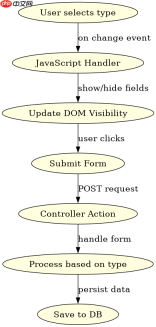
上述代码展示了基本结构。在实际操作中,为了真正实现“不同类型”,通常需要结合 JavaScript 来动态添加或删除特定的 DOM 元素,或者在后端根据 type 字段进行不同的验证和处理。如果必须使用纯 PHP 表单类型切换,可以考虑使用 FormEvents::PRE_SET_DATA 来动态添加字段,但这在集合类型中较为复杂。
如何处理不同条目数据的持久化与反序列化?
处理不同条目数据的持久化,推荐将异构数据存储在一个 JSON 列中,而不是创建多个关联表。这样可以在 EntryContainer 实体中定义一个 mixed 类型的字段,并使用 Doctrine 的 json 类型映射。在表单层,你可以使用 DataTransformer 将数组转换为 JSON 字符串,反之亦然。这种方式避免了复杂的 JOIN 查询,并且天然支持不同结构的条目。对于验证,可以使用 Symfony Validator 的 Valid 约束对数组中的每个元素进行校验,并根据元素的 type 字段应用不同的验证组。


<?php namespace App\Entity;

use App\Repository\EntryContainerRepository;
use Doctrine\Common\Collections\ArrayCollection;
use Doctrine\Common\Collections\Collection;
use Doctrine\DBAL\Types\Type;
use Doctrine\ORM\Mapping as ORM;
use Symfony\Component\Validator\Constraints as Assert;

/**
 * @ORM\Entity(repositoryClass=EntryContainerRepository::class)
 */
class EntryContainer
{
    /**
     * @ORM\Id
     * @ORM\GeneratedValue
     * @ORM\Column(type="integer")
     */
    private ?int $id = null;

    /**
     * @ORM\Column(type="json", nullable=true)
     * @Assert\Valid()
     */
    private ?array $entries = null;

    public function __construct()
    {
        $this->entries = new ArrayCollection();
    }

    public function getId(): ?int
    {
        return $this->id;
    }

    public function getEntries(): Collection
    {
        return $this->entries;
    }

    public function setEntries(array $entries): self
    {
        $this->entries = $entries;
        return $this;
    }

    public function addEntry(array $entry): self
    {
        if (!in_array($entry, $this->entries->toArray())) {
            $this->entries->add($entry);
        }
        return $this;
    }

    public function removeEntry(array $entry): self
    {
        $this->entries->removeElement($entry);
        return $this;
    }
}
在这个示例中,$entries 字段被定义为 json 类型,这意味着它将在数据库中存储为一个 JSON 字符串。Symfony 的表单组件会自动将这个 JSON 字符串解码为 PHP 数组供表单使用,并在提交时重新编码。这种方式的优点是简单且灵活,缺点是失去了关系型数据库的强类型约束和关联查询能力。如果需要复杂的查询,可能需要引入全文搜索或额外的索引策略。
当条目类型为 image 时,content 字段应如何特殊处理?
当条目类型为 image 时,content 字段不应再是普通的文本输入,而应该是一个文件上传字段。在 Symfony 表单中,这通常意味着你需要在 SingleDynamicEntryType 中根据 type 的值动态添加 FileType。然而,由于 CollectionType 的子表单在初始化时已经确定,最实用的方法是始终渲染 FileType,但在前端通过 JavaScript 根据 type 的选择来隐藏或显示该字段。在后端,你需要编写一个自定义的 DataTransformer 或 EventSubscriber,在 POST_SUBMIT 事件中检查 type 是否为 image,如果是,则处理上传的文件并将 URL 存入 content;如果不是,则将普通文本存入 content。这样可以保持表单结构的一致性,同时满足不同类型的数据需求。





