在 nginx 源码编译时添加 ssl 模块,需要在执行 configure 脚本时通过 --with-http_ssl_module 参数进行指定。这一步骤要求系统环境中已安装 openssl 开发库,配置完成后运行 make 即可生成包含 ssl 支持的新二进制文件。

如何确认当前 Nginx 是否已启用 ssl 模块
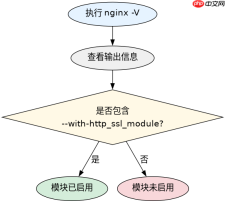
要确认当前安装的 Nginx 是否已经包含了 ssl 模块,最直接的方法是使用 -V 参数(大写)查看其编译配置信息。如果输出中包含 --with-http_ssl_module,则说明该模块已启用;若未出现,则说明当前版本不支持 HTTPS 功能,需要重新编译。
nginx -V
执行上述命令后,终端会输出类似如下的信息:
nginx version: nginx/1.24.0
built by gcc 11.4.0 (Ubuntu 11.4.0-1ubuntu1~22.04)
TLS SNI support enabled
configure arguments: --prefix=/etc/nginx --sbin-path=/usr/sbin/nginx --modules-path=/usr/lib/nginx/modules --conf-path=/etc/nginx/nginx.conf --error-log-path=/var/log/nginx/error.log --http-log-path=/var/log/nginx/access.log --pid-path=/run/nginx.pid --lock-path=/run/nginx.lock --http-client-body-temp-path=/var/cache/nginx/client_temp --http-proxy-temp-path=/var/cache/nginx/proxy_temp --http-fastcgi-temp-path=/var/cache/nginx/fastcgi_temp --http-uwsgi-temp-path=/var/cache/nginx/uwsgi_temp --http-scgi-temp-path=/var/cache/nginx/scgi_temp --user=nginx --group=nginx --with-http_ssl_module --with-http_realip_module --with-http_addition_module --with-http_sub_module --with-http_dav_module --with-http_gzip_static_module --with-http_random_index_module --with-http_secure_link_module --with-http_stub_status_module --with-mail --with-mail_ssl_module --with-stream --with-stream_ssl_module --with-stream_realip_module --with-stream_ssl_preread_module --with-threads --with-compat --with-pcre-jit --with-http_v2_module --with-http_slice_module --with-http_auth_request_module --with-http_xslt_module=dynamic --with-http_image_filter_module=dynamic --with-http_geoip_module=dynamic --with-http_perl_module=dynamic --add-dynamic-module=/tmp/ngx_http_geoip_module-1.10 --add-dynamic-module=/tmp/ngx_http_lua_module-1.5.2
在上述输出中,可以清晰地看到 --with-http_ssl_module 这一项,这表明当前的 Nginx 实例是支持 SSL/TLS 的。如果没有这一行,则需要按照前文提到的步骤重新编译。
编译时如何处理依赖缺失或路径错误
如果在执行 configure 时遇到错误,通常是因为缺少 OpenSSL 的开发包或者路径未被正确识别。在大多数 Linux 发行版中,需要安装 libssl-dev 或 openssl-devel 才能成功编译。此外,如果 OpenSSL 安装在非标准路径下,可以通过 --with-openssl=DIR 参数手动指定其源码目录,或者使用 --with-openssl-opt 传递额外的编译选项。


# Ubuntu/Debian
sudo apt-get install libssl-dev

# CentOS/RHEL
sudo yum install openssl-devel
安装完依赖后,重新执行 configure 命令。如果仍然报错,可以尝试清理之前的编译缓存并重新配置:
make clean
./configure --with-http_ssl_module
make
sudo make install
完成这些步骤后,新的 Nginx 二进制文件将具备处理 HTTPS 请求的能力。此时,可以在 nginx.conf 中配置 listen 443 ssl; 来启用加密连接。
基于 listen 443 ssl 指令的具体行为问题
当在 Nginx 配置中使用 listen 443 ssl; 指令时,Nginx 会尝试加载指定的证书和私钥文件。如果证书文件路径错误或权限不足,Nginx 将无法启动或无法提供 HTTPS 服务。此时,可以通过检查 Nginx 的错误日志来定位具体问题,通常错误日志中会明确提示证书加载失败的原因。