






1,下载安装包
安装包地址
2,在php.ini文件中进行如下配置:
;zend_extension="D:\phpStudy\PHPTutorial\php\php-7.2.1-nts\php_xdebug-2.6.0-7.2-vc15-nts-x86_64.dll"
zend_extension="D:\phpStudy\PHPTutorial\php\php-7.2.1-nts\php_xdebug-2.6.0-7.2-vc15-nts.dll"
xdebug.profiler_output_dir="D:\phpStudy\PHPTutorial\tmp\xdebug"
xdebug.trace_output_dir="D:\phpStudy\PHPTutorial\tmp\xdebug"
xdebug.profiler_append = 0
xdebug.profiler_enable = 1
xdebug.profiler_enable_trigger = 0
xdebug.profiler_output_name = "cache.out.%t-%s"
xdebug.remote_enable = 1
xdebug.remote_handler = "dbgp"
xdebug.remote_autostart = 1
xdebug.remote_host = "127.0.0.1"
xdebug.remote_port = 9060
xdebug.idekey = phpstorm
3,配置PhpStorm

Windows 开机自启并隐藏到系统托盘
下载
让 Windows 桌面程序在开机时静默自启并隐藏到系统托盘。特别适用于 Flutter、Electron 等无视 VBS/ProcessStartInfo 窗口样式、难以隐藏的顽固应用。提供「VBS 启动器 + Python ctypes/Win32 API」的隐藏窗口方案,可稳定把窗口收进托盘且不闪控制台。
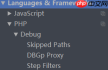

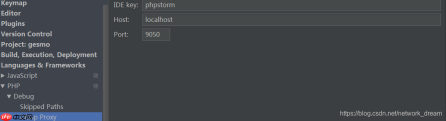
4,如果使用PhpStudy,请确保勾选xdebug选项






