在c#中使用linq查询语法进行group by统计,核心是使用 group ... by ... into ... select 结构。你需要指定分组键(by)、将结果集绑定到一个新变量(into),然后在 select 中对该组执行聚合操作(如 count()、sum())。如果未显式使用 into,编译器会隐式创建一个名为 g 的变量供后续聚合使用。

如何按单个属性分组并统计数量?
按单个属性分组并统计数量时,直接使用 group item by item.Key into g 或简写形式即可。这种方式最直观,适用于简单的计数场景。
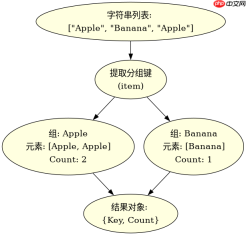
using System;
using System.Collections.Generic;
using System.Linq;

class Program
{
    static void Main()
    {
        var items = new List<string> { "Apple", "Banana", "Apple", "Orange", "Banana", "Apple" };

        // 方法1:使用 into 关键字
        var query1 = from item in items
                     group item by item into g
                     select new { Key = g.Key, Count = g.Count() };

        // 方法2:省略 into,默认变量名为 g
        var query2 = from item in items
                     group item by item
                     select new { Key = g.Key, Count = g.Count() };

        foreach (var result in query1)
        {
            Console.WriteLine($"{result.Key}: {result.Count}");
        }
    }
}</string>
如何按多个条件分组并计算总和?
当需要按多个字段分组时,可以在 by 子句中使用匿名对象。此时,into 后的变量代表该组合键下的所有元素集合,你可以对其执行 Sum()、Average() 等聚合操作。

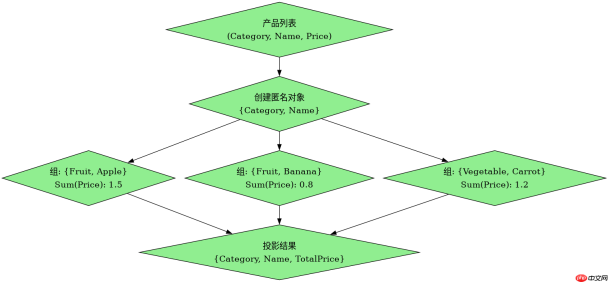
using System;
using System.Collections.Generic;
using System.Linq;

class Product
{
    public string Category { get; set; }
    public string Name { get; set; }
    public decimal Price { get; set; }
}

class Program
{
    static void Main()
    {
        var products = new List<product>
        {
            new Product { Category = "Fruit", Name = "Apple", Price = 1.5m },
            new Product { Category = "Fruit", Name = "Banana", Price = 0.8m },
            new Product { Category = "Vegetable", Name = "Carrot", Price = 1.2m },
            new Product { Category = "Fruit", Name = "Orange", Price = 2.0m }
        };

        // 按类别和名称分组,计算每组的总价
        var query = from p in products
                    group p by new { p.Category, p.Name } into g
                    select new
                    {
                        Category = g.Key.Category,
                        Name = g.Key.Name,
                        TotalPrice = g.Sum(x => x.Price)
                    };

        foreach (var result in query)
        {
            Console.WriteLine($"{result.Category} - {result.Name}: {result.TotalPrice}");
        }
    }
}</product>
分组后如何过滤掉数量为0的记录?
在分组统计后,如果需要排除某些组(例如数量为0或总和为0),可以在 select 之前添加 where 子句。注意,where 必须放在 into 之后、select 之前,因为此时上下文是分组后的集合 g,而不是原始数据源。
using System;
using System.Collections.Generic;
using System.Linq;

class Program
{
    static void Main()
    {
        var items = new List<int> { 1, 2, 2, 3, 3, 3 };

        // 分组并只保留出现次数大于1的元素
        var query = from item in items
                    group item by item into g
                    where g.Count() > 1
                    select new { Key = g.Key, Count = g.Count() };

        foreach (var result in query)
        {
            Console.WriteLine($"{result.Key}: {result.Count}");
        }
    }
}</int>