在 .net 11 中,可以使用内置的 zstream 类或第三方库如 zstdnet 来压缩数据。推荐使用 zstdnet,因为它提供了更简洁的 api 和更好的性能。
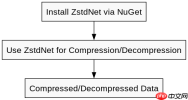
如何安装和使用ZstdNet库?
要使用 ZstdNet,首先需要安装该库。可以通过 NuGet 包管理器安装 ZstdNet。安装后,你可以使用 ZstdStream 类来进行压缩和解压操作。
using System;
using ZstdNet;

class Program
{
    static void Main()
    {
        byte[] data = { 0x01, 0x02, 0x03, 0x04 };
        using (var compressor = new Compressor())
        {
            byte[] compressed = compressor.Compress(data);
            Console.WriteLine("Compressed: " + BitConverter.ToString(compressed));
        }
    }
}
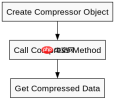
上述代码展示了如何使用 ZstdNet 进行数据压缩。首先创建一个 Compressor 对象,然后调用 Compress 方法对数据进行压缩。
如何解压Zstandard压缩的数据?
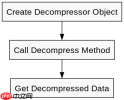
解压 Zstandard 压缩的数据同样简单。使用 Decompressor 类的 Decompress 方法即可。

using System;
using ZstdNet;

class Program
{
    static void Main()
    {
        byte[] compressedData = { 0x28, 0xB5, 0x2F, 0xFD, 0x01, 0x02, 0x03, 0x04 };
        using (var decompressor = new Decompressor())
        {
            byte[] decompressed = decompressor.Decompress(compressedData);
            Console.WriteLine("Decompressed: " + BitConverter.ToString(decompressed));
        }
    }
}
上述代码展示了如何解压 Zstandard 压缩的数据。首先创建一个 Decompressor 对象,然后调用 Decompress 方法对压缩数据进行解压。
如何处理大文件的压缩和解压?
对于大文件,建议使用流式处理以避免内存溢出。可以使用 ZstdStream 类的 Write 和 Read 方法进行流式压缩和解压。