使用linq的todictionary方法配合int.parse将字符串键转换为整数键。具体做法是遍历json反序列化后的字典,对每个键调用int.parse进行转换,并保留对应的值,从而生成一个system.collections.generic.dictionary

如何解析包含数字字符串键的JSON字符串?
使用Newtonsoft.Json库的JsonConvert.DeserializeObject方法,指定目标类型为Dictionary
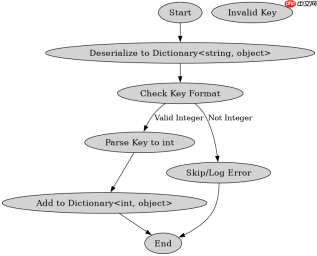
转换过程中遇到非数字键会怎样?
如果JSON中包含无法转换为整数的键(如字母或特殊符号),int.Parse会抛出FormatException异常。为了稳健处理,应使用int.TryParse进行预检查,跳过无效键或记录错误,确保只有合法的数字字符串被纳入最终字典。

Json To Jianying Description
下载
将包含oralBroadcastingList、materialList、bgmInfo等字段的JSON视频素材转换为剪映API可用的自然语言描述,用于生成视频制作指令,包括素材匹配、时间轴计算、字幕同步、特殊效果处理等。
using System;
using System.Collections.Generic;
using System.Linq;
using Newtonsoft.Json;

public class Program
{
    public static void Main()
    {
        string json = "{\"1\": \"A\", \"2\": \"B\", \"3\": \"C\"}";

        // 第一步:解析为字符串键字典
        var strDict = JsonConvert.DeserializeObject<dictionary string>>(json);

        // 第二步:转换为整数键字典
        var intDict = strDict.ToDictionary(
            kvp => int.Parse(kvp.Key),
            kvp => kvp.Value
        );

        foreach (var kvp in intDict)
        {
            Console.WriteLine($"Key: {kvp.Key}, Value: {kvp.Value}");
        }
    }
}</dictionary>
预期输出:
Key: 1, Value: A
Key: 2, Value: B
Key: 3, Value: C
using System;
using System.Collections.Generic;
using System.Linq;
using Newtonsoft.Json;

public class Program
{
    public static void Main()
    {
        string json = "{\"1\": \"A\", \"abc\": \"B\", \"3\": \"C\"}";
        var strDict = JsonConvert.DeserializeObject<dictionary string>>(json);

        var intDict = new Dictionary<int string>();
        foreach (var kvp in strDict)
        {
            if (int.TryParse(kvp.Key, out int key))
            {
                intDict.Add(key, kvp.Value);
            }
            else
            {
                Console.WriteLine($"Skipping invalid key: {kvp.Key}");
            }
        }

        foreach (var kvp in intDict)
        {
            Console.WriteLine($"Key: {kvp.Key}, Value: {kvp.Value}");
        }
    }
}</int></dictionary>
预期输出:
Skipping invalid key: abc
Key: 1, Value: A
Key: 3, Value: C