在c#中,处理字典为null和字典没有目标键需要采用不同的策略。对于null字典,必须在访问前进行判空检查或初始化,否则直接调用方法会抛出nullreferenceexception;对于缺少键的情况,应使用trygetvalue方法、containskey属性或索引器的异常捕获机制来安全获取值,避免引发keynotfoundexception。

如何防止因字典为null导致的程序崩溃
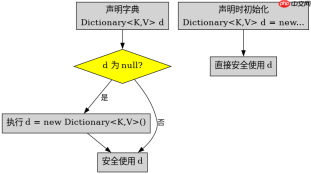
当字典变量未初始化时,其值为null。此时若尝试访问Count属性或调用Add方法,运行时将抛出NullReferenceException。最稳妥的做法是在使用前确保字典实例已创建,或者在代码逻辑中加入显式的null判断。如果业务允许字典为空,可以在声明时直接赋予初始值,这样后续操作无需额外判空。
using System;
using System.Collections.Generic;

class Program
{
    static void Main()
    {
        // 场景1:字典为null,直接访问会报错
        Dictionary<string int> nullDict = null;

        // 安全的处理方式:先检查是否为null
        if (nullDict == null)
        {
            Console.WriteLine("字典为null,需初始化或跳过");
            nullDict = new Dictionary<string int>();
        }

        // 场景2:字典已初始化但为空
        Dictionary<string int> emptyDict = new Dictionary<string int>();

        // 此时可以安全调用Count,结果为0
        Console.WriteLine($"空字典的Count: {emptyDict.Count}");

        // 推荐做法:声明时即初始化,避免null检查
        Dictionary<string int> safeDict = new Dictionary<string int>();
        safeDict["key"] = 100;
        Console.WriteLine($"安全字典的值: {safeDict["key"]}");
    }
}</string></string></string></string></string></string>
上述代码展示了两种处理null字典的方式:一是运行时动态判空并初始化,二是声明时直接实例化。推荐使用后者,因为现代C#开发中,尽量通过构造函数保证对象状态的有效性,减少防御性编程带来的冗余代码。如果必须接收外部传入的字典参数,则应在方法入口处进行null检查。
如何安全地获取字典中不存在的键对应的值
当字典中存在目标键时,可以直接通过索引器获取值;但当键不存在时,索引器会抛出KeyNotFoundException。为了避免程序中断,应当使用TryGetValue方法。该方法返回一个布尔值表示是否找到键,并通过out参数输出对应的值。这种方式比try-catch更高效,因为异常处理涉及栈展开,性能开销较大。此外,也可以使用ContainsKey属性先判断键是否存在,再取值,但TryGetValue是更推荐的单步操作方式。


using System;
using System.Collections.Generic;

class Program
{
    static void Main()
    {
        Dictionary<string int> dict = new Dictionary<string int>
        {
            ["apple"] = 1,
            ["banana"] = 2
        };

        string targetKey = "orange";

        // 错误做法:直接取值可能抛异常
        // int value = dict[targetKey]; // 抛出KeyNotFoundException

        // 正确做法1:使用TryGetValue
        if (dict.TryGetValue(targetKey, out int result))
        {
            Console.WriteLine($"找到键 '{targetKey}',值为: {result}");
        }
        else
        {
            Console.WriteLine($"未找到键 '{targetKey}'");
        }

        // 正确做法2:使用ContainsKey
        if (dict.ContainsKey(targetKey))
        {
            Console.WriteLine($"键 '{targetKey}' 存在,值为: {dict[targetKey]}");
        }
        else
        {
            Console.WriteLine($"键 '{targetKey}' 不存在");
        }

        // 针对C# 9+及以上版本,可使用索引器默认值特性(需配合特定语法)
        // 但传统方式仍推荐TryGetValue
    }
}</string></string>
在实际开发中,TryGetValue是处理缺失键的首选方案。它不仅避免了异常处理的性能损耗,还使代码意图更加清晰。如果需要根据缺失键设置默认值,可以在else分支中赋值。例如,若希望未找到的键返回0,可在else中设置result = 0。这种模式广泛应用于配置读取、缓存查询等场景,确保程序在面对不完整数据时仍能稳定运行。
当字典值为null且键存在时如何处理
在某些复杂场景中,字典的键可能存在,但其对应的值为null。这与字典本身为null或键不存在不同。例如,Dictionary
using System;
using System.Collections.Generic;

class Program
{
    static void Main()
    {
        Dictionary<string string> dict = new Dictionary<string string>
        {
            ["name"] = "Alice",
            ["nickname"] = null // 键存在,但值为null
        };

        string key = "nickname";

        if (dict.TryGetValue(key, out string value))
        {
            if (value != null)
            {
                Console.WriteLine($"值不为null: {value}");
            }
            else
            {
                Console.WriteLine($"键 '{key}' 存在,但值为null");
            }
        }
        else
        {
            Console.WriteLine($"键 '{key}' 不存在");
        }
    }
}</string></string>
这段代码演示了如何处理键存在但值为null的情况。首先通过TryGetValue确认键的存在性,然后对获取的值进行null检查。这种双重检查机制确保了程序的健壮性。在实际应用中,特别是在处理JSON解析或数据库映射结果时,这种模式非常实用。开发者应根据具体业务需求,决定在值为null时是返回默认值、跳过处理还是记录日志。