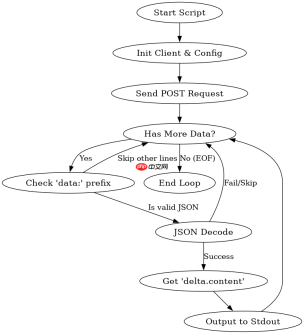
php 接收 longcat-2.5 的流式回答,核心在于使用支持 http/1.1 chunked transfer encoding 的客户端(如 guzzlehttp),并逐块读取响应体。通过设置 stream 为 true,可以获取一个资源句柄,随后在循环中读取数据块,解析出以 data: 开头的 json 字符串,提取其中的内容字段即可。

GuzzleHttp 如何配置流式请求
要启用流式传输,必须在创建 Client 或发送请求时指定 stream 选项。这告诉底层 cURL 或 stream wrapper 不要缓冲整个响应到内存,而是返回一个可读的资源指针。同时,需要正确设置 Content-Type 为 text/event-stream 或 application/x-ndjson,并确保超时时间足够长,以免在等待大模型生成时断开连接。

<?php require 'vendor/autoload.php';

use GuzzleHttp\Client;
use GuzzleHttp\Psr7\Utils;

$client = new Client([
    'base_uri' => 'https://api.longcat.com/v1/',
    'timeout'  => 300, // 设置较长的超时时间
]);

$response = $client->request('POST', 'chat/completions', [
    'stream' => true,
    'headers' => [
        'Authorization' => 'Bearer YOUR_API_KEY',
        'Content-Type'  => 'application/json',
    ],
    'json' => [
        'model' => 'LongCat-2.5',
        'messages' => [['role' => 'user', 'content' => 'Hello']],
        'stream' => true
    ]
]);

$stream = Utils::tryFopenFromString($response->getBody());
while (!feof($stream)) {
    $line = fgets($stream);
    if (strpos($line, 'data: ') === 0) {
        $json = json_decode(substr($line, 6), true);
        if ($json && isset($json['choices'][0]['delta']['content'])) {
            echo $json['choices'][0]['delta']['content'];
        }
    }
}
fclose($stream);
php免费学习视频:立即使用
踏上前端学习之旅,开启通往精通之路!从前端基础到项目实战,循序渐进,一步一个脚印,迈向巅峰!