






ansible playbook 配置批量变更通知的核心做法是在任务中调用 notify 触发器,并在 handlers 部分定义具体的通知动作。通过这种方式,只有当任务状态变为 changed 时才会发送通知,从而避免重复消息并精准定位变更点。

如何根据任务结果触发不同的通知渠道
要实现基于任务结果的差异化通知,需要在 handlers 中使用条件判断或结合 ansible.builtin.debug 模块来记录日志,再配合外部工具如 webhook 或邮件客户端发送消息。关键在于利用 Ansible 的 changed_when 属性来控制任务的变更状态,确保只有真正发生修改的任务才触发后续的通知流程。
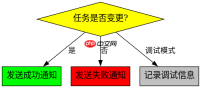
---
- name: Configure Notification Handler
  hosts: all
  tasks:
    - name: Check system status
      ansible.builtin.command: echo "System OK"
      register: result
      changed_when: false

    - name: Trigger notification if needed
      ansible.builtin.debug:
        msg: "Notification sent for {{ inventory_hostname }}"
      when: result.rc == 0

  handlers:
    - name: Send Webhook
      ansible.builtin.uri:
        url: "http://localhost:8080/webhook"
        method: POST
        body: "{\"status\": \"success\", \"host\": \"{{ inventory_hostname }}\"}"
        content_type: "application/json"
      listen: "send_notification"
如何处理并发执行中的通知冲突
在批量部署场景下,多个主机同时执行可能导致通知接口过载或信息混乱。解决这一问题的方法是使用 serial 关键字限制并发数量,或者在通知 handler 中加入去重逻辑。此外,可以通过 delegate_to 将通知任务集中到某一台控制节点上执行,确保通知发出的顺序性和一致性。

---
- name: Batch Deployment with Controlled Notifications
  hosts: webservers
  serial: 1  # Limit concurrency to 1 host at a time
  tasks:
    - name: Update configuration
      ansible.builtin.template:
        src: config.j2
        dest: /etc/app/config.yml
      notify: Restart Service

  handlers:
    - name: Restart Service
      ansible.builtin.service:
        name: app_service
        state: restarted
      listen: "Restart Service"
基于特定输入条件如何定制通知内容
如果需要根据特定的输入变量(如环境名称、版本号)来定制通知内容,可以在 handlers 中直接引用这些变量。例如,在发送 Slack 或钉钉通知时,动态构建消息体,包含当前主机的 IP、执行的模块以及返回的结果。这种灵活性允许运维团队根据不同场景获取更详细的变更信息。











