






如何在SQL中利用HAVING过滤聚合函数计算结果
在sql中,使用having子句可以对group by分组后的聚合结果进行过滤。与where不同,where作用于行级别,而having作用于组级别,因此它专门用于筛选满足特定聚合条件(如count、sum、avg等)的分组。

HAVING与WHERE的执行顺序差异
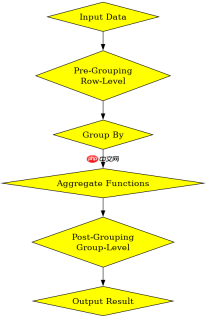
HAVING子句在GROUP BY之后执行,这意味着它可以引用聚合函数,而WHERE子句在GROUP BY之前执行,只能引用原始列。这种顺序差异决定了WHERE用于预过滤数据以减少分组开销,而HAVING用于后过滤分组以保留符合条件的结果集。

基于具体输入条件的过滤逻辑
当查询中包含多个聚合条件时,HAVING子句可以结合AND或OR逻辑运算符来细化过滤规则。例如,仅当某部门的员工数量大于5且平均薪资高于5000时,才返回该部门信息。这种多条件组合确保了结果的精确性。
digraph G { rankdir=LR; node [shape=box, style=filled, fillcolor=lightblue, fontsize=16]; "SELECT" -> "FROM"; "FROM" -> "WHERE"; "WHERE" -> "GROUP BY"; "GROUP BY" -> "HAVING"; "HAVING" -> "ORDER BY"; "ORDER BY" -> "LIMIT"; } -- 示例程序:基础HAVING用法
SELECT department_id, COUNT(*) as emp_count
FROM employees
GROUP BY department_id
HAVING COUNT(*) > 5;
预期结果:仅返回员工数量超过5人的部门ID及其计数。 -- 对比程序:WHERE与HAVING的区别
SELECT department_id, AVG(salary) as avg_sal
FROM employees
WHERE salary > 3000
GROUP BY department_id
HAVING AVG(salary) > 5000;
预期结果:先过滤掉薪资低于3000的员工,再按部门分组,最后筛选平均薪资高于5000的部门。 -- 第三节补充代码:多条件HAVING
SELECT department_id, COUNT(*) as cnt, AVG(salary) as avg_sal
FROM employees
GROUP BY department_id
HAVING COUNT(*) > 5 AND AVG(salary) > 5000;
预期结果:同时满足员工数大于5和平均薪资大于5000的部门。 digraph G { rankdir=TB; node [shape=diamond, style=filled, fillcolor=yellow, fontsize=16]; edge [fontsize=16]; "Input Data" -> "WHERE Filter"; "WHERE Filter" -> "Group By"; "Group By" -> "Aggregate Functions"; "Aggregate Functions" -> "HAVING Filter"; "HAVING Filter" -> "Output Result"; "WHERE Filter" [label="Pre-Grouping\nRow-Level"]; "HAVING Filter" [label="Post-Grouping\nGroup-Level"]; } digraph G { shape=plain; t [shape=plain,label=
>]; }


