在 linux 中确认 nginx 模块是静态编译还是动态加载,最直接的方法是运行 nginx -v 命令查看配置参数。如果输出中包含 --with-http_ssl_module 等具体模块名,说明该模块已静态编译进二进制文件;若包含 --modules-path=.../modules 且存在对应的 .so 文件并通过 load_module 指令加载,则为动态模块。

如何判断特定功能模块是否内置于当前 Nginx 版本
要判断某个具体功能(如 SSL、Gzip)的模块是否静态内置,需检查 nginx -V 的输出列表。静态模块会直接出现在 configure arguments 中,无需额外配置文件即可使用。例如,检查 --with-http_ssl_module 是否存在,若存在则 SSL 模块为静态。
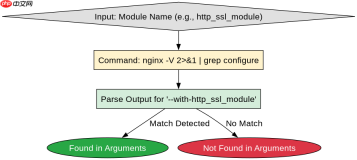
#!/bin/bash
# 检查静态模块示例
NGINX_BIN="/usr/sbin/nginx"
MODULE_NAME="http_ssl_module"

# 获取配置参数
CONFIG_ARGS=$($NGINX_BIN -V 2>&1 | grep -o 'configure arguments:.*' | sed 's/configure arguments: //')

# 判断是否包含指定模块
if echo "$CONFIG_ARGS" | grep -q "--with-$MODULE_NAME\|--with-http_${MODULE_NAME%%_*}_module"; then
    echo "Module $MODULE_NAME is statically compiled."
else
    echo "Module $MODULE_NAME is NOT statically compiled (might be dynamic or missing)."
fi
如何验证动态模块是否成功加载
动态模块通过 load_module 指令在主配置文件中加载,其有效性依赖于 .so 文件的完整性及路径正确性。验证时需检查 Nginx 错误日志是否有加载失败记录,并使用 nginx -t 测试配置合法性。若 nginx -V 显示 --modules-path,则系统支持动态模块。

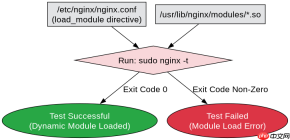
# 假设主配置文件 /etc/nginx/nginx.conf 包含:
# load_module modules/ngx_http_js_module.so;

# 验证步骤
sudo nginx -t
# 若输出 "syntax is ok" 和 "test is successful",则动态模块加载正常。

# 检查模块路径配置
grep -r "modules-path" /etc/nginx/nginx.conf /etc/nginx/conf.d/*.conf 2>/dev/null
ls -l /usr/lib/nginx/modules/ # 常见动态模块目录
基于 nginx -V 输出中的 --modules-path 字段的具体问题
当 nginx -V 输出中包含 --modules-path=/path/to/modules 时,表明该 Nginx 构建支持动态模块加载机制。此时,静态模块仍由 --with- 参数决定,而动态模块则由该路径下的 .so 文件和 load_module 指令共同决定。若缺少此字段,通常意味着该版本不支持动态模块或未启用相关构建选项。