使用 readfile() 配合正确的 http 响应头可以实现 php 强制下载文件。核心做法是设置 content-type、content-disposition 和 content-length 三个关键头部,然后输出文件内容并终止脚本。

Content-Disposition 头部的作用是什么
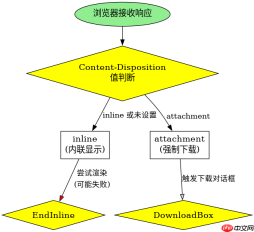
Content-Disposition: attachment 告诉浏览器该资源不是用于直接展示,而是作为附件处理,从而触发下载对话框。如果省略 attachment 或设置为 inline,浏览器会尝试在标签页内打开文件(如图片、PDF)。
<?php $file = 'example.pdf';
header('Content-Type: application/octet-stream');
header('Content-Disposition: attachment; filename="' . basename($file) . '"');
header('Content-Length: ' . filesize($file));
readfile($file);
exit;
如何确保下载的文件名正确且无乱码
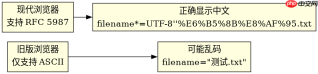
文件名通过 Content-Disposition 中的 filename 参数指定。对于非 ASCII 字符(如中文),建议使用 RFC 5987 编码格式,即 filename*=UTF-8''... 的形式,以确保跨浏览器兼容性。

<?php $file = '测试文件.txt';
$filename = basename($file);
header('Content-Type: application/octet-stream');
header('Content-Disposition: attachment; filename="' . $filename . '"; filename*=UTF-8\'\' . urlencode($filename));
header('Content-Length: ' . filesize($file));
readfile($file);
exit;
如果文件不存在会发生什么
如果指定的文件路径无效或文件不存在,filesize() 会返回 false 并产生警告,readfile() 也会失败。此时应添加存在性检查,避免向用户暴露服务器路径错误或发送空内容。
php免费学习视频:立即使用
踏上前端学习之旅,开启通往精通之路!从前端基础到项目实战,循序渐进,一步一个脚印,迈向巅峰!