






wordpress强制下载文件的核心做法是设置http响应头,将`content-disposition`设为`attachment`并指定文件名,同时正确输出文件的mime类型和二进制内容。你需要在主题或插件中通过`template_redirect`钩子拦截请求,读取目标文件路径,使用`readfile()`或类似函数发送数据,并在发送前调用`exit()`终止后续渲染。

如何拦截特定URL并触发下载
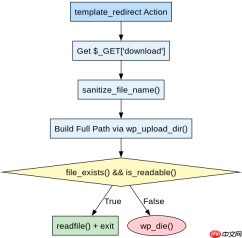
要实现强制下载,必须确保WordPress不输出HTML页面,而是直接输出文件流。这通常通过挂载到`template_redirect`动作来实现,该钩子在模板加载前执行,适合处理此类逻辑。你需要定义一个回调函数,检查当前请求是否匹配特定的查询参数(如`?download=file.pdf`),如果匹配,则获取文件绝对路径,设置正确的Header,输出内容并退出。
add_action('template_redirect', 'force_download_handler');

function force_download_handler() {
    // 检查是否有 download 参数
    if (empty($_GET['download'])) {
        return;
    }

    $filename = sanitize_file_name($_GET['download']);
    $upload_dir = wp_upload_dir();
    $file_path = trailingslashit($upload_dir['basedir']) . $filename;

    // 验证文件是否存在且可读
    if (!file_exists($file_path) || !is_readable($file_path)) {
        wp_die(__('File not found.', 'textdomain'));
    }

    // 设置 Header
    header('Content-Type: application/octet-stream');
    header('Content-Disposition: attachment; filename="' . $filename . '"');
    header('Content-Length: ' . filesize($file_path));
    header('Cache-Control: no-cache');

    // 输出文件内容
    readfile($file_path);
    exit;
}
上述代码首先通过`$_GET['download']`获取文件名,并使用`sanitize_file_name`防止路径遍历攻击。接着构建完整的服务器端文件路径,利用`wp_upload_dir()`获取上传目录基础路径。在确认文件存在后,设置`Content-Type`为通用二进制流,`Content-Disposition`强制浏览器下载而非预览,最后通过`readfile`输出内容并调用`exit`停止WordPress主循环。预期结果是用户访问`/?download=test.pdf`时,浏览器会弹出保存对话框,保存名为`test.pdf`的文件。
如何处理不同MIME类型的文件
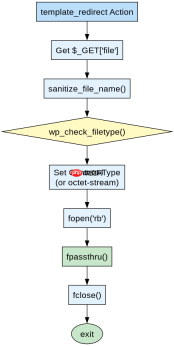
虽然通用二进制流`application/octet-stream`能强制所有文件下载,但为了更精确的控制或某些特殊场景,可能需要根据文件扩展名动态设置MIME类型。WordPress提供了`wp_check_filetype_and_ext`或简单的映射数组来处理这一需求。不同的MIME类型会影响浏览器对文件的处理方式,尽管`attachment`头已强制下载,明确类型有助于客户端软件识别。

add_action('template_redirect', 'smart_force_download');

function smart_force_download() {
    if (empty($_GET['file'])) return;

    $filename = sanitize_file_name($_GET['file']);
    $upload_dir = wp_upload_dir();
    $file_path = trailingslashit($upload_dir['basedir']) . $filename;

    if (!file_exists($file_path)) {
        wp_die(__('File not found.', 'textdomain'));
    }

    // 获取 MIME 类型
    $mime_type = wp_check_filetype($filename, false)['type'];
    if (!$mime_type) {
        $mime_type = 'application/octet-stream';
    }

    header('Content-Type: ' . $mime_type);
    header('Content-Disposition: attachment; filename="' . $filename . '"');
    header('Content-Length: ' . filesize($file_path));

    readfile($file_path);
    exit;
}
此版本代码引入了`wp_check_filetype`函数来自动检测文件的MIME类型。如果检测失败,则回退到通用的`application/octet-stream`。这种方式在处理图片、文档等不同格式时更加规范。例如,对于`image/png`文件,设置正确的MIME类型可以让某些支持下载的客户端更好地处理。同样,代码在输出前检查文件存在性,并通过`exit`确保无额外输出。预期行为与上一节相同,但Header中的Content-Type字段会根据文件后缀动态变化。
基于大文件下载时的内存溢出问题如何解决
当处理GB级别的大文件时,直接使用`readfile()`或`file_get_contents()`可能导致PHP内存耗尽,因为部分实现会将文件内容缓冲到内存中。为了避免这种情况,应使用分块读取的方式,或者依赖`readfile`本身的底层流处理能力(取决于PHP配置)。更稳妥的做法是使用`fpassthru`配合`fopen`,以小块方式传输数据,从而保持低内存占用。
add_action('template_redirect', 'large_file_download');

function large_file_download() {
    if (empty($_GET['bigfile'])) return;

    $filename = sanitize_file_name($_GET['bigfile']);
    $upload_dir = wp_upload_dir();
    $file_path = trailingslashit($upload_dir['basedir']) . $filename;

    if (!file_exists($file_path)) {
        wp_die(__('File not found.', 'textdomain'));
    }

    $mime_type = wp_check_filetype($filename, false)['type'] ?: 'application/octet-stream';

    header('Content-Type: ' . $mime_type);
    header('Content-Disposition: attachment; filename="' . $filename . '"');
    header('Content-Length: ' . filesize($file_path));
    header('Accept-Ranges: bytes');

    // 使用 fpassthru 进行流式输出,节省内存
    $handle = fopen($file_path, 'rb');
    if ($handle) {
        fpassthru($handle);
        fclose($handle);
    }
    exit;
}
这段代码针对大文件优化,使用了`fopen`打开文件句柄,并通过`fpassthru`直接将剩余内容从指针位置输出到输出缓冲区,而不是将整个文件读入内存。同时添加了`Accept-Ranges: bytes`头,支持断点续传,提升用户体验。这种方法在处理大型媒体文件或备份文件时能有效避免502 Bad Gateway或内存错误。预期结果是无论文件大小如何,下载过程稳定,内存占用保持在较低水平。


