






通过下载 nginx 源码和 brotli 模块源码,使用 --add-module 参数在编译时集成 brotli 压缩模块。具体做法是配置构建脚本并指定模块路径,编译安装后启用 brotli on; 指令即可生效。

如何获取并配置 Brotli 模块源码
需要分别获取 Nginx 源码和第三方 Brotli 模块的源代码。推荐使用 nginx-module-brotli 或 ngx_brotli 等成熟仓库,并将其放置在 Nginx 源码目录之外或子目录中。配置阶段需确保系统已安装 libbrotli-dev 等依赖库,并在 ./configure 命令中添加 --add-module=../path/to/brotli 参数以链接该模块。
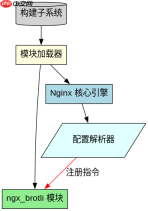
cd /usr/local/src
wget http://nginx.org/download/nginx-1.24.0.tar.gz
tar -zxvf nginx-1.24.0.tar.gz
cd nginx-1.24.0

# 假设已将 ngx_brotli 克隆到 ../ngx_brotli
./configure --prefix=/etc/nginx \
    --sbin-path=/usr/sbin/nginx \
    --modules-path=/usr/lib64/nginx/modules \
    --conf-path=/etc/nginx/nginx.conf \
    --error-log-path=/var/log/nginx/error.log \
    --http-log-path=/var/log/nginx/access.log \
    --pid-path=/var/run/nginx.pid \
    --lock-path=/var/run/nginx.lock \
    --user=nginx \
    --group=nginx \
    --with-http_ssl_module \
    --with-http_v2_module \
    --with-http_realip_module \
    --with-http_addition_module \
    --with-http_sub_module \
    --with-http_dav_module \
    --with-http_flv_module \
    --with-http_mp4_module \
    --with-http_gunzip_module \
    --with-http_gzip_static_module \
    --with-http_random_index_module \
    --with-http_secure_link_module \
    --with-http_stub_status_module \
    --with-http_auth_request_module \
    --with-http_xslt_module=dynamic \
    --with-http_image_filter_module=dynamic \
    --with-http_geoip_module=dynamic \
    --with-threads \
    --with-stream \
    --with-stream_ssl_module \
    --with-stream_realip_module \
    --with-stream_geoip_module=dynamic \
    --with-http_slice_module \
    --with-mail \
    --with-mail_ssl_module \
    --with-file-aio \
    --with-http_v2_module \
    --add-module=../ngx_brotli
make
sudo make install
上述代码展示了从下载 Nginx 源码到配置包含 Brotli 模块的完整过程。执行 make 和 make install 后,Nginx 二进制文件将包含 Brotli 支持。验证是否成功集成的方法是运行 nginx -V,输出中应包含 --add-module=../ngx_brotli 字样。
如何在 Nginx 配置文件中启用 Brotli 压缩
在 Nginx 配置文件(如 nginx.conf 或站点配置块)中使用 brotli on; 指令开启压缩。同时建议设置 brotli_types 指定需要压缩的 MIME 类型,以及 brotli_comp_level 调整压缩级别以平衡 CPU 占用与压缩率。默认情况下,Brotli 仅对文本类资源进行压缩,需显式添加其他类型。


server {
    listen 443 ssl http2;
    server_name example.com;

    ssl_certificate /etc/ssl/certs/example.com.crt;
    ssl_certificate_key /etc/ssl/private/example.com.key;

    root /var/www/html;
    index index.html;

    # 启用 Brotli 压缩
    brotli on;
    brotli_comp_level 6;  # 默认值为 4,范围 1-11
    brotli_buffers 16 8k;
    brotli_min_length 20;
    brotli_types text/plain application/javascript application/x-javascript text/css application/xml text/javascript image/svg+xml;

    location / {
        try_files $uri $uri/ =404;
    }
}
以上配置片段演示了如何在 HTTPS 服务器块中启用 Brotli。关键指令包括 brotli on; 用于总开关,brotli_types 用于控制哪些内容类型被压缩。注意 brotli_comp_level 越高压缩效果越好但 CPU 消耗越大,通常推荐设置为 4 到 6 之间。brotli_min_length 用于设置最小压缩阈值,小于该长度的响应不会被压缩,以减少小文件的处理开销。配置完成后重启 Nginx 使更改生效。
Brotli 模块如何处理 Accept-Encoding 头冲突
当客户端同时发送 gzip 和 br 到 Accept-Encoding 头时,Nginx 会优先选择 Brotli 压缩。这是因为 Brotli 算法通常能提供比 Gzip 更高的压缩率。如果客户端不支持 Brotli,Nginx 会自动回退到 Gzip 或其他配置的压缩方式。这种优先级行为由模块内部逻辑决定,无需额外配置即可实现智能选择。


