






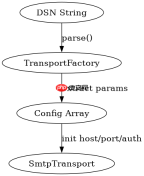
在php 8.5环境中使用symfony mailer 8.1替代旧版swiftmailer发送smtp邮件,核心做法是安装`symfony/mailer`和`symfony/smtp`组件,并通过`transportfactory`或dsn字符串创建`smtptransport`实例。你需要配置主机、端口、加密方式(如tls/ssl)以及认证凭据,然后调用`mailer`类的`send()`方法传递`email`对象。与旧版不同,新版不再依赖全局容器,而是采用面向对象的直接实例化,且默认支持异步传输。

如何配置基础的SMTP连接参数
配置基础连接的关键在于构建正确的DSN(数据源名称)字符串或直接实例化`SmtpTransport`。DSN格式为`smtp://[user]:[pass]@host[:port]?encryption=[tls|ssl]&auth_mode=[plain|login|xoauth2]`。例如,连接Google SMTP通常使用`smtp+tls://smtp.googlemail.com:587`。若需自定义超时或本地IP绑定,可在构造函数中传入`MessageBusInterface`或使用`EsmtpTransport`子类。务必确保PHP环境已启用`openssl`扩展以支持加密连接。
composer require symfony/mailer symfony/smtp
<?php require_once 'vendor/autoload.php';

use Symfony\Component\Mailer\Mailer;
use Symfony\Component\Mailer\Transport;
use Symfony\Component\Mailer\Envelope;
use Symfony\Component\Mailer\SenderAddress;
use Symfony\Component\Mime\Email;

// 1. 创建传输层:使用DSN配置SMTP
$dsn = 'smtp://user:password@smtp.example.com:587?encryption=tls&auth_mode=plain';
$transport = Transport::fromDsn($dsn);

// 2. 初始化Mailer
$mailer = new Mailer($transport);

// 3. 构建邮件
$email = (new Email())
    ->from('sender@example.com')
    ->to('recipient@example.com')
    ->subject('Test Subject')
    ->text('This is a test email body.');

// 4. 发送
$mailer->send($email);
echo "Email sent successfully.";
上述代码将输出“Email sent successfully.”,表示邮件已成功提交至SMTP服务器。若连接失败,会抛出`Symfony\Component\Mailer\Exception\TransportException`异常。
如何处理发送失败与重试机制
处理发送失败的核心是利用`Mailer`返回的`SentMessage`对象检查状态,并结合事件监听器实现重试。`send()`方法本身不自动重试,但你可以捕获`TransportException`并手动重试。更高级的做法是使用`EventDispatcher`监听`MessageEvent`,在投递失败时触发逻辑。Symfony Mailer 8.1内置了对`async`传输的支持,可通过配置`message_bus`将邮件放入队列,由后台进程处理重试,从而避免主请求阻塞。对于简单的同步场景,建议在`try-catch`块中包装`send()`调用,并根据异常类型决定是记录日志还是稍后重试。

使用官方Model Context Protocol PHP SDK将PHP应用程序功能暴露为MCP工具、资源和提示,用于代理工作流。

<?php require_once 'vendor/autoload.php';

use Symfony\Component\Mailer\Mailer;
use Symfony\Component\Mailer\Transport;
use Symfony\Component\Mailer\Exception\TransportException;
use Symfony\Component\Mime\Email;

$dsn = 'smtp://user:password@smtp.example.com:587?encryption=tls';
$transport = Transport::fromDsn($dsn);
$mailer = new Mailer($transport);

$email = (new Email())
    ->from('sender@example.com')
    ->to('recipient@example.com')
    ->subject('Retry Test')
    ->text('Testing failure handling.');

$maxRetries = 3;
$retryCount = 0;
$sent = false;

while ($retryCount send($email);
        $sent = true;
        echo "Success on attempt " . ($retryCount + 1) . ".";
    } catch (TransportException $e) {
        $retryCount++;
        echo "Attempt " . $retryCount . " failed: " . $e->getMessage() . ". Retrying...";
        sleep(2); // 简单退避
    }
}

if (!$sent) {
    echo "Failed after $maxRetries attempts.";
}
该脚本在连接正常时会输出“Success on attempt 1.”;若模拟故障,则会重试最多3次,最终输出失败信息。注意,实际生产中应使用指数退避而非固定延迟。
当SMTP服务器返回5xx错误码时程序行为是什么
当SMTP服务器返回5xx永久性错误(如550 User Unknown)时,`Symfony\Component\Mailer\Exception\TransportException`会被抛出,其内部包含SMTP响应码和消息。程序不会静默忽略,而是中断当前执行流,除非被显式捕获。此时,`SentMessage`对象可能未完全生成或标记为失败。开发者需在捕获块中检查`$exception->getCode()`是否为5xx,若是,则不应重试,而应记录错误并通知用户。例如,550错误通常意味着收件人地址无效,重试无意义。
,
php免费学习视频:立即使用
踏上前端学习之旅,开启通往精通之路!从前端基础到项目实战,循序渐进,一步一个脚印,迈向巅峰!






