






java nio 中 future 方式异步 io 通过 asynchronousfilechannel 的 read() 和 write() 方法实现,调用这些方法会立即返回一个 future 对象,开发者可以在后台线程执行 i/o 操作的同时继续处理其他逻辑,随后通过调用 get() 方法阻塞等待结果或检查 isdone() 状态来获取实际读取或写入的字节数。

如何创建并配置 AsynchronousFileChannel
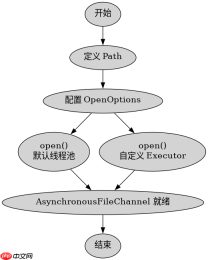
要使用异步文件通道,首先需要获取一个 AsynchronousFileChannel 实例。这通常通过静态工厂方法 AsynchronousFileChannel.open() 完成,该方法接受文件路径、打开选项(如只读、读写)以及可选的 ExecutorService 用于处理回调。如果不提供 Executor,底层会使用默认的 ForkJoinPool。在创建时,必须指定文件的访问模式,例如 StandardOpenOption.READ 或 StandardOpenOption.WRITE,并且确保文件存在(对于写操作可能需要 CREATE 选项)。
import java.nio.channels.AsynchronousFileChannel;
import java.nio.file.Path;
import java.nio.file.Paths;
import java.nio.file.StandardOpenOption;
import java.util.concurrent.ExecutorService;
import java.util.concurrent.Executors;

public class ChannelSetup {
    public static void main(String[] args) throws Exception {
        Path path = Paths.get("test.txt");
        // 创建只读的文件通道
        AsynchronousFileChannel readChannel = AsynchronousFileChannel.open(
            path, StandardOpenOption.READ);

        // 创建读写通道,使用自定义线程池
        ExecutorService executor = Executors.newFixedThreadPool(2);
        AsynchronousFileChannel writeChannel = AsynchronousFileChannel.open(
            path, StandardOpenOption.WRITE, StandardOpenOption.CREATE, executor);

        readChannel.close();
        writeChannel.close();
        executor.shutdown();
    }
}
上述代码展示了两种创建方式:默认线程池和自定义线程池。使用自定义线程池可以更好地控制资源消耗和任务调度策略。创建完成后,通道即可用于后续的异步读写操作。
如何执行异步读写并获取结果
执行异步读写时,需要提供一个 ByteBuffer 作为数据缓冲区,并指定起始位置(position)。调用 read() 或 write() 后,程序不会阻塞,而是立即返回一个 Future。这个 Future 代表了一个即将完成的 I/O 操作。开发者可以通过轮询 isDone() 来非阻塞地检查操作是否完成,或者调用 get() 来阻塞直到操作完成并获取实际传输的字节数。如果 I/O 过程中发生错误,get() 会抛出 ExecutionException,其中包含底层的 IOException。

FilePond 是一个 JavaScript 文件上传库,支持通过拖拽、粘贴和 API 方式处理文件、目录、URL 和 Data URI。它包含内置的图像优化功能、异步分块上传功能,并提供了适用于 React、Vue、Angular 和 Svelte 的适配器。

import java.nio.ByteBuffer;
import java.nio.channels.AsynchronousFileChannel;
import java.nio.file.Path;
import java.nio.file.Paths;
import java.nio.file.StandardOpenOption;
import java.util.concurrent.Future;

public class AsyncReadWrite {
    public static void main(String[] args) throws Exception {
        Path path = Paths.get("test.txt");
        AsynchronousFileChannel channel = AsynchronousFileChannel.open(
            path, StandardOpenOption.READ, StandardOpenOption.WRITE);

        String data = "Hello Async";
        ByteBuffer writeBuffer = ByteBuffer.wrap(data.getBytes());

        // 异步写入
        Future<integer> writeFuture = channel.write(writeBuffer, 0);

        // 模拟其他工作
        System.out.println("Doing other work...");

        // 等待写入完成
        int bytesWritten = writeFuture.get();
        System.out.println("Bytes written: " + bytesWritten);

        // 准备读取
        ByteBuffer readBuffer = ByteBuffer.allocate(1024);
        Future<integer> readFuture = channel.read(readBuffer, 0);

        // 等待读取完成
        int bytesRead = readFuture.get();
        readBuffer.flip();
        System.out.println("Read content: " + new String(readBuffer.array(), 0, bytesRead));

        channel.close();
    }
}</integer></integer>
在这个示例中,writeFuture.get() 和 readFuture.get() 是阻塞调用,它们会暂停当前线程直到对应的 I/O 操作完成。这是获取异步操作结果的标准方式。需要注意的是,get() 方法可能会抛出 InterruptedException 或 ExecutionException,在实际生产中应妥善处理这些异常。
当异步操作被中断时会发生什么
如果在等待 Future.get() 的过程中,当前线程被中断(即调用了 Thread.interrupt()),get() 方法会立即抛出 InterruptedException。此时,底层的 I/O 操作可能仍在进行中,具体取决于操作系统和 JVM 的实现。通常情况下,取消一个正在进行的异步 I/O 操作并不总是可靠的,因为文件描述符层面的操作可能无法被轻易中止。因此,最佳实践是在调用 get() 时捕获 InterruptedException,并根据业务需求决定是重试、取消后续操作还是记录日志。此外,如果希望显式取消操作,可以调用 Future.cancel(true),但这同样不保证能立即停止底层的 I/O 活动,特别是对于已经提交到内核的操作。
Java免费学习笔记:立即使用
解锁 Java 大师之旅:从入门到精通的终极指南


