






在java中使用try-with-resources管理outputstream时,只需将流实例化语句直接写在try后的括号内,jvm会自动调用其close方法释放资源。无需手动编写finally块或检查null,即使初始化失败或写入过程中抛出异常,流也会被安全关闭。若需处理ioexception,可直接在try-catch结构中捕获。

try-with-resources如何自动关闭OutputStream
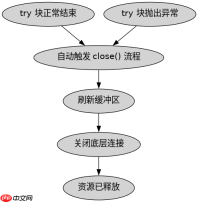
该机制依赖于AutoCloseable接口,当try块执行完毕(正常结束或异常退出)时,系统会按声明的逆序自动调用close方法。这确保了无论是否发生错误,底层文件描述符或网络连接都能被正确释放,避免了传统写法中因遗漏close导致的资源泄漏。
import java.io.FileOutputStream;
import java.io.IOException;

public class Demo {
    public static void main(String[] args) {
        // 定义输出路径
        String path = "output.txt";
        try (FileOutputStream fos = new FileOutputStream(path)) {
            // 写入字节数据
            byte[] data = "Hello World".getBytes();
            fos.write(data);
            System.out.println("Write success");
        } catch (IOException e) {
            System.err.println("IO Error: " + e.getMessage());
        }
    }
}
多流同时管理的资源释放顺序
当需要同时管理多个OutputStream时,可以在同一try括号内用分号分隔声明多个变量。资源关闭的顺序与声明顺序相反,即最后声明的流最先被关闭。这种设计保证了依赖关系的正确处理,例如先关闭包装流再关闭底层流。

FilePond 灵活的 JavaScript 文件上传库
下载
FilePond 是一个 JavaScript 文件上传库,支持通过拖拽、粘贴和 API 方式处理文件、目录、URL 和 Data URI。它包含内置的图像优化功能、异步分块上传功能,并提供了适用于 React、Vue、Angular 和 Svelte 的适配器。

import java.io.BufferedOutputStream;
import java.io.FileOutputStream;
import java.io.IOException;

public class MultiStreamDemo {
    public static void main(String[] args) {
        String path = "multi.txt";
        // 声明两个流,BufferedOutputStream在后
        try (FileOutputStream fos = new FileOutputStream(path);
             BufferedOutputStream bos = new BufferedOutputStream(fos)) {
            bos.write(65); // 写入 'A'
        } catch (IOException e) {
            e.printStackTrace();
        }
    }
}
自定义Closeable对象在try中的行为
如果尝试关闭的对象实现了AutoCloseable接口,它同样适用于try-with-resources。对于OutputStream子类,close方法不仅刷新缓冲区,还会释放系统资源。若在close过程中抛出异常,该异常会被抑制(Suppressed),原始异常仍由catch块处理,确保主要错误信息不被掩盖。
Java免费学习笔记:立即使用
解锁 Java 大师之旅:从入门到精通的终极指南


