






在 java 中,filterinputstream 是处理字节流装饰模式的核心基类,它通过组合而非继承的方式为输入流添加功能。要使用它,你需要创建一个具体的子类实例(如 datainputstream),并将目标 inputstream 作为参数传入其构造函数,这样就能在不修改原始流的情况下获得读取基本数据类型或缓冲数据的能力。

如何构建一个自定义的过滤流
构建自定义过滤流需要继承 FilterInputStream 并重写相关方法。具体做法是定义一个新类继承 FilterInputStream,在构造函数中调用 super(in) 保存源流,然后重写 read() 等方法来实现特定逻辑,例如将读取到的字节转换为大写。
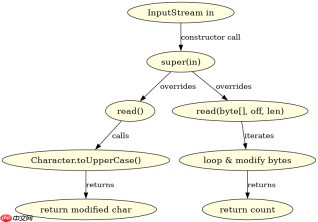
import java.io.*;

public class UpperCaseFilter extends FilterInputStream {
    protected UpperCaseFilter(InputStream in) {
        super(in);
    }

    @Override
    public int read() throws IOException {
        int c = super.read();
        return (c == -1) ? -1 : Character.toUpperCase(c);
    }

    @Override
    public int read(byte[] b, int off, int len) throws IOException {
        int result = super.read(b, off, len);
        if (result != -1) {
            for (int i = off; i <h2>标准库中常用的 FilterInputStream 子类有哪些</h2><p>标准库中最常用的子类包括 <code>DataInputStream</code>、<code>BufferedInputStream</code> 和 <code>PushbackInputStream</code>。<code>DataInputStream</code> 允许按机器无关格式读取 Java 基本数据类型;<code>BufferedInputStream</code> 通过内部缓冲区减少 I/O 操作次数以提升性能;<code>PushbackInputStream</code> 则支持将已读取的字节推回流中以便重新解析。</p><div class="aritcle_card flexRow artxards">
											<div class="artcardd flexRow">
												<a class="aritcle_card_img" rel="nofollow" href="/xiazai/skill13505" title="FilePond 灵活的 JavaScript 文件上传库"><img
														src="https://img.php.cn/upload/skill/001/246/273/6adaf20e695c2374.jpg" alt="FilePond 灵活的 JavaScript 文件上传库" onerror="this.onerror='';this.src='/static/lhimages/moren/morentu.png'" ></a>
												<div class="aritcle_card_info flexColumn">
													<a rel="nofollow" href="/xiazai/skill13505" title="FilePond 灵活的 JavaScript 文件上传库" class="overflowclass">FilePond 灵活的 JavaScript 文件上传库</a>
													<p class="overflowclass">FilePond 是一个 JavaScript 文件上传库,支持通过拖拽、粘贴和 API 方式处理文件、目录、URL 和 Data URI。它包含内置的图像优化功能、异步分块上传功能,并提供了适用于 React、Vue、Angular 和 Svelte 的适配器。</p>
												</div>
												<a rel="nofollow" href="/xiazai/skill13505" title="FilePond 灵活的 JavaScript 文件上传库" class="aritcle_card_btn flexRow flexcenter"><b></b><span>下载</span>
												</a>
											</div>
										</div><p><img src="https://img.php.cn/upload/article/001/242/473/179514618870439.png?x-oss-process=image/resize,p_40" alt="Java 字节流与字符流中 FilterInputStream 怎么使用"></p><pre class="brush:php;toolbar:false;">import java.io.*;

public class StandardFiltersExample {
    public static void main(String[] args) throws IOException {
        // 1. BufferedInputStream: 增加缓冲,提高读取效率
        try (FileInputStream fis = new FileInputStream("data.bin");
             BufferedInputStream bis = new BufferedInputStream(fis)) {
            byte[] buffer = new byte[1024];
            int bytesRead = bis.read(buffer);
            System.out.println("Bytes read with buffering: " + bytesRead);
        }

        // 2. DataInputStream: 读取基本数据类型
        try (FileInputStream fis = new FileInputStream("data.bin");
             DataInputStream dis = new DataInputStream(fis)) {
            // 假设文件中先存了一个 int,再存了一个 double
            if (fis.available() >= 12) { // 简单检查文件大小
                int intValue = dis.readInt();
                double doubleValue = dis.readDouble();
                System.out.println("Int: " + intValue + ", Double: " + doubleValue);
            }
        }

        // 3. PushbackInputStream: 支持回退字节
        try (FileInputStream fis = new FileInputStream("text.txt");
             PushbackInputStream pis = new PushbackInputStream(fis)) {
            int c = pis.read();
            if (c == '#') {
                pis.unread(c); // 将 '#' 推回流
                // 可以在此处进行特殊处理,比如跳过注释
            }
        }
    }
}
当底层流关闭时 FilterInputStream 的行为是什么
当调用 FilterInputStream 的 close() 方法时,它会委托给其包装的底层 InputStream 执行关闭操作。这意味着如果你关闭了过滤器流,底层的物理连接(如文件句柄或网络连接)也会被释放。如果底层流已经被关闭,再次调用 close() 通常是安全的,大多数实现会忽略重复关闭的请求,但读取操作会抛出 IOException。
Java免费学习笔记:立即使用
解锁 Java 大师之旅:从入门到精通的终极指南


