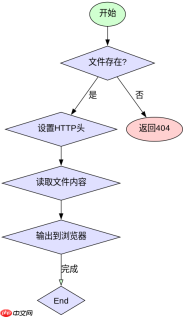
php强制下载文件需要设置特定的http响应头,包括`content-type`、`content-disposition`和`content-length`,然后输出文件内容。不使用标签是因为它默认触发浏览器内嵌预览而非下载,且无法在服务器端动态控制文件名或处理二进制流。

Content-Disposition头如何触发下载行为
通过设置Content-Disposition: attachment; filename="...",浏览器会忽略内嵌渲染,直接弹出保存对话框。这是强制下载的核心机制。
<?php $file = 'report.pdf';
$path = '/var/www/files/' . $file;

if (file_exists($path)) {
    header('Content-Description: File Transfer');
    header('Content-Type: application/octet-stream');
    header('Content-Disposition: attachment; filename="' . basename($path) . '"');
    header('Expires: 0');
    header('Cache-Control: must-revalidate');
    header('Pragma: public');
    header('Content-Length: ' . filesize($path));
    readfile($path);
    exit;
} else {
    http_response_code(404);
    echo 'File not found';
}
?>
运行上述代码后,浏览器将下载名为report.pdf的文件,而不是在标签页中打开它。如果文件不存在,则返回404错误。
为什么不能用直接链接
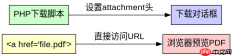
标签的href属性指向资源URL时,浏览器根据MIME类型决定是预览还是下载。对于PDF、图片等常见类型,浏览器通常直接显示内容,而非下载。此外,标签无法动态生成文件名或处理服务器端逻辑(如权限验证)。

<!-- 错误做法:浏览器可能直接预览PDF -->
<a href="https://www.php.cn/link/049ca0d6775e5b1f376269ac03826e81">Download Report</a>

<!-- 正确做法:通过PHP脚本处理 -->
<a href="/download.php?file=report.pdf">Download Report</a>
使用标签直接链接到文件时,若服务器未配置正确的MIME类型或缓存策略,用户可能看到空白页或预览内容。而通过PHP脚本,可以确保所有请求都经过统一处理,强制触发下载行为。
当readfile()遇到大文件时会发生什么
readfile()会将整个文件读入内存再输出,导致大文件引发内存溢出。此时应改用分块读取方式,如fopen()配合fread()循环输出。
<?php $file = 'large_video.mp4';
$path = '/var/www/files/' . $file;

if (file_exists($path)) {
    header('Content-Type: video/mp4');
    header('Content-Disposition: attachment; filename="' . basename($path) . '"');
    header('Content-Length: ' . filesize($path));

    $handle = fopen($path, 'rb');
    while (!feof($handle)) {
        echo fread($handle, 8192); // 每次读取8KB
        flush(); // 刷新输出缓冲
    }
    fclose($handle);
    exit;
}
?>
该代码通过分块读取避免内存耗尽,适用于GB级视频文件。每次读取8KB并立即输出,确保低内存占用。
php免费学习视频:立即使用
踏上前端学习之旅,开启通往精通之路!从前端基础到项目实战,循序渐进,一步一个脚印,迈向巅峰!