





本文围绕交通标志分类识别竞赛展开,介绍了赛题背景、任务及数据集情况。还阐述了利用paddleclas套件,通过数据格式化划分、配置mobilenetv3模型、训练评估、导出模型并预测,最终生成结果提交的完整流程与注意事项。
☞☞☞AI 智能聊天, 问答助手, AI 智能搜索, 多模态理解力帮你轻松跨越从0到1的创作门槛☜☜☜

一、【Paddle打比赛】 交通标志分类识别
1.赛题名称
【交通标志分类识别 竞赛 - DataFountain 】 https://www.datafountain.cn/competitions/553
2.赛题背景
目标检测在自动驾驶等方面有着广泛的应用前景,在自动驾驶场景中,需要对交通标志(如限速标志等)进行识别以采取不同的驾驶策略。此赛题旨在使用Oneflow框架识别确定图像中显示的交通标志的类型,并且对不同的环境(如光线、障碍物或标志距离)具有鲁棒性。
3.赛题任务
此赛题的数据集由云测数据提供。比赛数据集中包含6358张真实场景下行车记录仪采集的图片,我们选取其中95%的图片作为训练集,5%的图片作为测试集。参赛者需基于Oneflow框架在训练集上进行训练,对测试集中的交通标志进行分类识别。数据集中一共有10种细分的交通标志标签。
4.数据简介
本赛题的数据集包含6358张人工标注的类别标签。标签包括以下10种类别:“GuideSign”, “M1”, “M4, “M5”, “M6”, “M7”, “P1”, “P10_50”, “P12”, “W1”,分别对应十个不同的交通标识类别。所有数据已经按比例人工划分为了训练集和测试集,并且提供了相关的训练集标注的json文件。
5.数据说明
数据集包含train和test两个文件夹,以及一个统一的train.json文件用来保存所有训练数据集的标注,图片标签将字典以json格式序列化进行保存,所有的标注都保存在train.json文件中的名为annotations的key下,其中每个训练文件都包含以下属性:
- P12: 礼让标志
- P10_50:限速50
- GuideSing:路牌
- W1:警告
- P1:禁停
- M1:方向指示
- M4:直行
- M6:机动车道
- M6:自行车道
- M7:人行横道
| 列名 | 示例 | 作用 |
|---|---|---|
| filename | 示例“train/W1/00123.jpg” | 图片 |
| label | 0 ~ 9的整型数据 | 每张图片对应的类别标注 |


6.提交要求
参赛者使用Oneflow框架对数据集进行训练后对测试集图片进行推理后,
- 1.将测试集图片的目标检测和识别结果以与训练集格式保持一致的json文件序列化保存,并上传至参赛平台由参赛平台自动评测返回结果。
- 2.在提交时的备注附上自己的模型github仓库链接。
{ “annotations”: [ { “filename”: “test/W1/00123.jpg”, # filepath: str “label”: 0 # label: int from 0 to 9 }] }
二、环境准备
飞桨图像识别套件PaddleClas是飞桨为工业界和学术界所准备的一个图像识别任务的工具集,助力使用者训练出更好的视觉模型和应用落地。此次计划使用端到端的PaddleClas图像分类套件来快速完成分类。
# git下载!git clone https://gitee.com/paddlepaddle/PaddleClas.git --depth=1
Cloning into 'PaddleClas'...
remote: Enumerating objects: 1037, done.
remote: Counting objects: 100% (1037/1037), done.
remote: Compressing objects: 100% (918/918), done.
remote: Total 1037 (delta 332), reused 478 (delta 95), pack-reused 0
Receiving objects: 100% (1037/1037), 59.94 MiB | 7.11 MiB/s, done.
Resolving deltas: 100% (332/332), done.
Checking connectivity... done.
# PaddleClas安装%cd ~/PaddleClas/
!pip install -U pip
!pip install -r requirements.txt
!pip install -e ./
三、数据准备
1.数据解压缩
%cd ~
!unzip -oq /home/aistudio/data/data125044/road_sign.zip
!unzip -qoa train_dataset.zip!unzip -qoa test_dataset.zip
! rm test_dataset.zip! rm train_dataset.zip
from PIL import Image

img=Image.open("train/P12/00014.jpg")
img
<pil.jpegimageplugin.jpegimagefile></pil.jpegimageplugin.jpegimagefile>
img=Image.open("train/P10_50/00014.jpg")
img
<pil.jpegimageplugin.jpegimagefile></pil.jpegimageplugin.jpegimagefile>
img=Image.open("train/GuideSign/00452.jpg")
img
<pil.jpegimageplugin.jpegimagefile></pil.jpegimageplugin.jpegimagefile>
2.数据集格式化 AND 划分
%cd ~import jsonimport os

train_json={}with open('train.json','r') as f:
    train_json=json.load(f)print(len(train_json["annotations"]))


train_f = open('train_list.txt', 'w')
eval_f = open('eval_list.txt', 'w')
for i in range(len(train_json["annotations"])):    if i%5==0:
        eval_f.write(train_json["annotations"][i]['filename']+' '+ str(train_json["annotations"][i]['label']) +'\n')    else:
        train_f.write(train_json["annotations"][i]['filename']+' '+ str(train_json["annotations"][i]['label']) +'\n')
/home/aistudio
6024
四、模型训练
1.配置
以 PaddleClas/ppcls/configs/quick_start/MobileNetV3_large_x1_0.yaml 为基础进行配置,具体见下:

使用 gh project CLI 管理 GitHub Projects v2。在代理需要列出待办事项、设置项目字段(如状态、迭代、优先级等)时使用此技能。
# global configsGlobal:
  checkpoints: null
  pretrained_model: null
  output_dir: ./output/
  device: gpu
  save_interval: 1
  eval_during_train: True
  eval_interval: 1
  epochs: 20
  print_batch_step: 10
  use_visualdl: True
  # used for static mode and model export
  image_shape: [3, 224, 224]  save_inference_dir: ./inference# model architectureArch:
  name: MobileNetV3_large_x1_0
  class_num: 102
 # loss function config for traing/eval processLoss:
  Train:
    - CELoss:
        weight: 1.0
  Eval:
    - CELoss:
        weight: 1.0Optimizer:
  name: Momentum
  momentum: 0.9
  lr:
    name: Cosine
    learning_rate: 0.00375
    warmup_epoch: 5
    last_epoch: -1
  regularizer:
    name: 'L2'
    coeff: 0.000001# data loader for train and evalDataLoader:
  Train:
    dataset:
      name: ImageNetDataset
      image_root: /home/aistudio/
      cls_label_path: /home/aistudio/train_list.txt
      transform_ops:
        - DecodeImage:
            to_rgb: True
            channel_first: False
        - RandCropImage:
            size: 224
        - RandFlipImage:
            flip_code: 1
        - NormalizeImage:
            scale: 1.0/255.0
            mean: [0.485, 0.456, 0.406]            std: [0.229, 0.224, 0.225]            order: ''

    sampler:
      name: DistributedBatchSampler
      batch_size: 512
      drop_last: False
      shuffle: True
    loader:
      num_workers: 4
      use_shared_memory: True

  Eval:
    dataset:
      name: ImageNetDataset
      image_root: /home/aistudio/
      cls_label_path: /home/aistudio/eval_list.txt
      transform_ops:
        - DecodeImage:
            to_rgb: True
            channel_first: False
        - ResizeImage:
            resize_short: 256
        - CropImage:
            size: 224
        - NormalizeImage:
            scale: 1.0/255.0
            mean: [0.485, 0.456, 0.406]            std: [0.229, 0.224, 0.225]            order: ''
    sampler:
      name: DistributedBatchSampler
      batch_size: 128
      drop_last: False
      shuffle: False
    loader:
      num_workers: 4
      use_shared_memory: TrueInfer:
  infer_imgs: docs/images/whl/demo.jpg
  batch_size: 10
  transforms:
    - DecodeImage:
        to_rgb: True
        channel_first: False
    - ResizeImage:
        resize_short: 256
    - CropImage:
        size: 224
    - NormalizeImage:
        scale: 1.0/255.0
        mean: [0.485, 0.456, 0.406]        std: [0.229, 0.224, 0.225]        order: ''
    - ToCHWImage:
  PostProcess:
    name: Topk
    topk: 5
    class_id_map_file: ./dataset/flowers102/flowers102_label_list.txtMetric:
  Train:
    - TopkAcc:
        topk: [1, 5]  Eval:
    - TopkAcc:
        topk: [1, 5]
2.开始训练
# 覆盖配置%cd ~
!cp -f ~/MobileNetV3_large_x1_0.yaml  PaddleClas/ppcls/configs/quick_start/MobileNetV3_large_x1_0.yaml
%cd ~/PaddleClas/# 进入 PaddleClas 根目录,执行此命令# Arch.pretrained=True使用预训练模型!python tools/train.py -c ./ppcls/configs/quick_start/MobileNetV3_large_x1_0.yaml -o Arch.pretrained=True
训练情况:
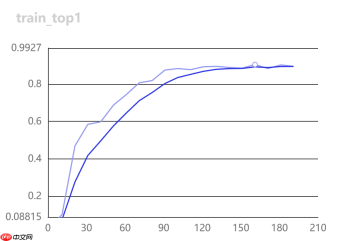
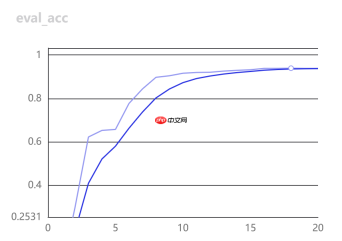
3.开始评估
%cd ~/PaddleClas/
!python  tools/eval.py \
        -c ./ppcls/configs/quick_start/MobileNetV3_large_x1_0.yaml  \
        -o Global.pretrained_model=./output/MobileNetV3_large_x1_0/best_model
[2022/01/10 23:08:17] root INFO: [Eval][Epoch 0][Iter: 0/9]CELoss: 0.36174, loss: 0.36174, top1: 0.90625, top5: 1.00000, batch_cost: 1.31483s, reader_cost: 1.22580, ips: 97.35107 images/sec[2022/01/10 23:08:17] root INFO: [Eval][Epoch 0][Avg]CELoss: 0.25337, loss: 0.25337, top1: 0.93923, top5: 0.99732
五、预测
1.模型导出
# 模型导出%cd ~/PaddleClas/
!python tools/export_model.py -c ./ppcls/configs/quick_start/MobileNetV3_large_x1_0.yaml  -o Global.pretrained_model=./output/MobileNetV3_large_x1_0/best_model
2.开始预测
编辑 PaddleClas/deploy/python/predict_cls.py,按提交格式输出预测结果到文件。
import osimport sys

__dir__ = os.path.dirname(os.path.abspath(__file__))
sys.path.append(os.path.abspath(os.path.join(__dir__, '../')))import cv2import numpy as npfrom utils import loggerfrom utils import configfrom utils.predictor import Predictor# from utils.get_image_list import get_image_listfrom python.preprocess import create_operatorsfrom python.postprocess import build_postprocessclass ClsPredictor(Predictor):
    def __init__(self, config):
        super().__init__(config["Global"])

        self.preprocess_ops = []
        self.postprocess = None
        if "PreProcess" in config:            if "transform_ops" in config["PreProcess"]:
                self.preprocess_ops = create_operators(config["PreProcess"][                    "transform_ops"])        if "PostProcess" in config:
            self.postprocess = build_postprocess(config["PostProcess"])        # for whole_chain project to test each repo of paddle
        self.benchmark = config["Global"].get("benchmark", False)        if self.benchmark:            import auto_log            import os
            pid = os.getpid()
            self.auto_logger = auto_log.AutoLogger(
                model_name=config["Global"].get("model_name", "cls"),
                model_precision='fp16'
                if config["Global"]["use_fp16"] else 'fp32',
                batch_size=config["Global"].get("batch_size", 1),
                data_shape=[3, 224, 224],
                save_path=config["Global"].get("save_log_path",                                               "./auto_log.log"),
                inference_config=self.config,
                pids=pid,
                process_name=None,
                gpu_ids=None,
                time_keys=[                    'preprocess_time', 'inference_time', 'postprocess_time'
                ],
                warmup=2)    def predict(self, images):
        input_names = self.paddle_predictor.get_input_names()
        input_tensor = self.paddle_predictor.get_input_handle(input_names[0])

        output_names = self.paddle_predictor.get_output_names()
        output_tensor = self.paddle_predictor.get_output_handle(output_names[            0])        if self.benchmark:
            self.auto_logger.times.start()        if not isinstance(images, (list, )):
            images = [images]        for idx in range(len(images)):            for ops in self.preprocess_ops:
                images[idx] = ops(images[idx])
        image = np.array(images)        if self.benchmark:
            self.auto_logger.times.stamp()

        input_tensor.copy_from_cpu(image)
        self.paddle_predictor.run()
        batch_output = output_tensor.copy_to_cpu()        if self.benchmark:
            self.auto_logger.times.stamp()        if self.postprocess is not None:
            batch_output = self.postprocess(batch_output)        if self.benchmark:
            self.auto_logger.times.end(stamp=True)        return batch_outputdef get_image_list(img_file_path):
    imgs_lists = []    # if img_file is None or not os.path.exists(img_file):
    #     raise Exception("not found any img file in {}".format(img_file))

    img_end = ['jpg', 'png', 'jpeg', 'JPEG', 'JPG', 'bmp']    import os    from os.path import join, getsize    for root, dirs, files in os.walk(img_file_path):        for file in files:
            img_file=os.path.join(root, file)
            imgs_lists.append(img_file)    if len(imgs_lists) == 0:        raise Exception("not found any img file in {}".format(img_file))
    imgs_lists = sorted(imgs_lists)    return imgs_listsdef main(config):
    cls_predictor = ClsPredictor(config)
    image_list = get_image_list(config["Global"]["infer_imgs"])

    batch_imgs = []
    batch_names = []
    cnt = 0
    # dic
    import json
    mydic=[]    for idx, img_path in enumerate(image_list):
        img = cv2.imread(img_path)        if img is None:
            logger.warning(                "Image file failed to read and has been skipped. The path: {}".                format(img_path))        else:
            img = img[:, :, ::-1]
            batch_imgs.append(img)
            img_name = os.path.basename(img_path)
            batch_names.append(img_name)
            cnt += 1

        if cnt % config["Global"]["batch_size"] == 0 or (idx + 1
                                                         ) == len(image_list):            if len(batch_imgs) == 0:                continue
            batch_results = cls_predictor.predict(batch_imgs)            for number, result_dict in enumerate(batch_results):
                filename = batch_names[number]
                clas_ids = result_dict["class_ids"]
                scores_str = "[{}]".format(", ".join("{:.2f}".format(
                    r) for r in result_dict["scores"]))
                label_names = result_dict["label_names"]                print("{}:\tclass id(s): {}, score(s): {}, label_name(s): {}".                      format(filename, clas_ids, scores_str, label_names))
                temp_dic={}
                temp_dic["filename"]="test/"+img_path.strip('/home/aistudio')
                temp_dic["label"]=clas_ids[0]
                mydic.append(temp_dic)
            batch_imgs = []
            batch_names = []    # 保存到文件
    with open('/home/aistudio/result.json', 'w') as f:
        myjson={"annotations":mydic}
        json.dump(myjson,f)    if cls_predictor.benchmark:
        cls_predictor.auto_logger.report()    returnif __name__ == "__main__":
    args = config.parse_args()
    config = config.get_config(args.config, overrides=args.override, show=True)
    main(config)
# 自定义predict_cls.py覆盖%cd ~
!cp -f ~/predict_cls.py ~/PaddleClas/deploy/python/predict_cls.py
# 开始预测%cd /home/aistudio/PaddleClas/deploy
!python3 python/predict_cls.py  -c configs/inference_cls.yaml -o Global.infer_imgs=/home/aistudio/test -o Global.inference_model_dir=../inference/  -o PostProcess.Topk.class_id_map_file=None
预测日志
01220.jpg: class id(s): [0, 3, 2, 4, 5], score(s): [1.00, 0.00, 0.00, 0.00, 0.00], label_name(s): []01229.jpg: class id(s): [0, 2, 3, 4, 5], score(s): [0.97, 0.02, 0.00, 0.00, 0.00], label_name(s): []01232.jpg: class id(s): [0, 3, 2, 8, 5], score(s): [0.98, 0.01, 0.00, 0.00, 0.00], label_name(s): []00004.jpg: class id(s): [2, 3, 1, 0, 5], score(s): [0.79, 0.10, 0.03, 0.02, 0.01], label_name(s): []00013.jpg: class id(s): [1, 5, 2, 3, 0], score(s): [0.80, 0.08, 0.05, 0.02, 0.01], label_name(s): []00052.jpg: class id(s): [1, 5, 3, 4, 6], score(s): [0.91, 0.03, 0.02, 0.01, 0.01], label_name(s): []00061.jpg: class id(s): [3, 0, 4, 2, 5], score(s): [0.60, 0.14, 0.09, 0.06, 0.03], label_name(s): []00092.jpg: class id(s): [1, 2, 3, 5, 4], score(s): [0.65, 0.18, 0.08, 0.04, 0.01], label_name(s): []
六、提交
1.提交结果
提交当前目录下的result.json,即刻得到成绩,如下图:
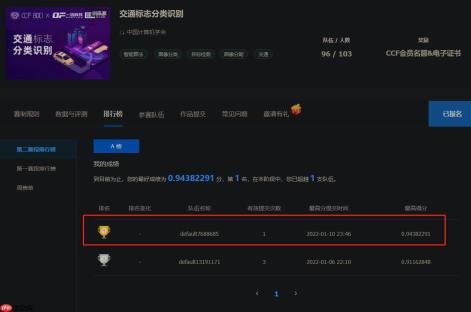
大家来试试吧!
2.其他注意事项
生成版本时提示存在无效软链接无法保存 ,可以在终端 PaddleClas 下运行下列代码清理即可。
for a in `find . -type l`do
    stat -L $a >/dev/null 2>/dev/null
    if [ $? -gt 0 ]
    then
      rm $a
    fi
done






