



微信小程序 框架
逻辑层(App Service)
微信小程序 WXML
视图容器
基础内容
表单组件
操作反馈
微信小程序导航
媒体组件
地图
画布
客服会话
网络
媒体
数据
位置
设备
界面交互
绘图
开放接口
工具
微信小程序设计规范
MINA 文件目录结构
小程序配置
注册程序
注册页面
模块化
API
微信小程序 数据绑定
微信小程序 条件渲染 wx:if
微信小程序 列表渲染 wx:for
微信小程序 模板
微信小程序 事件
微信小程序 引用
微信小程序 WXSS
微信小程序 基础组件
微信小程序WeUI.js网页开发样式库
微信小程序视图容器
微信小程序可滚动视图区域
微信小程序滑块视图容器
微信小程序内容组件图标 icon
微信小程序内容组件 text(文本)
微信小程序内容组件 进度条:progress
微信小程序按钮组件:button
微信小程序表单组件 checkbox
微信小程序表单组件 form
微信小程序表单组件输入框 input
微信小程序表单组件 label
微信小程序表单组件选择器 picker
微信小程序表单组件picker-view(嵌入页面的滚动选择器)
微信小程序表单组件单选框 radio
微信小程序表单组件滑动选择器 slider
微信小程序表单组件 开关 switch
微信小程序表单组件多行输入框 textarea
wxapp操作反馈上拉菜单 action-sheet
wxapp操作反馈模式对话框 modal
wxapp操作反馈消息提示框:toast
wxapp操作反馈消息提示框:loading
微信小程序导航 navigator
媒体组件 audio
媒体组件 image
媒体组件 video(视频)
微信小程序地图 map
wxapp画布 canvas
微信小程序组件 contact-button(客服会话按钮)
微信小程序API 发起请求
微信小程序API 上传、下载
微信小程序API Websocket
微信小程序API 图片
微信小程序API 录音
微信小程序API 音频播放控制
微信小程序API 音乐播放控制
微信小程序API 视频
微信小程序音频组件控制
微信小程序视频组件控制
微信小程序API 文件
微信小程序API 数据缓存
微信小程序API 位置
微信小程序API 获取位置
微信小程序API 查看位置
微信小程序API 地图组件控制
微信小程序API 系统信息
微信小程序API 网络状态
微信小程序API 重力感应
微信小程序API 罗盘
微信小程序API 拨打电话
微信小程序API 扫码
微信小程序API 交互反馈
微信小程序API 设置导航条
微信小程序API 导航
微信小程序API 动画
微信小程序API 绘图接口(reference)、方法大全
微信小程序API 绘图
微信小程序API 绘图介绍(如何在Canvas上画图)
微信小程序API coordinates(Canvas 坐标系)
微信小程序API gradient(如何绘制渐变效果)
微信小程序API wx.createCanvasContext(canvasId)(绘图上下文)
微信小程序API 绘图·绘制画布 drawCanvas (不推荐使用)
微信小程序API 绘图·导出图片canvasToTempFilePath(OBJECT)
微信小程序API 绘图·设置填充样式setFillStyle
微信小程序API 绘图setStrokeStyle(设置线条样式)
微信小程序API 绘图setShadow(设置阴影样式)
微信小程序API 绘图createLinearGradient(创建线性渐变)
微信小程序API 绘图createCircularGradient(创建圆形渐变)
微信小程序API绘图addColorStop(创建颜色渐变点)
微信小程序API 绘图setLineCap(设置线条端点样式)
微信小程序API 绘图setLineJoin(设置线条交点样式)
微信小程序API 绘图setMiterLimit(设置最大倾斜)
微信小程序API 绘图rect创建矩形
微信小程序API 绘图fillRect(填充矩形)
微信小程序API 绘图strokeRect(画一个矩形,非填充)
微信小程序API 绘图clearRect(在给定的矩形区域内,清除画布上的像素)
微信小程序API 绘图fill(对当前路径进行填充)
微信小程序API 绘图stroke(对当前路径进行描边)
微信小程序API 绘图beginPath(开始一个路径)
微信小程序API 绘图closePath(关闭一个路径)
微信小程序使用moveTo把路径移动到画布中的指定点,不创建线条
微信小程序中使用lineTo方法增加一个新点
使用arc()方法在微信小程序canvas中画弧线
在微信小程序绘图API中创建二次方贝塞尔曲线
在微信小程序API绘图中创建三次方贝塞尔曲线路径
在微信小程序中调用scale方法对横纵坐标进行缩放
微信小程序API 绘图对坐标轴进行顺时针旋转
微信小程序canvas中使用translate对坐标原点进行缩放
微信小程序API 绘图setFontSize(设置字号)
微信小程序绘图API中使用fillText在画布上绘制被填充的文本
微信小程序API中,使用drawImage完成绘制图像,图像保持原始尺寸
微信小程序API 绘图中使用setGlobalAlpha设置全局画笔透明度
微信小程序save/restore(保存和恢复绘图上下文)
微信小程序API 绘图·draw(进行绘图)
微信小程序API 绘图·getActions(不推荐使用)
微信小程序API 绘图·clearActions (不推荐使用)
微信小程序API 其他
微信小程序API 下拉刷新
微信小程序API 登录
微信小程序API 用户数据的签名验证和加解密
微信小程序API 用户信息
微信小程序API 微信支付
微信小程序API 模板消息
微信小程序API 接收消息和事件
微信小程序API 发送客服消息
微信小程序API 临时素材接口
微信小程序API 接入指引
微信小程序API 分享
微信小程序API 获取小程序页面二维码
微信小程序工具 概览
微信小程序工具 程序调试的三大主要功能区
微信小程序工具 代码编辑
微信小程序工具 项目页卡三大主要功能
微信小程序工具 下载地址
微信小程序工具细节点
微信小程序开发者工具测试版本的下载
微信小程序 联系我们
微信小程序 Q&A
微信小程序设计规范(1) 友好礼貌
微信小程序设计规范(2) 清晰明确
微信小程序设计规范(3) 便捷优雅
微信小程序设计规范(4) 统一稳定
微信小程序设计规范(5) 视觉规范
微信小程序 框架
微信小程序 WXML
表单组件
微信小程序导航
地图
媒体
绘图
微信小程序API 绘图接口(reference)、方法大全
微信小程序API 绘图
微信小程序API 绘图介绍(如何在Canvas上画图)
微信小程序API coordinates(Canvas 坐标系)
微信小程序API gradient(如何绘制渐变效果)
微信小程序API wx.createCanvasContext(canvasId)(绘图上下文)
微信小程序API 绘图·绘制画布 drawCanvas (不推荐使用)
微信小程序API 绘图·导出图片canvasToTempFilePath(OBJECT)
微信小程序API 绘图·设置填充样式setFillStyle
微信小程序API 绘图setStrokeStyle(设置线条样式)
微信小程序API 绘图setShadow(设置阴影样式)
微信小程序API 绘图createLinearGradient(创建线性渐变)
微信小程序API 绘图createCircularGradient(创建圆形渐变)
微信小程序API绘图addColorStop(创建颜色渐变点)
微信小程序API 绘图setLineCap(设置线条端点样式)
微信小程序API 绘图setLineJoin(设置线条交点样式)
微信小程序API 绘图setMiterLimit(设置最大倾斜)
微信小程序API 绘图rect创建矩形
微信小程序API 绘图fillRect(填充矩形)
微信小程序API 绘图strokeRect(画一个矩形,非填充)
微信小程序API 绘图clearRect(在给定的矩形区域内,清除画布上的像素)
微信小程序API 绘图fill(对当前路径进行填充)
微信小程序API 绘图stroke(对当前路径进行描边)
微信小程序API 绘图beginPath(开始一个路径)
微信小程序API 绘图closePath(关闭一个路径)
微信小程序使用moveTo把路径移动到画布中的指定点,不创建线条
微信小程序中使用lineTo方法增加一个新点
使用arc()方法在微信小程序canvas中画弧线
在微信小程序绘图API中创建二次方贝塞尔曲线
在微信小程序API绘图中创建三次方贝塞尔曲线路径
在微信小程序中调用scale方法对横纵坐标进行缩放
微信小程序API 绘图对坐标轴进行顺时针旋转
微信小程序canvas中使用translate对坐标原点进行缩放
微信小程序API 绘图setFontSize(设置字号)
微信小程序绘图API中使用fillText在画布上绘制被填充的文本
微信小程序API中,使用drawImage完成绘制图像,图像保持原始尺寸
微信小程序API 绘图中使用setGlobalAlpha设置全局画笔透明度
微信小程序save/restore(保存和恢复绘图上下文)
微信小程序API 绘图·draw(进行绘图)
微信小程序API 绘图·getActions(不推荐使用)
微信小程序API 绘图·clearActions (不推荐使用)
微信小程序API 其他
微信小程序API 下拉刷新
开放接口
工具


微信小程序开发文档
wx.saveFile(OBJECT)
保存文件到本地。
OBJECT参数说明:
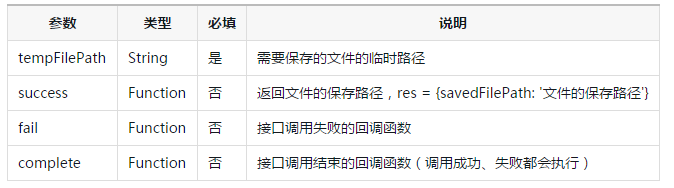
示例代码:
wx.startRecord({
  success: function(res) {
    var tempFilePath = res.tempFilePath
    wx.saveFile({
      tempFilePath: tempFilePath,
      success: function(res) {
        var savedFilePath = res.savedFilePath
      }
    })
  }
})
bug & tip
-
tip: 本地文件存储的大小限制为 10M
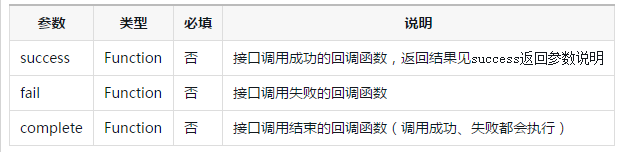
wx.getSavedFileList(OBJECT)
获取本地已保存的文件列表
OBJECT参数说明:
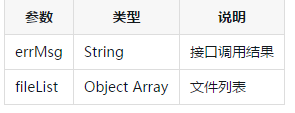
success返回参数说明:
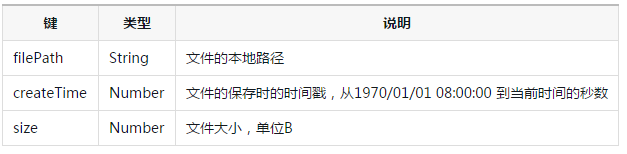
fileList中的项目说明:
示例代码:
wx.getSavedFileList({
  success: function(res) {
    console.log(res.fileList)
  }
})
wx.getSavedFileInfo(OBJECT)
获取本地文件的文件信息
OBJECT参数说明:
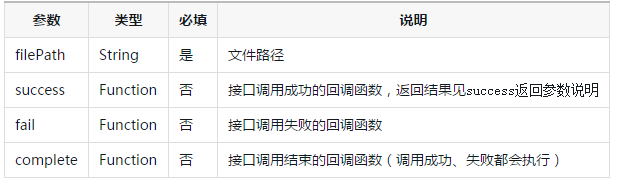
success返回参数说明:
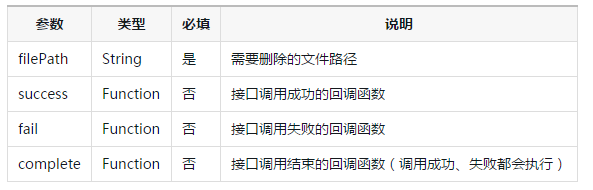
示例代码:
wx.getSavedFileInfo({
  filePath: 'wxfile://somefile', //仅做示例用,非真正的文件路径
  success: function(res) {
    console.log(res.size)
    console.log(res.createTime)
  }
})
wx.removeSavedFile(OBJECT)
删除本地存储的文件
OBJECT参数说明:
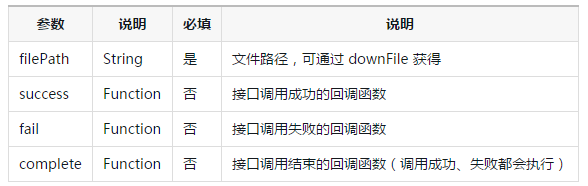
示例代码:
wx.getSavedFileList({
  success: function(res) {
    if (res.fileList.length > 0){
      wx.removeSavedFile({
        filePath: res.fileList[0].filePath,
        complete: function(res) {
          console.log(res)
        }
      })
    }
  }
})
wx.openDocument(OBJECT)
新开页面打开文档,支持格式:doc, xls, ppt, pdf, docx, xlsx, pptx
OBJECT参数说明:
| 参数 | 说明 | 必填 | 说明 |
|---|---|---|---|
| filePath | String | 是 | 文件路径,可通过 downFile 获得 |
| success | Function | 否 | 接口调用成功的回调函数 |
| fail | Function | 否 | 接口调用失败的回调函数 |
| complete | Function | 否 | 接口调用结束的回调函数(调用成功、失败都会执行) |
示例代码
wx.downloadFile({
  url: 'http://example.com/somefile.pdf',
  success: function (res) {
    var filePath = res.tempFilePath
    wx.openDocument({
      filePath: filePath,
      success: function (res) {
        console.log('打开文档成功')
      }
    })
  }
})
相关视频


24小时阅读榜
精品课程


独孤九贱(2)_CSS视频教程
共22课时
24.3万人学习

独孤九贱(3)_JavaScript视频教程
共28课时
36.2万人学习

独孤九贱(4)_PHP视频教程
共89课时
133.1万人学习
热门下载

phpStudy 2018最新版
集成PHP7,16种组合,超全大合集
下载

vc9-vc14(32+64位)运行库合集(链接在下方)
phpStudy安装所需运行库集合下载
下载


php程序员工具箱完整版
程序员工具箱 v1.0 php集成环境
下载


SublimeText3汉化版
中文版,非常好用
下载

Notepad++ Windows版
Notepad++ 8.9.7 Windows版官方安装包,适合 Windows 用户进行代码编辑、文本处理、语法高亮和插件扩展配置。
下载

phpStudy V8.1(Win64位)(已支持php8)
Win64位,支持php多版本共存
下载