php
//本分页类不处理sql;
//大大的加快了分页功能
//http://blog.csdn.net/fkedwgwy
//潇湘博客--潇湘
/**
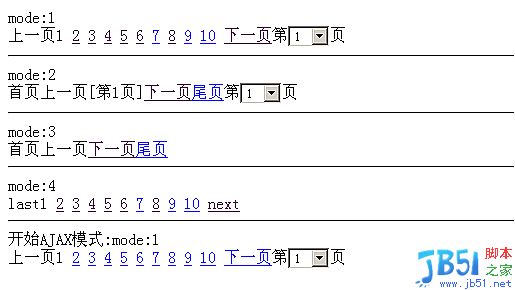
演示
require_once('../libs/classes/page.class.php');
$page=new page(array('total'=>1000,'perpage'=>20));
echo 'mode:1
'.$page->show();
echo '
mode:2
'.$page->show(2);
echo '
mode:3
'.$page->show(3);
echo '

使用官方Model Context Protocol PHP SDK将PHP应用程序功能暴露为MCP工具、资源和提示,用于代理工作流。
mode:4
'.$page->show(4);
echo '
开始AJAX模式:';
$ajaxpage=new page(array('total'=>1000,'perpage'=>20,'ajax'=>'ajax_page','page_name'=>'test'));
echo 'mode:1
'.$ajaxpage->show();
*/
class Zend_Page
{
/**
* config ,public
*/
var $page_name="page";//page标签,用来控制url页。比如说xxx.php?PB_page=2中的PB_page
var $next_page='>';//下一页
var $pre_page='var $first_page='First';//首页
var $last_page='Last';//尾页
var $pre_bar='var $next_bar='>>';//下一分页条
var $format_left='';
var $format_right='';
var $is_ajax=false;//是否支持AJAX分页模式
var $next_ten_page=">>>";
var $per_ten_page="
/**
* private
*
*/
var $pagebarnum=10;//控制记录条的个数。
var $totalpage=0;//总页数
var $ajax_action_name='';//AJAX动作名
var $nowindex=1;//当前页
var $url="";//url地址头
var $offset=0;
var $total='';
/**
* constructor构造函数
*
* @param array $array['total'],$array['perpage'],$array['nowindex'],$array['url'],$array['ajax']...
*/
function Zend_Page($array)
{
if(is_array($array)){
if(!array_key_exists('total',$array))$this->error(__FUNCTION__,'need a param of total');
$total=intval($array['total']);
$perpage=(array_key_exists('perpage',$array))?intval($array['perpage']):10;
$nowindex=(array_key_exists('nowindex',$array))?intval($array['nowindex']):'';
$url=(array_key_exists('url',$array))?$array['url']:'';
}else{
$total=$array;
$perpage=10;
$nowindex='';
$url='';
}
if((!is_int($total))||($totalerror(__FUNCTION__,$total.' is not a positive integer!');
if((!is_int($perpage))||($perpageerror(__FUNCTION__,$perpage.' is not a positive integer!');
if(!empty($array['page_name']))$this->set('page_name',$array['page_name']);//设置pagename
$this->_set_nowindex($nowindex);//设置当前页
$this->_set_url($url);//设置链接地址
$this->totalpage=ceil($total/$perpage);
$this->total=$total;
$this->offset=($this->nowindex-1)*$perpage;
if(!empty($array['ajax']))$this->open_ajax($array['ajax']);//打开AJAX模式
}
/**
* 设定类中指定变量名的值,如果改变量不属于这个类,将throw一个exception
*
* @param string $var
* @param string $value
*/
function set($var,$value)
{
if(in_array($var,get_object_vars($this)))
$this->$var=$value;
else {
$this->error(__FUNCTION__,$var." does not belong to PB_Page!");
}
}
/**
* 打开倒AJAX模式
*
* @param string $action 默认ajax触发的动作。
*/
function open_ajax($action)
{
$this->is_ajax=true;
$this->ajax_action_name=$action;
}
/**
* 获取显示"下一页"的代码
*
* @param string $style
* @return string
*/
function next_page($style='')
{
if($this->nowindextotalpage){
return $this->_get_link($this->_get_url($this->nowindex+1),$this->next_page,$style);
}
return ''.$this->next_page.'';
}
/**
* 获取显示“上一页”的代码
*
* @param string $style
* @return string
*/
function pre_page($style='')
{
if($this->nowindex>1){
return $this->_get_link($this->_get_url($this->nowindex-1),$this->pre_page,$style);
}
return ''.$this->pre_page.'';
}
/**
* 获取显示“上十页”的代码
*
* @param string $style
* @return string
*/
function pre_ten_page($style='')
{
if(intval($this->nowindex/10)+1>1){
return $this->_get_link($this->_get_url(intval($this->nowindex/10)*10-5),$this->pre_ten_page,$style);
}
return ''.$this->pre_ten_page.'';
}
/**
* 获取显示"下十页"的代码
*
* @param string $style
* @return string
*/
function next_ten_page($style='')
{
if(intval($this->nowindex/10)
return $this->_get_link($this->_get_url((intval($this->nowindex/10)+1)*10+5),$this->next_ten_page,$style);
}
return ''.$this->next_ten_page.'';
}
/**
* 获取显示“首页”的代码
*
* @return string
*/
function first_page($style='')
{
if($this->nowindex==1){
return ''.$this->first_page.'';
}
return $this->_get_link($this->_get_url(1),$this->first_page,$style);
}
/**
* 获取显示“尾页”的代码
*
* @return string
*/
function last_page($style='')
{
if($this->nowindex==$this->totalpage){
return ''.$this->last_page.'';
}
return $this->_get_link($this->_get_url($this->totalpage),$this->last_page,$style);
}
function nowbar($style='',$nowindex_style='')
{
$plus=ceil($this->pagebarnum/2);
if($this->pagebarnum-$plus+$this->nowindex>$this->totalpage)$plus=($this->pagebarnum-$this->totalpage+$this->nowindex);
$begin=$this->nowindex-$plus+1;
$begin=($begin>=1)?$begin:1;
$return='';
for($i=$begin;$ipagebarnum;$i++)
{
if($itotalpage){
if($i!=$this->nowindex)
$return.=$this->_get_text($this->_get_link($this->_get_url($i),$i,$style));
else
$return.=$this->_get_text(''.$i.'');
}else{
break;
}
$return.="\n";
}
unset($begin);
return $return;
}
/**
* 获取显示跳转按钮的代码
*
* @return string
*/
function select()
{
$return='';
return $return;
}
/**
* 获取mysql 语句中limit需要的值
*
* @return string
*/
function offset()
{
return $this->offset;
}
/**
* 控制分页显示风格(你可以增加相应的风格)
*
* @param int $mode
* @return string
*/
function show($mode=1,$url='')
{
switch ($mode)
{
case '1':
$this->next_page='下一页';
$this->pre_page='上一页';
return $this->pre_page().$this->nowbar().$this->next_page().'第'.$this->select().'页';
break;
case '2':
$this->next_page='下一页';
$this->pre_page='上一页';
$this->first_page='首页';
$this->last_page='尾页';
return $this->first_page().$this->pre_page().'[第'.$this->nowindex.'页]'.$this->next_page().$this->last_page().'第'.$this->select().'页';
break;
case '3':
$this->next_page='下一页';
$this->pre_page='上一页';
$this->first_page='首页';
$this->last_page='尾页';
return $this->first_page().$this->pre_page().$this->next_page().$this->last_page();
break;
case '4':
$this->next_page='next';
$this->pre_page='last';
return $this->pre_page().$this->nowbar().$this->next_page();
break;
case '5':
return $this->pre_bar().$this->pre_page().$this->nowbar().$this->next_page().$this->next_bar();
break;
case '6':
//启用了“上一页”,“下一页”,“最后一页”。可根据情况启用“第一页”。
//$this->first_page=' ';
$this->pre_page='';
$this->next_page=' ';
$this->last_page='最后一页';
//return "".$this->select()." "."页 "."".$this->first_page()." "."".$this->pre_page()." "."".$this->next_page()." "."".$this->last_page()." ";
return "共有[".$this->total."]件商品 ".$this->nowindex."/".$this->totalpage."页 "."".$this->pre_page()." ".$this->next_page()." "."".$this->last_page()." ".$this->select()." 页 ";
break;
case '7':
$this->next_page=' ';
$this->pre_page=' ';
$this->first_page=' ';
$this->last_page=' ';
if($this->totalpage==0)
{$this->nowindex=0;}
return $this->first_page()." ".$this->pre_page()." ".$this->next_page()." ".$this->last_page()." ".$this->select();
break;
case '8':
//启用了“上一页”,“下一页”,“最后一页”。可根据情况启用“第一页”。
//$this->first_page='';
$this->pre_page='';
$this->next_page='';
$this->last_page='最后一页';
if($this->totalpage==0)
{$this->nowindex=0;}
//return "".$this->select()." "."页 "."".$this->first_page()." "."".$this->pre_page()." "."".$this->next_page()." "."".$this->last_page()." ";
return "共有[".$this->total."]条信息 ".$this->nowindex."/".$this->totalpage."页 "."".$this->pre_page()." ".$this->next_page()." "."".$this->last_page()." ".$this->select()." 页 ";
break;
}
}
/*----------------private function (私有方法)-----------------------------------------------------------*/
/**
* 设置url头地址
* @param: String $url
* @return boolean
*/
function _set_url($url="")
{
if(!empty($url)){
//手动设置
$this->url=$url.((stristr($url,'?'))?'&':'?').$this->page_name."=";
}else{
//自动获取
if(empty($_SERVER['QUERY_STRING'])){
//不存在QUERY_STRING时
$this->url=$_SERVER['REQUEST_URI']."?".$this->page_name."=";
}else{
//
if(stristr($_SERVER['QUERY_STRING'],$this->page_name.'=')){
//地址存在页面参数
$this->url=str_replace($this->page_name.'='.$this->nowindex,'',$_SERVER['REQUEST_URI']);
$last=$this->url[strlen($this->url)-1];
if($last=='?'||$last=='&'){
$this->url.=$this->page_name."=";
}else{
$this->url.='&'.$this->page_name."=";
}
}else{
//
$this->url=$_SERVER['REQUEST_URI'].'&'.$this->page_name.'=';
}//end if
}//end if
}//end if
}
/**
* 设置当前页面
*
*/
function _set_nowindex($nowindex)
{
if(empty($nowindex)){
//系统获取
if(isset($_GET[$this->page_name])){
$this->nowindex=intval($_GET[$this->page_name]);
}
}else{
//手动设置
$this->nowindex=intval($nowindex);
}
}
/**
* 为指定的页面返回地址值
*
* @param int $pageno
* @return string $url
*/
function _get_url($pageno=1)
{
return $this->url.$pageno;
}
/**
* 获取分页显示文字,比如说默认情况下_get_text('1')将返回[1]
*
* @param String $str
* @return string $url
*/
function _get_text($str)
{
return $this->format_left.$str.$this->format_right;
}
/**
* 获取链接地址
*/
function _get_link($url,$text,$style=''){
$style=(empty($style))?'':'class="'.$style.'"';
if($this->is_ajax){
//如果是使用AJAX模式
return ''.$text.'';
}else{
return ''.$text.'';
}
}
/**
* 出错处理方式
*/
function error($function,$errormsg)
{
die('Error in file '.__FILE__.' ,Function '.$function.'() :'.$errormsg);
}
}
?>
php免费学习视频:立即使用
踏上前端学习之旅,开启通往精通之路!从前端基础到项目实战,循序渐进,一步一个脚印,迈向巅峰!