用过zen-cart的人都知道,zen-cart中下单步骤是下面这样的(其中[]中的表示不是必须的):
1. 购物车(shopping cart)
2. [货运方式(delivery method)]
3. 支付方式(payment method)
4. 订单确认(confirmation)
5. [第三方网站支付]
6. 订单处理(checkout process)——这一步比较重要,因为会在这里将购物车中的信息写入订单
7. 下单成功(checkout success)
这样的流程在正常情况下是没有任何问题的。但是,从第5步到第6部的过程中,用户可能以为付款成功就直接关闭掉网页了,或者由于网络原因造成不能正常跳转到checkout_process页面,这样造成的后果是很严重的,因为订单不能被正常的创建。
基于上述的分析, 我们希望稍微地改变一下流程,即在支付之前订单已经创建好了,这样就算在支付时不能从第三方支付网站跳转回来,我们也不会存在用户付款成功却在后台没有订单的情况了。经过修改后的蓝图基本是下面这样的:
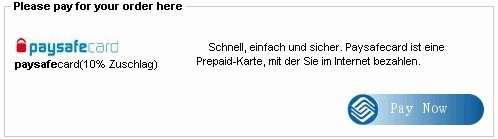
1. 在checkour_confirmation页面确认订单后,都会直接proccess,并且进入checkour_success页面,可以在这里进入付款页面。如下图所示:

使用官方Model Context Protocol PHP SDK将PHP应用程序功能暴露为MCP工具、资源和提示,用于代理工作流。
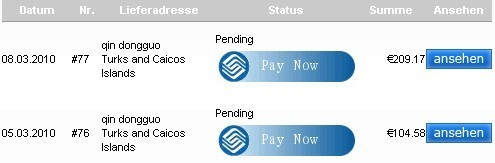
2. 如果当时客户没能付款,也可进入自己的后台对历史订单进行付款。如下图所示:
下面我们就来看看如何一步一步来实现上述的功能。
1. 首先我们需要对现有的支付模块进行一个改造。需要对支付方式的class增加一个字段paynow_action_url,用来表示进行支付的页面url,另外还需要增加一个函数,paynow_button($order_id),来获取支付表单的参数隐藏域代码。
要增加paynow_action_url字段,请在类payment的构造函数中最后加上下面的代码:
if ( (zen_not_null($module)) && (in_array($module.'.php', $this->modules)) && (isset($GLOBALS[$module]->paynow_action_url)) ) {
$this->paynow_action_url = $GLOBALS[$module]->paynow_action_url;
}
要增加paynow_button($order_id)函数,请在payment类的最后一个函数之后加上如下的代码:
function paynow_button($order_id){
if (is_array($this->modules)) {
if (is_object($GLOBALS[$this->selected_module])) {
return $GLOBALS[$this->selected_module]->paynow_button($order_id);
}
}
}
2. 以paypal支付方式为例子,说明如何具体实现。为了不破坏paypal原有的代码,我们将paypal.php文件拷贝一个副本出来,并命名为paypalsimple.php,并对里面的代码做适当的修改。代码如下所示,可以看到,这里去掉了对form_action_url的指定,并给定了paynow_action_url,因为我们希望用户点击“确认订单”后直接进入checkout_process,所以如果不指定form_action_url,那么确认订单的表单就会直接提交到checkout_process页面了,而paynow_action_url就是以前的form_action_url的值。paynow_button函数的实现也很简单,这里只是将原先的process_button()函数的内容剪切过来而已,只不过我们没有使用全局的$order变量,而是使用$order = new order($order_id),来重新构造的一个对象,这样做是为在历史订单中显示pay now按钮做准备的。
paypalsimple.php
/**
* @package paypalsimple payment module
* @copyright Copyright 2003-2006 Zen Cart Development Team
* @copyright Portions Copyright 2003 osCommerce
* @license http://www.zen-cart.com/license/2_0.txt GNU Public License V2.0
* @version $Id: paypalsimple.php 4960 2009-12-29 11:46:46Z gary $
*/
// ensure dependencies are loaded
include_once((IS_ADMIN_FLAG === true ? DIR_FS_CATALOG_MODULES : DIR_WS_MODULES) . 'payment/paypal/paypal_functions.php');
class paypalsimple {
var $code, $title, $description, $enabled;
// class constructor
function paypalsimple() {
global $order;
$this->code = 'paypalsimple';
$this->title = MODULE_PAYMENT_PAYPAL_SIMPLE_TEXT_TITLE;
if(IS_ADMIN_FLAG === true){
$this->title = MODULE_PAYMENT_PAYPAL_SIMPLE_TEXT_ADMIN_TITLE;
}
$this->description = MODULE_PAYMENT_PAYPAL_SIMPLE_TEXT_DESCRIPTION;
$this->sort_order = MODULE_PAYMENT_PAYPAL_SIMPLE_SORT_ORDER;
$this->enabled = ((MODULE_PAYMENT_PAYPAL_SIMPLE_STATUS == 'True') ? true : false);
if ((int)MODULE_PAYMENT_PAYPAL_SIMPLE_ORDER_STATUS_ID > 0) {
$this->order_status = MODULE_PAYMENT_PAYPAL_SIMPLE_ORDER_STATUS_ID;
}
$this->paynow_action_url = 'https://' . MODULE_PAYMENT_PAYPAL_SIMPLE_HANDLER;
if (is_object($order)) $this->update_status();
}
// class methods
function update_status() {
global $order, $db;
if ( ($this->enabled == true) && ((int)MODULE_PAYMENT_PAYPAL_SIMPLE_ZONE > 0) ) {
$check_flag = false;
$check = $db->Execute("select zone_id from " . TABLE_ZONES_TO_GEO_ZONES . " where geo_zone_id = '" . MODULE_PAYMENT_PAYPAL_SIMPLE_ZONE . "' and zone_country_id = '" . $order->billing['country']['id'] . "' order by zone_id");
while (!$check->EOF) {
if ($check->fields['zone_id'] $check_flag = true;
break;
} elseif ($check->fields['zone_id'] == $order->billing['zone_id']) {
$check_flag = true;
break;
}
$check->MoveNext();
}
if ($check_flag == false) {
$this->enabled = false;
}
}
}
function javascript_validation() {
return false;
}
function selection() {
$text = MODULE_PAYMENT_SIMPLE_PAYPAL_TEXT_CATALOG_LOGO.' '.MODULE_PAYMENT_PAYPAL_SIMPLE_TEXT_TITLE . '
' . MODULE_PAYMENT_PAYPAL_SIMPLE_ACCEPTANCE_MARK_TEXT . '
';
return array('id' => $this->code,
'module' => $text
);
}
function pre_confirmation_check() {
return false;
}
function confirmation() {
return false;
}
function process_button() {
return false;
}
function before_process() {
return false;
}
function after_process() {
return false;
}
function get_error() {
return false;
}
function check() {
global $db;
if (!isset($this->_check)) {
$check_query = $db->Execute("select configuration_value from " . TABLE_CONFIGURATION . " where configuration_key = 'MODULE_PAYMENT_PAYPAL_SIMPLE_STATUS'");
$this->_check = $check_query->RecordCount();
}
return $this->_check;
}
function install() {
global $db;
$db->Execute("insert into " . TABLE_CONFIGURATION . " (configuration_title, configuration_key, configuration_value, configuration_description, configuration_group_id, sort_order, set_function, date_added) values ('Enable PayPal-Simple Module', 'MODULE_PAYMENT_PAYPAL_SIMPLE_STATUS', 'True', 'Do you want to accept PayPal-Simple payments?', '6', '0', 'zen_cfg_select_option(array(\'True\', \'False\'), ', now())");
$db->Execute("insert into " . TABLE_CONFIGURATION . " (configuration_title, configuration_key, configuration_value, configuration_description, configuration_group_id, sort_order, date_added) values ('Sort order of display.', 'MODULE_PAYMENT_PAYPAL_SIMPLE_SORT_ORDER', '0', 'Sort order of display. Lowest is displayed first.', '6', '8', now())");
$db->Execute("insert into " . TABLE_CONFIGURATION . " (configuration_title, configuration_key, configuration_value, configuration_description, configuration_group_id, sort_order, use_function, set_function, date_added) values ('Payment Zone', 'MODULE_PAYMENT_PAYPAL_SIMPLE_ZONE', '0', 'If a zone is selected, only enable this payment method for that zone.', '6', '2', 'zen_get_zone_class_title', 'zen_cfg_pull_down_zone_classes(', now())");
$db->Execute("insert into " . TABLE_CONFIGURATION . " (configuration_title, configuration_key, configuration_value, configuration_description, configuration_group_id, sort_order, set_function, use_function, date_added) values ('Set Order Status', 'MODULE_PAYMENT_PAYPAL_SIMPLE_ORDER_STATUS_ID', '0', 'Set the status of orders made with this payment module to this value', '6', '0', 'zen_cfg_pull_down_order_statuses(', 'zen_get_order_status_name', now())");
$db->Execute("insert into " . TABLE_CONFIGURATION . " (configuration_title, configuration_key, configuration_value, configuration_description, configuration_group_id, sort_order, set_function, date_added) values ('Mode for PayPal web services
Default:
www.paypal.com/cgi-bin/webscror
www.paypal.com/us/cgi-bin/webscror for the UK,
www.paypal.com/uk/cgi-bin/webscr', 'MODULE_PAYMENT_PAYPAL_SIMPLE_HANDLER', 'www.paypal.com/cgi-bin/webscr', 'Choose the URL for PayPal live processing', '6', '73', '', now())"); }
function remove() {
global $db;
$db->Execute("delete from " . TABLE_CONFIGURATION . " where configuration_key in ('" . implode("', '", $this->keys()) . "')");
}
function keys() {
return array('MODULE_PAYMENT_PAYPAL_SIMPLE_STATUS','MODULE_PAYMENT_PAYPAL_SIMPLE_SORT_ORDER','MODULE_PAYMENT_PAYPAL_SIMPLE_ZONE','MODULE_PAYMENT_PAYPAL_SIMPLE_ORDER_STATUS_ID', 'MODULE_PAYMENT_PAYPAL_SIMPLE_HANDLER');
}
function paynow_button($order_id){
global $db, $order, $currencies, $currency;
require_once(DIR_WS_CLASSES . 'order.php');
$order = new order($order_id);
$options = array();
$optionsCore = array();
$optionsPhone = array();
$optionsShip = array();
$optionsLineItems = array();
$optionsAggregate = array();
$optionsTrans = array();
$buttonArray = array();
$this->totalsum = $order->info['total'];
// save the session stuff permanently in case paypal loses the session
$_SESSION['ppipn_key_to_remove'] = session_id();
$db->Execute("delete from " . TABLE_PAYPAL_SESSION . " where session_id = '" . zen_db_input($_SESSION['ppipn_key_to_remove']) . "'");
$sql = "insert into " . TABLE_PAYPAL_SESSION . " (session_id, saved_session, expiry) values (
'" . zen_db_input($_SESSION['ppipn_key_to_remove']) . "',
'" . base64_encode(serialize($_SESSION)) . "',
'" . (time() + (1*60*60*24*2)) . "')";
$db->Execute($sql);
$my_currency = select_pp_currency();
$this->transaction_currency = $my_currency;
$this->transaction_amount = ($this->totalsum * $currencies->get_value($my_currency));
$telephone = preg_replace('/\D/', '', $order->customer['telephone']);
if ($telephone != '') {
$optionsPhone['H_PhoneNumber'] = $telephone;
if (in_array($order->customer['country']['iso_code_2'], array('US','CA'))) {
$optionsPhone['night_phone_a'] = substr($telephone,0,3);
$optionsPhone['night_phone_b'] = substr($telephone,3,3);
$optionsPhone['night_phone_c'] = substr($telephone,6,4);
$optionsPhone['day_phone_a'] = substr($telephone,0,3);
$optionsPhone['day_phone_b'] = substr($telephone,3,3);
$optionsPhone['day_phone_c'] = substr($telephone,6,4);
} else {
$optionsPhone['night_phone_b'] = $telephone;
$optionsPhone['day_phone_b'] = $telephone;
}
}
$optionsCore = array(
'charset' => CHARSET,
'lc' => $order->customer['country']['iso_code_2'],
'page_style' => MODULE_PAYMENT_PAYPAL_PAGE_STYLE,
'custom' => zen_session_name() . '=' . zen_session_id(),
'business' => MODULE_PAYMENT_PAYPAL_BUSINESS_ID,
'return' => zen_href_link(FILENAME_PAY_SUCCESS, 'referer=paypal', 'SSL'),
'cancel_return' => zen_href_link(FILENAME_PAY_FAILED, '', 'SSL'),
'shopping_url' => zen_href_link(FILENAME_SHOPPING_CART, '', 'SSL'),
'notify_url' => zen_href_link('ipn_main_handler.php', '', 'SSL',false,false,true),
'redirect_cmd' => '_xclick',
'rm' => 2,
'bn' => 'zencart',
'mrb' => 'R-6C7952342H795591R',
'pal' => '9E82WJBKKGPLQ',
);
$optionsCust = array(
'first_name' => replace_accents($order->customer['firstname']),
'last_name' => replace_accents($order->customer['lastname']),
'address1' => replace_accents($order->customer['street_address']),
'city' => replace_accents($order->customer['city']),
'state' => zen_get_zone_code($order->customer['country']['id'], $order->customer['zone_id'], $order->customer['zone_id']),
'zip' => $order->customer['postcode'],
'country' => $order->customer['country']['iso_code_2'],
'email' => $order->customer['email_address'],
);
if ($order->customer['suburb'] != '') $optionsCust['address2'] = $order->customer['suburb'];
if (MODULE_PAYMENT_PAYPAL_ADDRESS_REQUIRED == 2) $optionsCust = array(
'address_name' => replace_accents($order->customer['firstname'] . ' ' . $order->customer['lastname']),
'address_street' => replace_accents($order->customer['street_address']),
'address_city' => replace_accents($order->customer['city']),
'address_state' => zen_get_zone_code($order->customer['country']['id'], $order->customer['zone_id'], $order->customer['zone_id']),
'address_zip' => $order->customer['postcode'],
'address_country' => $order->customer['country']['title'],
'address_country_code' => $order->customer['country']['iso_code_2'],
'payer_email' => $order->customer['email_address'],
);
$optionsShip = array(
//'address_override' => MODULE_PAYMENT_PAYPAL_ADDRESS_OVERRIDE,
'no_shipping' => MODULE_PAYMENT_PAYPAL_ADDRESS_REQUIRED,
);
if (MODULE_PAYMENT_PAYPAL_DETAILED_CART == 'Yes') $optionsLineItems = ipn_getLineItemDetails();
if (sizeof($optionsLineItems) > 0) {
$optionsLineItems['cmd'] = '_cart';
// $optionsLineItems['num_cart_items'] = sizeof($order->products);
if (isset($optionsLineItems['shipping'])) {
$optionsLineItems['shipping_1'] = $optionsLineItems['shipping'];
unset($optionsLineItems['shipping']);
}
if (isset($optionsLineItems['handling'])) {
$optionsLineItems['handling_1'] = $optionsLineItems['handling'];
unset($optionsLineItems['handling']);
}
unset($optionsLineItems['subtotal']);
// if line-item details couldn't be kept due to calculation mismatches or discounts etc, default to aggregate mode
if (!isset($optionsLineItems['item_name_1'])) $optionsLineItems = array();
//if ($optionsLineItems['amount'] != $this->transaction_amount) $optionsLineItems = array();
ipn_debug_email('Line Item Details (if blank, this means there was a data mismatch, and thus bypassed): ' . "\n" . print_r($optionsLineItems, true));
}
$products_name_display = "";
/*
for ($i=0, $n=sizeof($order->products); $iif(i > 0) {
$products_name_display.= ', ';
}
$products_name_display.= $order->products[$i]['name']. '('. $order->products[$i]['qty'] .','.$order->products[$i]['dhisys_web_order_number'].')';
}*/
$optionsAggregate = array(
'cmd' => '_ext-enter',
'item_name' => $products_name_display,
'item_number' => $order_id,
'num_cart_items' => sizeof($order->products),
'amount' => number_format($this->transaction_amount, $currencies->get_decimal_places($my_currency)),
'shipping' => '0.00',
);
if (MODULE_PAYMENT_PAYPAL_TAX_OVERRIDE == 'true') $optionsAggregate['tax'] = '0.00';
if (MODULE_PAYMENT_PAYPAL_TAX_OVERRIDE == 'true') $optionsAggregate['tax_cart'] = '0.00';
$optionsTrans = array(
'upload' => (int)(sizeof($order->products) > 0),
'currency_code' => $my_currency,
// 'paypal_order_id' => $paypal_order_id,
//'no_note' => '1',
//'invoice' => '',
);
// if line-item info is invalid, use aggregate:
if (sizeof($optionsLineItems) > 0) $optionsAggregate = $optionsLineItems;
// prepare submission
$options = array_merge($optionsCore, $optionsCust, $optionsPhone, $optionsShip, $optionsTrans, $optionsAggregate);
ipn_debug_email('Keys for submission: ' . print_r($options, true));
if(sizeof($order->products) > 0){
$options['cmd'] = '_cart';
for ($i=0, $n=sizeof($order->products); $i$options['item_name_'. (string)($i+1)] = $order->products[$i]['name'];
$options['item_number_'. (string)($i+1)] = $order->products[$i]['dhisys_web_order_number'];
$options['amount_'. (string)($i+1)] = number_format((float)$order->products[$i]['final_price'],2);
$options['quantity_'. (string)($i+1)] = $order->products[$i]['qty'];
}
}
// build the button fields
foreach ($options as $name => $value) {
// remove quotation marks
$value = str_replace('"', '', $value);
// check for invalid chars
if (preg_match('/[^a-zA-Z_0-9]/', $name)) {
ipn_debug_email('datacheck - ABORTING - preg_match found invalid submission key: ' . $name . ' (' . $value . ')');
break;
}
// do we need special handling for & and = symbols?
//if (strpos($value, '&') !== false || strpos($value, '=') !== false) $value = urlencode($value);
$buttonArray[] = zen_draw_hidden_field($name, $value);
}
$_SESSION['paypal_transaction_info'] = array($this->transaction_amount, $this->transaction_currency);
$process_button_string = implode("\n", $buttonArray) . "\n";
return $process_button_string;
}
}
?>
3. 在checkout_success页面中显示pay now按钮。打开文件"includes/modules/pages/checkout_success/header.php",在文件的末尾添加下面的代码(如果你已经掌握zen-cart中的通知者/观察者模式,并且又不想破坏zen-cart核心代码的话,也可以创建一个观察类来监听NOTIFY_HEADER_END_CHECKOUT_SUCCESS来实现)。
require_once(DIR_WS_CLASSES . 'order.php');
require_once(DIR_WS_CLASSES . 'payment.php');
$payment_modules = new payment($orders->fields['payment_module_code']);
打开文件"includes/modules/templates/template_default/templates/tpl_checkout_success_default.php",并在适当的位置加上如下的代码,这里对订单的状态进行了一个判断,当只有订单的状态在未付款状态,才显示该按钮,
//&& $orders->fields['orders_status'] == '1'
if(isset($payment_modules->paynow_action_url) && $payment_modules->paynow_action_url != ''&& $orders->fields['orders_status'] == '1'){
echo('');
}
?>
4. 在历史订单中显示pay now按钮。需要显示pay now按钮的页面有三个:account, account_history,account_history_info,这里的实现和checkout_success页面的实现大同小异,只是传给$payment_modules的函数paynow_button的参数不一样而已,这里就不再赘述。
总结:
经过上面的修改,我们的流程如下:
1. 购物车(shopping cart)
2. [货运方式(delivery method)]
3. 支付方式(payment method)
4. 订单确认(confirmation)
5. 订单处理(checkout process)
6. 下单成功(checkout success)
7. [第三方网站支付]
因为从订单确认到订单处理,都是在我们自己的网站完成的,并且进入支付网站之前,订单已经存在了,这样就不会出现掉单的情况了。
php免费学习视频:立即使用
踏上前端学习之旅,开启通往精通之路!从前端基础到项目实战,循序渐进,一步一个脚印,迈向巅峰!