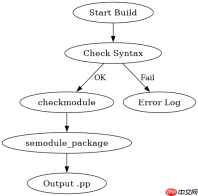
配置 selinux 策略包编译加载的核心流程是:使用 `make` 命令基于源码目录生成 `.te` 和 `.pp` 文件,然后通过 `semodule -i` 安装生成的策略包。具体做法是进入策略源码目录执行构建,确认输出无误后,以 root 权限调用 semodule 工具将二进制策略模块加载到内核中。

如何从源码构建 SELinux 策略模块
从源码构建策略模块需要依赖 `selinux-policy-devel` 提供的 Makefile 模板。开发者需创建包含 `
mkdir -p /root/my_module
# 创建文件上下文定义
cat > /root/my_module/my_module.fc  /root/my_module/my_module.te <h2>如何验证并加载已编译的策略包</h2><p>加载策略包前需确保 `.pp` 文件存在且无语法冲突。使用 `semodule -i` 命令可将模块注入当前运行的策略库。加载后可通过 `semodule -l` 查看模块状态,或使用 `audit2why` 分析因新策略缺失导致的 AVC 拒绝日志。若模块版本与现有策略冲突,需先使用 `semodule -e` 禁用或删除旧模块再重新加载。</p><div class="aritcle_card flexRow artxards">
											<div class="artcardd flexRow">
												<a class="aritcle_card_img" rel="nofollow" href="/xiazai/skill14075" title="Linux 系统管理"><img
														src="https://img.php.cn/upload/skill/001/246/273/6adaf20e695c2374.jpg" alt="Linux 系统管理" onerror="this.onerror='';this.src='/static/lhimages/moren/morentu.png'" ></a>
												<div class="aritcle_card_info flexColumn">
													<a rel="nofollow" href="/xiazai/skill14075" title="Linux 系统管理" class="overflowclass">Linux 系统管理</a>
													<p class="overflowclass">Linux 系统管理技能。避免权限陷阱、静默失败和常见运维错误,覆盖用户权限、文件系统、进程管理、网络配置等日常运维场景。触发词:Linux 管理、系统运维、权限、Shell 命令。</p>
												</div>
												<a rel="nofollow" href="/xiazai/skill14075" title="Linux 系统管理" class="aritcle_card_btn flexRow flexcenter"><b></b><span>下载</span>
												</a>
											</div>
										</div><p><img src="https://img.php.cn/upload/article/001/242/473/179557520865031.png?x-oss-process=image/resize,p_40" alt="Linux SELinux 怎么配置策略包编译加载"></p><pre class="brush:php;toolbar:false;"># 安装策略包
sudo semodule -i /root/my_module/my_module.pp

# 验证模块是否加载成功
semodule -l | grep my_module

# 检查是否有新的 AVC 拒绝记录
ausearch -m avc -ts recent | audit2why
当模块加载失败时如何排查 AVC 拒绝
模块加载成功后若应用仍被拦截,通常是因为文件上下文未正确标记或权限定义不全。此时应检查 `/var/log/audit/audit.log` 中的 AVC 消息,提取被拒绝的操作类型和目标对象。使用 `audit2allow` 可自动生成对应的允许规则,但需谨慎审查生成的 `.te` 内容,避免过度授权。修正 `.te` 文件后需重新执行 `make` 并再次加载模块。