






在junit中给请求添加路径参数,最直接的方式是在构建http请求时通过占位符(如`{id}`)和实际值进行替换。对于接口地址变量的测试,通常使用`@testtemplate`结合`@methodsource`或`@parameterizedtest`来传入不同的路径变量,从而验证不同id下的响应结果。

如何构造带路径参数的GET请求
使用RestAssured的`pathParam`方法可以清晰地指定路径中的变量。这种方法比字符串拼接更安全且易读。例如,当需要获取特定用户信息时,将用户ID作为路径参数传入。
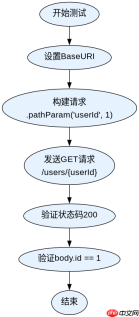
import io.restassured.RestAssured;
import io.restassured.response.Response;
import org.junit.jupiter.api.Test;

import static io.restassured.RestAssured.given;
import static org.hamcrest.Matchers.equalTo;

public class PathParamTest {
    @Test
    public void testGetUserById() {
        // 假设基础URL为 https://jsonplaceholder.typicode.com
        RestAssured.baseURI = "https://jsonplaceholder.typicode.com";

        Response response = given()
                .pathParam("userId", 1)
                .when()
                .get("/users/{userId}")
                .then()
                .statusCode(200)
                .body("id", equalTo(1))
                .extract().response();
    }
}
上述代码中,`pathParam("userId", 1)`将路径中的`{userId}`替换为`1`。最终请求的URL变为`/users/1`。断言部分验证返回的JSON中`id`字段是否为`1`。这种方式避免了手动拼接字符串可能带来的错误。
如何使用参数化测试批量验证路径变量
当需要测试多个不同的路径参数时,可以使用JUnit Jupiter的`@ParameterizedTest`注解。这允许你定义一组输入数据,并为每组数据执行相同的测试逻辑。这对于验证API在不同ID下的行为一致性非常有用。


import io.restassured.RestAssured;
import io.restassured.response.Response;
import org.junit.jupiter.params.ParameterizedTest;
import org.junit.jupiter.params.provider.ValueSource;

import static io.restassured.RestAssured.given;
import static org.hamcrest.Matchers.equalTo;

public class ParameterizedPathParamTest {

    @ParameterizedTest(name = "Test user with ID: {0}")
    @ValueSource(ints = {1, 2, 3})
    public void testMultipleUsers(int userId) {
        RestAssured.baseURI = "https://jsonplaceholder.typicode.com";

        given()
                .pathParam("userId", userId)
                .when()
                .get("/users/{userId}")
                .then()
                .statusCode(200)
                .body("id", equalTo(userId));
    }
}
在这个示例中,`@ValueSource(ints = {1, 2, 3})`提供了三个整数作为测试输入。JUnit会为每个整数运行一次`testMultipleUsers`方法。每次运行时,`userId`参数会被注入到方法中,并通过`pathParam`传递给请求。这样可以一次性验证多个用户ID的接口响应,提高测试覆盖率。
路径参数为空或无效时的处理策略
在实际开发中,路径参数可能为空、缺失或格式不正确。测试这些边界情况有助于确保API的健壮性。例如,如果路径参数缺失,服务器通常会返回404 Not Found或400 Bad Request。我们可以编写测试用例来验证这些错误场景。
import io.restassured.RestAssured;
import io.restassured.response.Response;
import org.junit.jupiter.api.Test;

import static io.restassured.RestAssured.given;
import static org.hamcrest.Matchers.equalTo;

public class InvalidPathParamTest {

    @Test
    public void testNonExistentUser() {
        RestAssured.baseURI = "https://jsonplaceholder.typicode.com";

        // 测试一个不存在的用户ID
        given()
                .pathParam("userId", 99999)
                .when()
                .get("/users/{userId}")
                .then()
                .statusCode(404);
    }

    @Test
    public void testEmptyPathParam() {
        RestAssured.baseURI = "https://jsonplaceholder.typicode.com";

        // 尝试传递空字符串作为路径参数
        given()
                .pathParam("userId", "")
                .when()
                .get("/users/{userId}")
                .then()
                .statusCode(404); // 具体状态码取决于后端实现
    }
}
第一个测试用例验证了当请求一个不存在的用户ID时,API是否返回404状态码。第二个测试用例则检查了当路径参数为空字符串时的行为。根据具体的后端实现,空参数可能导致400或404错误。通过测试这些边缘情况,可以确保API在面对异常输入时能够正确响应,而不是抛出未处理的异常或返回意外结果。


