






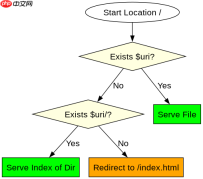
在 nginx 中配置回退到 index 文件,需要在 location 块中使用 try_files 指令,并在参数列表的末尾指定 /index.html。这样当请求的文件不存在时,nginx 会内部重定向到该文件,而不是返回 404 错误。

try_files 如何处理静态资源缺失
当请求一个具体的静态文件(如图片、JS)且该文件不存在时,try_files 会直接执行最后的 fallback 动作。如果最后参数是 /index.html,服务器将内部跳转到首页,这通常不是处理静态资源缺失的最佳实践,但符合 SPA 路由或特定回退逻辑的配置需求。
server {
    listen 80;
    server_name example.com;
    root /usr/share/nginx/html;

    location / {
        try_files $uri $uri/ /index.html;
    }
}
目录索引与默认文件的区别
如果希望在没有具体文件时尝试列出目录内容,或者使用不同的默认文件,可以调整 try_files 的参数顺序。例如,先检查文件,再检查目录,最后回退到 index。这与直接使用 index 指令不同,index 仅在 URI 以斜杠结尾且匹配目录时生效,而 try_files 提供了更灵活的路径映射能力。


server {
    listen 80;
    server_name example.com;
    root /usr/share/nginx/html;

    location / {
        # 先试文件,再试目录,最后回退到 index.html
        try_files $uri $uri/ =404;
    }

    # 或者混合使用
    location /app {
        try_files $uri $uri/ /app/index.html;
    }
}
try_files 在 SPA 路由中的具体表现
在单页应用(SPA)中,用户可能直接访问 /user/profile 这样的深层 URL。此时 $uri 指向 /user/profile,文件系统无此文件;$uri/ 指向 /user/profile/,也无此目录。因此 try_files 会触发最后的 /index.html 回退,由前端路由接管解析。这种配置确保了无论用户刷新哪个子页面,都能正确加载应用入口。


