






将php错误日志写入数据库的核心做法是注册自定义错误处理函数,并在该函数中通过pdo或mysqli执行insert语句。具体而言,调用 set_error_handler() 接管 e_error、e_warning 等异常,在回调中获取 $errno、$errstr 及堆栈信息,随后使用预处理语句安全地存入数据库表。若未捕获的致命错误发生,需配合 register_shutdown_function() 检查 error_get_last() 并补录日志。

如何拦截常规运行时错误并存入数据库?
通过 set_error_handler() 可以拦截非致命的运行时错误(如警告、通知),并在回调函数中将错误详情插入数据库。此方法适用于大多数业务逻辑中的错误记录,确保程序不会因错误而直接终止,同时保留详细的上下文信息。
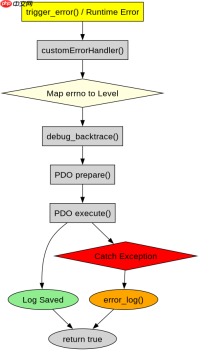
<?php // 定义数据库连接配置
$host = '127.0.0.1';
$db   = 'myapp';
$user = 'root';
$pass = '';
$charset = 'utf8mb4';

$dsn = "mysql:host=$host;dbname=$db;charset=$charset";
options = [
    PDO::ATTR_ERRMODE            => PDO::ERRMODE_EXCEPTION,
    PDO::ATTR_DEFAULT_FETCH_MODE => PDO::FETCH_ASSOC,
    PDO::ATTR_EMULATE_PREPARES   => false,
];

try {
    $pdo = new PDO($dsn, $user, $pass, $options);
} catch (\PDOException $e) {
    throw new \PDOException($e->getMessage(), (int)$e->getCode());
}

// 创建日志表(若不存在)
$pdo->exec("CREATE TABLE IF NOT EXISTS error_logs (
    id INT AUTO_INCREMENT PRIMARY KEY,
    level VARCHAR(32) NOT NULL,
    message TEXT NOT NULL,
    file VARCHAR(255) NOT NULL,
    line INT NOT NULL,
    trace TEXT,
    created_at DATETIME DEFAULT CURRENT_TIMESTAMP
)");

// 自定义错误处理器
function customErrorHandler($errno, $errstr, $errfile, $errline) {
    global $pdo;

    // 忽略用户级通知,避免噪音
    if ($errno === E_NOTICE || $errno === E_USER_NOTICE) {
        return false;
    }

    $levelMap = [
        E_ERROR             => 'ERROR',
        E_WARNING           => 'WARNING',
        E_PARSE             => 'PARSE',
        E_NOTICE            => 'NOTICE',
        E_CORE_ERROR        => 'CORE_ERROR',
        E_CORE_WARNING      => 'CORE_WARNING',
        E_COMPILE_ERROR     => 'COMPILE_ERROR',
        E_COMPILE_WARNING   => 'COMPILE_WARNING',
        E_USER_ERROR        => 'USER_ERROR',
        E_USER_WARNING      => 'USER_WARNING',
        E_USER_NOTICE       => 'USER_NOTICE',
        E_STRICT            => 'STRICT',
        E_RECOVERABLE_ERROR => 'RECOVERABLE_ERROR',
        E_DEPRECATED        => 'DEPRECATED',
        E_USER_DEPRECATED   => 'USER_DEPRECATED',
    ];

    $level = $levelMap[$errno] ?? 'UNKNOWN';
    $message = $errstr;
    $file = $errfile;
    $line = $errline;

    // 获取堆栈跟踪
    $trace = debug_backtrace(DEBUG_BACKTRACE_IGNORE_ARGS, 10);
    $traceStr = json_encode($trace);

    try {
        $stmt = $pdo->prepare(
            "INSERT INTO error_logs (level, message, file, line, trace) VALUES (:level, :message, :file, :line, :trace)"
        );
        $stmt->execute([
            ':level'   => $level,
            ':message' => $message,
            ':file'    => $file,
            ':line'    => $line,
            ':trace'   => $traceStr,
        ]);
    } catch (\Exception $ex) {
        // 如果写库失败,回退到标准错误日志
        error_log("DB Write Failed: $message in $file on line $line");
    }

    // 返回 true 表示已处理,阻止 PHP 默认行为
    return true;
}

// 注册错误处理器
set_error_handler('customErrorHandler');

// 触发一个警告以测试
trigger_error('This is a test warning', E_USER_WARNING);

// 触发一个致命错误以测试 shutdown function
// trigger_error('This is a fatal error', E_USER_ERROR);
?>
如何捕获致命错误并补录日志?
对于 E_ERROR 等导致脚本终止的致命错误,set_error_handler() 无法捕获,需借助 register_shutdown_function()。在脚本关闭时检查 error_get_last(),若存在致命错误,则将其信息插入数据库,确保关键崩溃也能被记录。

使用官方Model Context Protocol PHP SDK将PHP应用程序功能暴露为MCP工具、资源和提示,用于代理工作流。
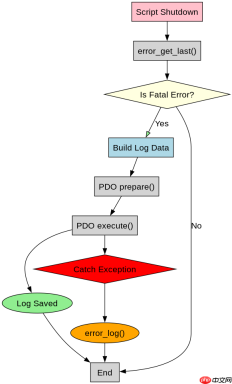
<?php // 复用之前的 PDO 连接和表结构
// ... (同上)

// 注册关闭函数
register_shutdown_function(function() use ($pdo) {
    $error = error_get_last();
    if ($error && in_array($error['type'], [E_ERROR, E_CORE_ERROR, E_COMPILE_ERROR, E_USER_ERROR])) {
        $level = 'FATAL_ERROR';
        $message = $error['message'];
        $file = $error['file'];
        $line = $error['line'];
        $trace = json_encode(debug_backtrace(DEBUG_BACKTRACE_IGNORE_ARGS, 10));

        try {
            $stmt = $pdo->prepare(
                "INSERT INTO error_logs (level, message, file, line, trace) VALUES (:level, :message, :file, :line, :trace)"
            );
            $stmt->execute([
                ':level'   => $level,
                ':message' => $message,
                ':file'    => $file,
                ':line'    => $line,
                ':trace'   => $trace,
            ]);
        } catch (\Exception $ex) {
            // 最终回退
            error_log("Final DB Write Failed: $message");
        }
    }
});

// 触发致命错误
trigger_error('This is a fatal error', E_USER_ERROR);
?>
当数据库连接失败时如何处理错误日志写入?
在自定义错误处理器中,若数据库连接不可用或插入操作抛出异常,应实现降级策略。例如,将错误信息追加到传统的 error_log() 文件或标准输出,防止因写库失败导致二次错误。上述代码已在 customErrorHandler 和关闭函数中体现了这一机制,确保即使数据库不可用,错误信息也不会丢失。
php免费学习视频:立即使用
踏上前端学习之旅,开启通往精通之路!从前端基础到项目实战,循序渐进,一步一个脚印,迈向巅峰!





