






php使用heredoc语法可以方便地输出大段文本,只需在`echo`或赋值语句中使用`

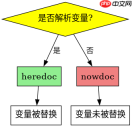
heredoc与nowdoc在处理变量时的区别是什么
heredoc会解析其中的变量并替换为实际值,而nowdoc则完全忽略变量,将其作为纯文本处理。如果你需要在输出中包含未解析的变量名(如 `$var`),应使用nowdoc;如果希望变量被自动替换,则使用heredoc。
<?php $var = "world";

// heredoc: 变量会被解析
$html_heredoc =
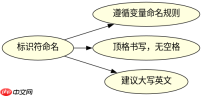
<h2>heredoc标识符命名有哪些限制和最佳实践<p>heredoc的标识符必须遵循PHP变量命名规则:只能包含字母、数字和下划线,且不能以数字开头。此外,标识符在结束时必须顶格书写,前面不能有任何空格或字符,否则会导致解析错误。建议使用大写英文单词作为标识符,以提高可读性并避免与代码中的其他标识符冲突。</p><div class="aritcle_card flexRow artxards">
											<div class="artcardd flexRow">
												<a class="aritcle_card_img" rel="nofollow" href="/xiazai/skill13222" title="Build MCP servers and clients for PHP applications with the official PHP SDK"><img
														src="https://img.php.cn/upload/skill/001/246/273/6adaf20e352aa140.jpg" alt="Build MCP servers and clients for PHP applications with the official PHP SDK" onerror="this.onerror='';this.src='/static/lhimages/moren/morentu.png'" ></a>
												<div class="aritcle_card_info flexColumn">
													<a rel="nofollow" href="/xiazai/skill13222" title="Build MCP servers and clients for PHP applications with the official PHP SDK" class="overflowclass">Build MCP servers and clients for PHP applications with the official PHP SDK</a>
													<p class="overflowclass">使用官方Model Context Protocol PHP SDK将PHP应用程序功能暴露为MCP工具、资源和提示,用于代理工作流。</p>
												</div>
												<a rel="nofollow" href="/xiazai/skill13222" title="Build MCP servers and clients for PHP applications with the official PHP SDK" class="aritcle_card_btn flexRow flexcenter"><b></b><span>下载</span>
												</a>
											</div>
										</div><p>@@##@@</p>
<pre class="brush:php;toolbar:false;"><?php // 正确示例
$content =
<h2>当heredoc中包含特殊字符时如何处理<p>在heredoc中,大多数特殊字符(如双引号、单引号、反斜杠)都不需要转义,但反斜杠本身仍需转义。例如,如果你想输出一个反斜杠,需要使用两个反斜杠 `\`。此外,heredoc不支持正则表达式中的特殊字符转义,因此在使用时需格外小心。</p>
<pre class="brush:php;toolbar:false;"><?php $text =
php免费学习视频:立即使用
踏上前端学习之旅,开启通往精通之路!从前端基础到项目实战,循序渐进,一步一个脚印,迈向巅峰!





