在 linux 中通过源码编译 nginx 以支持 stream 模块,核心做法是在执行 ./configure 时添加 --with-stream 参数。这样做会将流代理功能直接编译进 nginx 二进制文件,从而允许配置 tcp/udp 负载均衡和代理。如果未指定该参数,nginx 默认不包含此模块,导致无法处理非 http 协议的流量转发。

如何验证 stream 模块是否已正确编译?
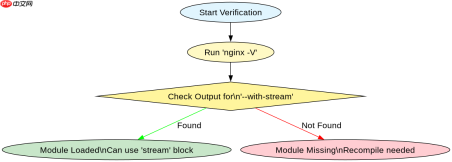
验证 stream 模块是否生效的最直接方法是使用 -V 参数运行 Nginx。该命令会输出详细的编译配置信息,检查输出字符串中是否包含 --with-stream。如果存在,说明模块已静态编译;如果缺失,则需重新编译。此外,可以通过查看 nginx -v 输出版本号后,结合配置文件中的 stream 块语法进行逻辑测试,但命令行输出是最确凿的证据。
# 假设源码目录为 /usr/local/src/nginx-1.24.0
cd /usr/local/src/nginx-1.24.0

# 清理之前的构建(可选,确保干净状态)
make clean

# 配置编译选项,关键是指定 --with-stream
./configure \
  --prefix=/etc/nginx \
  --sbin-path=/usr/sbin/nginx \
  --modules-path=/usr/lib64/nginx/modules \
  --conf-path=/etc/nginx/nginx.conf \
  --error-log-path=/var/log/nginx/error.log \
  --http-log-path=/var/log/nginx/access.log \
  --pid-path=/run/nginx.pid \
  --lock-path=/run/nginx.lock \
  --user=nginx \
  --group=nginx \
  --with-stream \
  --with-http_ssl_module \
  --with-http_v2_module \
  --with-http_gzip_static_module

# 编译并安装
make
make install

# 验证编译参数
nginx -V 2>&1 | grep with-stream
预期结果:执行 nginx -V 后,标准错误输出中包含 --with-stream 字样。此时可以在 nginx.conf 中使用 stream { ... } 块定义 TCP/UDP 代理规则,例如:
stream {
    upstream backend_db {
        server 192.168.1.10:3306;
        server 192.168.1.11:3306;
    }
    server {
        listen 3307;
        proxy_pass backend_db;
    }
}
stream 模块与 http 模块在配置结构上有何区别?
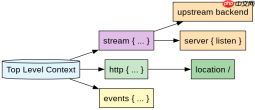
stream 模块的配置结构与 http 模块平行,而非嵌套。它位于主配置文件的顶层,与 http、mail 等模块同级。这意味着 stream 的上下文(如 upstream、server)不能放在 http 块内部,反之亦然。这种分离设计使得 Nginx 能够独立处理四层网络流量,而不受七层 HTTP 协议解析的影响。开发者在迁移或混合部署时,必须注意配置块的层级关系,避免将 listen 指令误放入 http 块中导致启动失败。

# 正确的 nginx.conf 结构示例
worker_processes auto;

events {
    worker_connections 1024;
}

# stream 块与 http 块平行
stream {
    log_format main '$remote_addr $remote_port - [$time_local] $status';
    access_log /var/log/nginx/stream_access.log main;

    upstream mysql_backend {
        hash $remote_addr consistent;
        server 10.0.0.5:3306 max_fails=3 fail_timeout=5s;
        server 10.0.0.6:3306 max_fails=3 fail_timeout=5s;
    }

    server {
        listen 3306;
        proxy_connect_timeout 1s;
        proxy_timeout 3s;
        proxy_pass mysql_backend;
    }
}

http {
    # HTTP 相关配置...
    server {
        listen 80;
        location / {
            root /usr/share/nginx/html;
        }
    }
}
预期结果:Nginx 启动时不会报错,且能同时监听 3306(TCP)和 80(HTTP)端口。如果将 stream 块错误地放置在 http 块内,Nginx 启动时会抛出 unknown directive "stream" 错误。同样,如果在 stream 块内使用了 location 指令,也会因语法不支持而失败。这种结构上的隔离确保了四层代理功能的纯粹性和高性能。
当 stream 上游服务器全部宕机时,Nginx 的行为是什么?
当 stream 模块配置的上游服务器全部不可用时,Nginx 会根据 proxy_next_upstream 指令(默认为 error timeout)尝试重连其他服务器。如果所有服务器均标记为故障或无可用服务器,连接将被拒绝,客户端通常会收到 Connection refused 或超时错误。具体行为取决于底层 TCP 栈的实现,但 Nginx 本身不会返回 HTTP 错误码,而是直接断开 TCP 连接。开发者可以通过调整 max_fails 和 fail_timeout 来控制故障检测的灵敏度,避免因短暂网络抖动导致服务中断。