






Nginx 中 rewrite 怎么配合 expires 为重写页面设置缓存
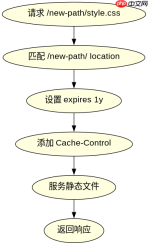
在 nginx 中,rewrite 指令负责将请求重定向到新的 url,而 expires 指令用于控制响应头中的缓存过期时间。要让被重写后的页面正确设置缓存,关键在于确保 expires 指令作用于最终返回内容的 location 块中,而不是仅仅在 server 块或旧的 location 中生效。通常的做法是:先通过 rewrite 规则匹配旧路径并重写到新路径(如静态资源路径),然后在对应新路径的 location 块中配置 expires,这样 nginx 在处理重写后的请求时,会应用该 location 的缓存策略。

如何为特定类型的重写结果设置长期缓存
对于被重写为静态资源(如 JS、CSS、图片)的请求,可以设置较长的缓存时间,例如一年。这能显著减少重复请求,提升性能。具体做法是在匹配这些文件扩展名的 location 块中使用 expires 1y;。需要注意的是,如果重写规则涉及版本化文件名(如 app.v1.js),则无需担心缓存更新问题;若使用非版本化文件名,则需结合内容哈希或强制刷新机制来避免用户获取旧缓存。

server {
    listen 80;
    server_name example.com;

    # 旧路径重写为新路径
    rewrite ^/old-path/(.*)$ /new-path/$1 last;

    # 新路径的 location 块,设置缓存
    location /new-path/ {
        root /var/www/html;
        expires 1y;
        add_header Cache-Control "public, immutable";
    }

    # 其他默认处理
    location / {
        try_files $uri $uri/ =404;
    }
}
如何处理动态内容重写后的短缓存策略
当重写规则指向动态内容(如 API 接口或生成式页面)时,通常不建议设置长缓存,而是采用较短的缓存时间或不缓存。例如,可以使用 expires -1; 或 add_header Cache-Control no-cache; 来禁止浏览器缓存。此外,若动态内容依赖用户会话或实时数据,应确保 proxy_cache 或应用层逻辑正确处理缓存失效。在实际部署中,可结合 if 条件判断请求类型,分别应用不同的缓存策略。

server {
    listen 80;
    server_name example.com;

    # 动态内容重写
    rewrite ^/api/v1/(.*)$ /backend/api/$1 last;

    # 动态 API 的 location 块,禁用缓存
    location /backend/api/ {
        proxy_pass http://127.0.0.1:8080;
        proxy_set_header Host $host;
        proxy_set_header X-Real-IP $remote_addr;
        add_header Cache-Control "no-cache, no-store, must-revalidate";
        add_header Pragma "no-cache";
        add_header Expires "0";
    }

    # 其他默认处理
    location / {
        try_files $uri $uri/ =404;
    }
}


