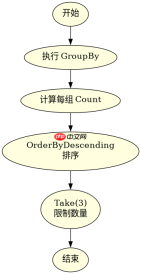
使用 linq 的 groupby 将数据分组,接着用 select 投影出分组键和计数值,然后调用 orderbydescending 按数量降序排列,最后通过 take 截取前 n 个结果。这种方法能直接获取统计数量最多的前几个分组及其对应的数据。

如何对分组后的数据进行降序排序并限制返回数量?
在获取分组统计后,必须显式指定排序规则,否则分组顺序不确定。通过 OrderByDescending(g => g.Count()) 可以确保数量多的组排在前面,配合 .Take(3) 即可精准拿到前三组。若需处理并列情况,可结合 Skip 或进一步筛选,但基础场景下直接取 Top N 最为高效。
using System;
using System.Collections.Generic;
using System.Linq;

public class Program
{
    public static void Main()
    {
        var items = new List<string>
        {
            "Apple", "Banana", "Apple", "Orange", "Banana", "Apple",
            "Banana", "Grape", "Orange", "Apple"
        };

        var topGroups = items
            .GroupBy(x => x)
            .Select(g => new { Name = g.Key, Count = g.Count() })
            .OrderByDescending(x => x.Count)
            .Take(3);

        foreach (var group in topGroups)
        {
            Console.WriteLine($"{group.Name}: {group.Count}");
        }
    }
}</string>
预期输出:
Apple: 4
Banana: 3
Orange: 2
如果需要在获取 Top N 分组的同时保留原始分组数据怎么办?
上述示例仅返回了键和计数,若需获取该分组下的所有原始元素,应在 Select 中直接保留 IGrouping 对象,或者在投影时包含 Items = g.ToList()。这样可以在一次查询中同时获得统计信息和具体明细,避免二次查询数据库或集合。


using System;
using System.Collections.Generic;
using System.Linq;

public class Program
{
    public static void Main()
    {
        var items = new List<string>
        {
            "Apple", "Banana", "Apple", "Orange", "Banana", "Apple",
            "Banana", "Grape", "Orange", "Apple"
        };

        var topGroupsWithDetails = items
            .GroupBy(x => x)
            .OrderByDescending(g => g.Count())
            .Take(2)
            .Select(g => new
            {
                Key = g.Key,
                Count = g.Count(),
                Items = g.ToList()
            });

        foreach (var group in topGroupsWithDetails)
        {
            Console.WriteLine($"Group: {group.Key}, Count: {group.Count}");
            Console.WriteLine(string.Join(", ", group.Items));
        }
    }
}</string>
预期输出:
Group: Apple, Count: 4
Apple, Apple, Apple, Apple
Group: Banana, Count: 3
Banana, Banana, Banana
当存在多个分组数量相同时,Take 会如何选择?
Take 方法严格基于排序后的索引位置截取,不关心数值是否相等。如果第 N 名和第 N+1 名数量相同,Take(N) 只会保留前者,后者被丢弃。若业务要求“并列也显示”,则不能使用 Take,而应使用 Where 过滤出等于第 N 名数量的所有分组,或使用 DistinctBy 等高级技巧,但这超出了基础 Top N 的范畴。