






在 nginx 中配置 x-forwarded-proto 头,需要在 location 块中使用 proxy_set_header x-forwarded-proto $scheme;。这会将当前请求使用的协议(http 或 https)传递给后端应用,确保后端能正确识别连接安全性。

如何获取客户端真实 IP 地址
要获取客户端真实 IP,需配置 proxy_set_header X-Real-IP $remote_addr; 和 proxy_set_header X-Forwarded-For $proxy_add_x_forwarded_for;。$remote_addr 直接记录客户端 IP,而 $proxy_add_x_forwarded_for 会在原有链后追加当前代理 IP,形成完整的信任链。
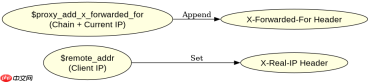
server {
    listen 80;
    server_name example.com;

    location / {
        proxy_pass http://backend_app;
        proxy_set_header Host $host;
        proxy_set_header X-Real-IP $remote_addr;
        proxy_set_header X-Forwarded-For $proxy_add_x_forwarded_for;
        proxy_set_header X-Forwarded-Proto $scheme;
    }
}
预期结果:后端接收到 X-Real-IP 为客户端 IP,X-Forwarded-For 包含完整路径,X-Forwarded-Proto 为 http。
如何处理 HTTPS 终止后的协议头
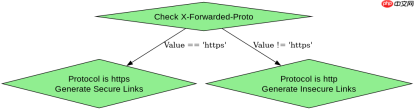
当 Nginx 作为 SSL 终端时,它处理了加密并解密了流量,此时 $scheme 变量值为 http。如果后端需要知道原始请求是 https,必须显式设置 X-Forwarded-Proto 为 https,或者依赖 $scheme 但需确保后端理解这是终止后的状态。通常建议在后端配置中检查此头以决定重定向行为。

# SSL Termination Example
server {
    listen 443 ssl;
    server_name secure.example.com;

    ssl_certificate /path/to/cert.pem;
    ssl_certificate_key /path/to/key.pem;

    location / {
        proxy_pass http://backend_app;
        proxy_set_header X-Forwarded-Proto https; # 强制指定为 https
        proxy_set_header Host $host;
    }
}
预期结果:即使内部通信是 HTTP,后端接收到的 X-Forwarded-Proto 始终为 https,从而生成正确的安全链接。
当后端服务未正确解析 XForwardedProto 时会发生什么
如果后端服务未正确解析 X-Forwarded-Proto,它可能会错误地认为连接是不安全的,从而导致混合内容警告、重定向循环或安全策略失效。例如,Node.js 的 Express 框架默认信任最后一个代理的信任度,若配置不当,可能忽略该头。
// Node.js Express Example
const app = require('express')();
app.set('trust proxy', true); // 信任所有代理
app.get('/', (req, res) => {
    console.log(req.protocol); // 输出由 X-Forwarded-Proto 决定
    if (req.protocol === 'https') {
        res.send('Secure');
    } else {
        res.send('Insecure');
    }
});
app.listen(3000); // 运行在 backend_app
预期结果:当 Nginx 发送 X-Forwarded-Proto: https 时,Express 应用通过 req.protocol 获取到 https,返回 'Secure'。若未设置或解析失败,则返回 'Insecure'。


