使用 readfile() 配合分块读取或流式输出是解决大文件下载内存溢出的标准做法。直接调用 readfile() 时,php 会将整个文件内容加载到缓冲区并一次性发送给客户端,这会导致内存占用等于文件大小。通过设置 ignore_user_abort(true) 和循环读取小块数据(如 8192 字节),可以确保无论文件多大,内存占用始终保持在极低的水平。

readfile() 导致内存溢出
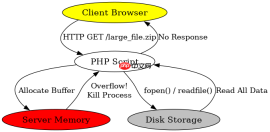
当直接使用 readfile() 处理超过服务器可用内存的大文件时,PHP 会抛出 Fatal error: Allowed memory size exhausted。这是因为 readfile() 内部实现通常涉及将文件内容读入一个大的字符串变量中,然后将其写入输出缓冲区。如果文件为 500MB,而 PHP 的 memory_limit 设置为 128MB,脚本就会立即崩溃。
function downloadFile($filePath) {
    if (!file_exists($filePath)) {
        http_response_code(404);
        echo "File not found";
        return;
    }

    // 设置响应头
    header('Content-Description: File Transfer');
    header('Content-Type: application/octet-stream');
    header('Content-Disposition: attachment; filename="' . basename($filePath) . '"');
    header('Expires: 0');
    header('Cache-Control: must-revalidate');
    header('Pragma: public');
    header('Content-Length: ' . filesize($filePath));

    // 危险操作:尝试一次性读取并输出大文件
    readfile($filePath);
}

// 假设 $filePath 指向一个 1GB 的文件
// downloadFile('/path/to/large_file.zip');
// 结果:Fatal error: Allowed memory size exhausted
上述代码在调用 readfile() 时,PHP 解释器试图分配与文件大小相等的内存空间来存储文件内容。对于小文件这是可行的,但对于大文件,这违反了服务器的内存限制。解决方法是不依赖 readfile() 的内部缓冲机制,而是手动控制数据的流动。
分块流式下载实现
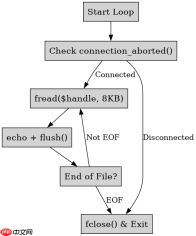
通过 fopen() 打开文件句柄,并使用 fread() 在循环中每次只读取固定大小(例如 8KB)的数据块,然后立即通过 echo 输出,可以有效避免内存累积。这种方法下,内存峰值仅取决于块的大小,而非文件的总大小。

function streamDownload($filePath) {
    if (!file_exists($filePath)) {
        http_response_code(404);
        return;
    }

    header('Content-Description: File Transfer');
    header('Content-Type: application/octet-stream');
    header('Content-Disposition: attachment; filename="' . basename($filePath) . '"');
    header('Content-Transfer-Encoding: binary');
    header('Expires: 0');
    header('Cache-Control: must-revalidate');
    header('Pragma: public');
    header('Content-Length: ' . filesize($filePath));

    // 优化:忽略用户中断,防止因网络问题导致脚本提前终止
    ignore_user_abort(true);
    set_time_limit(0); // 解除执行时间限制

    $chunkSize = 8192; // 8KB 块大小
    $handle = fopen($filePath, 'rb');

    if ($handle === false) {
        return;
    }

    while (!feof($handle)) {
        echo fread($handle, $chunkSize);
        // 可选:flush() 强制将缓冲区数据发送到客户端
        // flush();
    }

    fclose($handle);
}

// 测试:下载一个 1GB 的文件
// streamDownload('/path/to/large_file.zip');
// 结果:内存占用稳定在几 MB,无溢出错误
该实现的核心在于 fread($handle, $chunkSize) 只从磁盘读取指定字节数,而不是全部。每次循环后,旧的数据块被丢弃,新的数据块被读取,从而保持内存低位。同时,set_time_limit(0) 确保了长时间传输不会因超时中断。
大文件下载时的连接中断处理
在使用分块流式下载时,如果用户在浏览器中点击“停止”或关闭标签页,PHP 脚本默认会继续运行直到完成或达到超时时间,这会浪费服务器资源。通过检查 connection_status() 或 connection_aborted(),可以在检测到客户端断开连接时优雅地终止脚本,释放文件句柄并结束进程。
function safeStreamDownload($filePath) {
    if (!file_exists($filePath)) {
        http_response_code(404);
        return;
    }

    header('Content-Description: File Transfer');
    header('Content-Type: application/octet-stream');
    header('Content-Disposition: attachment; filename="' . basename($filePath) . '"');
    header('Content-Length: ' . filesize($filePath));

    ignore_user_abort(true);
    set_time_limit(0);

    $chunkSize = 8192;
    $handle = fopen($filePath, 'rb');

    if ($handle === false) {
        return;
    }

    while (!feof($handle)) {
        // 检查连接是否已中止
        if (connection_aborted()) {
            break; // 优雅退出
        }

        echo fread($handle, $chunkSize);
        flush(); // 确保数据立即发送
    }

    fclose($handle);
}

// 测试场景:启动下载后,立即关闭浏览器标签
// safeStreamDownload('/path/to/large_file.zip');
// 结果:脚本立即停止,文件句柄正确关闭,无后台残留进程
在此场景中,connection_aborted() 返回 true 表示客户端已断开。此时跳出循环并调用 fclose() 是关键步骤,它防止了文件描述符泄漏。这种处理方式特别适用于高并发环境下的文件服务,确保服务器资源不被无效请求占用。
php免费学习视频:立即使用
踏上前端学习之旅,开启通往精通之路!从前端基础到项目实战,循序渐进,一步一个脚印,迈向巅峰!