PHP强制下载文件代码完整异常处理trycatch
在php中实现强制下载并完善异常处理,核心在于使用 readfile() 或 fopen() 配合正确的http响应头,并将整个流程包裹在 try...catch 块中以捕获文件系统错误或权限问题。具体做法是设置 content-type 为 application/octet-stream,添加 content-disposition 指定文件名,并在 try 块中执行文件读取和输出,在 catch 块中记录错误并返回用户友好的提示,确保即使发生异常也不会导致页面白屏或数据泄露。

如何验证文件存在性与权限
在执行下载逻辑前,必须通过 file_exists() 检查文件路径是否存在,并使用 is_readable() 确认当前进程是否有读取权限,这是防止抛出未捕获异常的第一道防线。如果文件不存在或不可读,程序应直接抛出 RuntimeException 或自定义异常,以便上层 catch 块统一处理。这种前置校验能避免 readfile() 在底层静默失败或产生难以调试的警告信息,确保下载的可靠性。
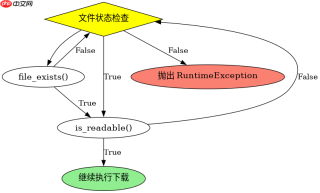
<?php function downloadFile($filePath, $fileName) {
    try {
        if (!file_exists($filePath)) {
            throw new RuntimeException("File not found: " . $filePath);
        }
        if (!is_readable($filePath)) {
            throw new RuntimeException("File is not readable: " . $filePath);
        }

        header('Content-Description: File Transfer');
        header('Content-Type: application/octet-stream');
        header('Content-Disposition: attachment; filename="' . basename($fileName) . '"');
        header('Expires: 0');
        header('Cache-Control: must-revalidate');
        header('Pragma: public');
        header('Content-Length: ' . filesize($filePath));

        readfile($filePath);
        exit;
    } catch (Exception $e) {
        http_response_code(404);
        echo "Error: " . $e->getMessage();
    }
}

// 示例调用
downloadFile('/var/www/html/data/report.pdf', 'report.pdf');
如何处理大文件与内存溢出
对于大文件,直接使用 readfile() 可能会因为一次性加载过多内容而导致内存溢出,尤其是在服务器配置较低时。此时应改用 fopen() 结合 fread() 进行分块读取,每次读取固定字节数(如8192字节)并立即输出,从而将内存占用控制在极低水平。这种方法虽然代码稍长,但能显著提升大文件下载的稳定性,避免 Catchable fatal error 或内存耗尽导致的脚本终止。


<?php function downloadLargeFile($filePath, $fileName) {
    try {
        if (!file_exists($filePath) || !is_readable($filePath)) {
            throw new RuntimeException("Invalid file path or permissions.");
        }

        header('Content-Description: File Transfer');
        header('Content-Type: application/octet-stream');
        header('Content-Disposition: attachment; filename="' . basename($fileName) . '"');
        header('Content-Length: ' . filesize($filePath));
        header('Connection: Keep-Alive');
        header('Keep-Alive: timeout=5, max=100');

        $chunkSize = 8192;
        $handle = fopen($filePath, 'rb');
        if ($handle === false) {
            throw new RuntimeException("Failed to open file handle.");
        }

        while (!feof($handle)) {
            echo fread($handle, $chunkSize);
            flush();
        }
        fclose($handle);
        exit;
    } catch (Exception $e) {
        http_response_code(500);
        echo "Download Error: " . $e->getMessage();
    }
}

// 示例调用
downloadLargeFile('/var/www/html/large_data.zip', 'large_data.zip');
基于Content-Disposition参数乱码的具体问题
当文件名包含中文或非ASCII字符时,Content-Disposition 头中的文件名部分若未正确编码,会导致浏览器端显示乱码或拒绝下载。这是因为HTTP协议默认使用ISO-8859-1编码传输头部字段,而现代浏览器期望UTF-8编码。解决方法是使用 rawurlencode() 对文件名进行URL编码,或者遵循RFC 6266标准,使用 filename*=UTF-8'' 格式指定编码后的文件名,确保跨浏览器兼容性。
,
php免费学习视频:立即使用
踏上前端学习之旅,开启通往精通之路!从前端基础到项目实战,循序渐进,一步一个脚印,迈向巅峰!