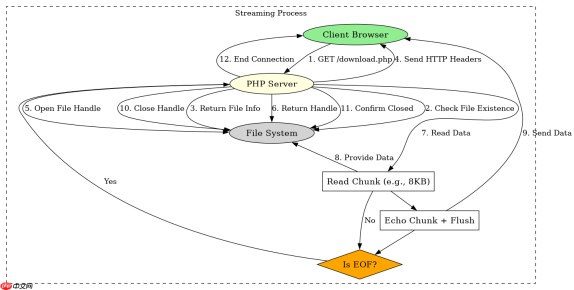
使用 fpassthru() 配合 readfile() 或流式读取实现大文件下载时,核心在于正确设置 http 响应头并避免输出缓冲干扰。具体做法是:先发送 content-type、content-disposition(设为 attachment)、content-length 和 accept-ranges 等头部,然后打开文件句柄,通过循环读取小块数据并使用 fread() 结合 echo 或 ob_flush() 输出,或者直接使用 fpassthru() 一次性输出剩余内容。若需支持断点续传,需解析 range 请求头并调整文件指针位置;否则直接从头开始流式传输即可。

如何设置正确的HTTP响应头以触发浏览器下载对话框?
要强制浏览器下载而非预览文件,必须设置 Content-Disposition: attachment 头部。同时需要指定 Content-Type 为 application/octet-stream 以告知浏览器这是二进制流,并计算 Content-Length 以便显示进度条。对于大文件,建议添加 Accept-Ranges: bytes 以支持断点续传,但这会增加服务端逻辑复杂度。若不处理 Range 请求,直接忽略该头部也可,但用户体验会下降。
<?php $file = '/path/to/large/file.zip';
if (!file_exists($file)) {
    http_response_code(404);
    die('File not found');
}

// 获取文件大小
$size = filesize($file);

// 设置响应头
header('Content-Description: File Transfer');
header('Content-Type: application/octet-stream');
header('Content-Disposition: attachment; filename="' . basename($file) . '"');
header('Expires: 0');
header('Cache-Control: must-revalidate');
header('Pragma: public');
header('Content-Length: ' . $size);
header('Accept-Ranges: bytes');

// 清除输出缓冲
if (ob_get_level()) {
    ob_end_clean();
}

// 打开文件并流式输出
$handle = fopen($file, 'rb');
if ($handle === false) {
    die('Cannot open file');
}

// 可选:支持断点续传
if (isset($_SERVER['HTTP_RANGE'])) {
    // 简单解析 Range 头,实际生产环境应更健壮
    preg_match('/bytes=(\d+)-/', $_SERVER['HTTP_RANGE'], $matches);
    if (isset($matches[1])) {
        $start = (int)$matches[1];
        fseek($handle, $start);
        header('HTTP/1.1 206 Partial Content');
        header('Content-Length: ' . ($size - $start));
        header('Content-Range: bytes ' . $start . '-' . ($size - 1) . '/' . $size);
    }
}

// 流式输出
while (!feof($handle)) {
    echo fread($handle, 8192);
    flush();
}

fclose($handle);
exit;
?>
上述代码在接收到请求后,首先检查文件是否存在,然后设置一系列 HTTP 头部。关键步骤是使用 fopen 打开文件,并通过 fread 循环读取 8KB 数据块,每次读取后立即 echo 并调用 flush() 将数据推送到客户端。这种方式避免了将整个文件加载到内存中,适合大文件。如果存在 HTTP_RANGE 头,则尝试支持断点续传,通过 fseek 移动文件指针到指定位置,并返回 206 状态码及相应的 Content-Range 头部。
为什么fpassthru()在某些情况下会导致内存溢出或超时?
fpassthru() 函数会将文件指针当前位置到末尾的所有内容直接输出到输出缓冲区。如果文件非常大且未进行分块处理,它可能会尝试一次性读取大量数据,导致 PHP 进程内存占用激增或执行时间超过限制。此外,如果之前有输出缓冲(如 ob_start())未被正确清理,fpasthu() 的输出可能会被缓冲,直到缓冲区满或脚本结束才发送,这可能导致客户端长时间无响应。因此,在使用 fpassthru() 前,务必确保已关闭所有输出缓冲,并考虑使用分块读取方式以获得更好的控制。


<?php // 模拟一个较大的文件
$largeFile = '/tmp/large_file.dat';
if (!file_exists($largeFile)) {
    // 创建一个测试文件
    $f = fopen($largeFile, 'w');
    for ($i = 0; $i < 1000; $i++) {
        fwrite($f, str_repeat('A', 1024 * 1024)); // 1MB chunks
    }
    fclose($f);
}

header('Content-Type: application/octet-stream');
header('Content-Disposition: attachment; filename="test.dat"');
header('Content-Length: ' . filesize($largeFile));

// 清除所有输出缓冲
while (ob_get_level() > 0) {
    ob_end_flush();
}

$handle = fopen($largeFile, 'rb');
if ($handle) {
    // 使用 fpassthru 直接输出剩余内容
    // 注意:如果之前有 fread 操作,fpassthru 会从当前指针继续
    // 这里假设从头开始
    fseek($handle, 0);
    fpassthru($handle);
    fclose($handle);
} else {
    die('Failed to open file');
}
?>
此示例展示了如何使用 fpassthru()。首先创建一个大文件用于测试。然后设置必要的 HTTP 头部。关键在于使用 while (ob_get_level() > 0) { ob_end_flush(); } 来确保所有输出缓冲都被清除,这样 fpassthru() 的输出才能直接发送到客户端。接着打开文件,使用 fseek($handle, 0) 将指针重置到文件开头,最后调用 fpassthru($handle) 输出全部内容。这种方法简洁,但对于超大型文件,仍建议采用分块读取以避免潜在的内存问题。
当用户取消下载时,服务器端资源如何正确释放?
当用户取消下载时,PHP 脚本通常会因为连接断开而终止,此时 PHP 会自动清理大部分资源,包括关闭文件句柄。然而,为了确保资源的及时释放和良好的行为,最好在脚本结束时显式关闭文件句柄。可以使用 register_shutdown_function() 来注册一个回调函数,在脚本正常或异常终止时执行清理工作。此外,设置 ignore_user_abort(true) 可以防止因用户断开连接而导致脚本立即终止,从而允许后台任务继续运行,但在下载场景中通常不需要这样做,因为我们需要在用户取消时尽快停止传输并释放资源。
<?php // 注册关闭函数以确保资源释放
register_shutdown_function(function () {
    global $fileHandle;
    if (isset($fileHandle) && is_resource($fileHandle)) {
        fclose($fileHandle);
    }
});

$file = '/path/to/large/file.zip';
$handle = fopen($file, 'rb');
$fileHandle = $handle; // 供关闭函数访问

if (!$handle) {
    die('Error opening file');
}

header('Content-Type: application/octet-stream');
header('Content-Disposition: attachment; filename="' . basename($file) . '"');
header('Content-Length: ' . filesize($file));

// 流式输出
while (!feof($handle)) {
    // 检查用户是否已断开连接
    if (connection_aborted()) {
        break;
    }
    echo fread($handle, 8192);
    flush();
}

// 显式关闭文件句柄
if (is_resource($handle)) {
    fclose($handle);
}
?>
在这个改进的版本中,我们使用了 register_shutdown_function() 来确保即使脚本因错误或其他原因提前终止,文件句柄也能被正确关闭。同时,在输出循环中加入了 connection_aborted() 检查,一旦检测到用户断开连接,立即跳出循环,避免不必要的 I/O 操作。最后,显式调用 fclose() 关闭文件句柄。这种处理方式更加健壮,确保了资源的及时释放。
php免费学习视频:立即使用
踏上前端学习之旅,开启通往精通之路!从前端基础到项目实战,循序渐进,一步一个脚印,迈向巅峰!