






通过监听页面滚动事件,在接近底部时调用 fetch 请求下一页数据并追加到 dom 中即可实现。核心做法是维护一个页码变量,每次请求携带 ?page=n 参数,并在响应后更新页码;若返回数据为空或不足一页则停止加载。

如何检测用户已滚动到底部
使用 window.innerHeight、document.documentElement.scrollTop 和 document.documentElement.scrollHeight 计算当前可视区域与文档总高度的关系。当剩余距离小于阈值(如 100px)时触发加载逻辑。
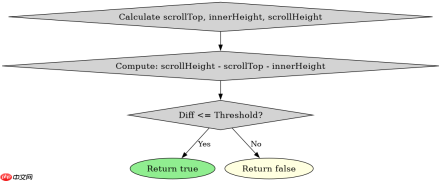
const threshold = 100;
function isNearBottom() {
  const scrollTop = window.scrollY || document.documentElement.scrollTop;
  const windowHeight = window.innerHeight;
  const docHeight = document.documentElement.scrollHeight;
  return (docHeight - scrollTop - windowHeight) <p>该函数返回布尔值,用于判断是否应发起下一次请求。实际使用时需绑定到 <code>scroll</code> 事件监听器中,并建议配合防抖或节流策略避免频繁触发。</p><div class="aritcle_card flexRow artxards">
											<div class="artcardd flexRow">
												<a class="aritcle_card_img" rel="nofollow" href="/xiazai/skill12540" title="javascript-typescript-typescript-scaffold"><img
														src="https://img.php.cn/upload/skill/001/246/273/6adaf20e352aa140.jpg" alt="javascript-typescript-typescript-scaffold" onerror="this.onerror='';this.src='/static/lhimages/moren/morentu.png'" ></a>
												<div class="aritcle_card_info flexColumn">
													<a rel="nofollow" href="/xiazai/skill12540" title="javascript-typescript-typescript-scaffold" class="overflowclass">javascript-typescript-typescript-scaffold</a>
													<p class="overflowclass">你是 TypeScript 项目架构专家,专注于脚手架搭建生产就绪的 Node.js 和前端应用。生成包含现代工具链(pnpm、Vite、Next.js)、类型</p>
												</div>
												<a rel="nofollow" href="/xiazai/skill12540" title="javascript-typescript-typescript-scaffold" class="aritcle_card_btn flexRow flexcenter"><b></b><span>下载</span>
												</a>
											</div>
										</div><h2>如何管理分页状态与终止条件</h2><p>维护一个全局的 <code>currentPage</code> 变量初始为 1,每次成功加载后将 <code>currentPage++</code>。同时设置一个标志位 <code>isLoading</code> 防止重复请求。当服务器返回空数组或长度小于每页固定数量时,认为无更多数据,可移除滚动监听或禁用加载按钮。</p><p><img src="https://img.php.cn/upload/article/001/242/473/179445380033972.png?x-oss-process=image/resize,p_40" alt="JavaScript Fetch API 怎么实现无限滚动加载数据"></p><pre class="brush:php;toolbar:false;">let currentPage = 1;
let isLoading = false;
const pageSize = 10;

async function loadMore() {
  if (isLoading) return;
  isLoading = true;
  try {
    const res = await fetch(`/api/items?page=${currentPage}&size=${pageSize}`);
    const data = await res.json();
    if (data.length === 0) {
      console.log('No more items');
      window.removeEventListener('scroll', handleScroll);
      return;
    }
    appendItems(data);
    currentPage++;
  } catch (err) {
    console.error('Fetch failed:', err);
  } finally {
    isLoading = false;
  }
}
上述代码展示了完整的异步加载流程:检查锁、发起请求、处理响应、更新状态、异常捕获。其中 appendItems() 需自行实现 DOM 插入逻辑。注意 fetch 不会自动重试失败请求,需根据业务需求决定是否需要重试机制。
大量免费API接口:立即使用
涵盖生活服务API、金融科技API、企业工商API、等相关的API接口服务。免费API接口可安全、合规地连接上下游,为数据API应用能力赋能!





