在 nginx 中,`try_files` 和 `add_header` 配合使用设置缓存头时,核心在于理解 `add_header` 的作用域继承规则。默认情况下,`add_header` 仅在 `server` 和 `location` 块中生效,如果请求被 `try_files` 内部重定向到另一个 location(例如从 `/` 重定向到 `/index.html`),子 location 中的 `add_header` 会覆盖父级,导致父级的缓存头丢失。因此,必须在每个可能匹配的路径对应的 `location` 块中都显式声明 `add_header cache-control`,或者将逻辑封装在独立的配置片段中并包含进来。

为什么 try_files 会导致 add_header 失效
当 Nginx 处理请求时,如果 `try_files` 找不到直接匹配的文件,它会尝试进行内部重定向。例如,在根目录 `/` 的 location 中配置了 `try_files $uri $uri/ /index.html;`,如果用户访问 `/about` 且该文件不存在,Nginx 会将请求内部重定向到 `/index.html`。此时,请求进入新的 location 上下文(通常是匹配 `/index.html` 或 `/` 的 location)。如果在这些子 location 中没有重新定义 `add_header`,父级 location 中设置的 `Cache-Control` 头就不会被添加到响应中。这是开发者常遇到的陷阱,误以为在顶层 location 设置一次即可全局生效。
server {
    listen 80;
    server_name example.com;
    root /var/www/html;

    # 方案:在每个相关 location 中重复设置 header
    location / {
        try_files $uri $uri/ /index.html;
        add_header Cache-Control "public, max-age=31536000";
        add_header X-Content-Type-Options nosniff;
    }

    # 静态资源单独处理,确保缓存头生效
    location ~* \.(js|css|png|jpg|jpeg|gif|ico)$ {
        expires 30d;
        add_header Cache-Control "public, immutable";
        add_header X-Content-Type-Options nosniff;
    }
}
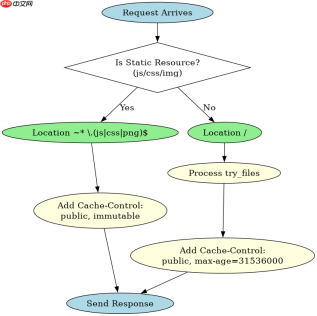
上述配置展示了最稳妥的做法。在 `location /` 中,我们设置了 `try_files` 以支持 SPA 路由,同时添加了 `Cache-Control`。关键在于,对于静态资源,我们使用了正则匹配的 location。由于 Nginx 会选择最精确匹配的 location,静态资源的请求不会进入 `location /`,而是进入静态资源 location。因此,我们必须在那个 location 中也添加 `add_header`。如果不加,静态资源将没有缓存头。这种“显式声明”的方式避免了继承丢失的问题。
如何验证缓存头是否正确设置
验证缓存头是否生效,最直接的方法是使用 `curl` 命令查看响应头。通过发送请求并检查 `Cache-Control` 字段,可以确认 Nginx 是否正确添加了头部。需要注意的是,如果使用浏览器开发工具,可能会因为缓存机制看到旧的结果,因此建议使用 `curl -I` 或禁用浏览器缓存进行测试。此外,还可以检查 `X-Content-Type-Options` 等其他自定义头部,确保它们也按预期出现。


# 测试 HTML 页面
$ curl -I http://example.com/about
HTTP/1.1 200 OK
Server: nginx/1.24.0
Date: Mon, 01 Jan 2024 00:00:00 GMT
Content-Type: text/html
Cache-Control: public, max-age=31536000
X-Content-Type-Options: nosniff

# 测试静态 JS 文件
$ curl -I http://example.com/app.js
HTTP/1.1 200 OK
Server: nginx/1.24.0
Date: Mon, 01 Jan 2024 00:00:00 GMT
Content-Type: application/javascript
Cache-Control: public, immutable
X-Content-Type-Options: nosniff
运行上述 `curl` 命令后,观察输出结果。对于 `/about` 请求,即使它最终由 `index.html` 提供服务,只要 `location /` 中的 `add_header` 生效,就会返回 `Cache-Control: public, max-age=31536000`。对于 `.js` 文件,请求匹配到静态资源 location,应返回 `Cache-Control: public, immutable`。如果某个请求缺少预期的 `Cache-Control` 头,说明该请求进入了未设置 `add_header` 的 location 块,需要检查 `try_files` 的重定向路径或 location 的优先级。
基于 try_files 重定向到 index.html 时的具体行为
当 `try_files` 将请求重定向到 `/index.html` 时,Nginx 的行为取决于 `/index.html` 是否被一个特定的 location 块捕获。如果 `/index.html` 没有被单独的 location 块匹配,它将回退到 `location /`。在这种情况下,`location /` 中的 `add_header` 会生效。但是,如果存在一个专门针对 `/index.html` 或类似模式的 location 块,且该块中没有 `add_header`,则缓存头会丢失。因此,必须确保所有可能被 `try_files` 指向的路径都有相应的 `add_header` 定义。例如,如果配置了 `location = /index.html { ... }`,则必须在该块中添加 `add_header`,否则重定向后的请求将没有缓存头。