在 nginx 中配置独立日志文件,核心做法是在 `http` 块中定义包含占位符的 `log_format`,然后在具体的 `location` 或 `server` 块中使用 `access_log` 指令指向该格式和路径。通过这种方式,不同 location 可以记录不同格式的访问数据到不同的文件中。

如何定义自定义日志格式
使用 log_format 指令可以在 nginx.conf 的 http 上下文中创建新的日志格式。该指令需要指定一个名称(如 my_format)以及一系列变量,例如 $remote_addr、$request 和 $status。定义后,这个名称就可以在其他地方引用。

http {
    log_format my_format '$remote_addr - $remote_user [$time_local] '
                         '"$request" $status $body_bytes_sent '
                         '"$http_referer" "$http_user_agent"';

    server {
        listen 80;
        server_name example.com;

        location /api {
            access_log /var/log/nginx/api_access.log my_format;
            proxy_pass http://backend;
        }

        location /static {
            access_log /var/log/nginx/static_access.log combined;
        }
    }
}
如何在 Location 中应用独立日志
在 location 块中,通过 access_log 指令指定日志文件的路径和使用的格式。如果省略格式参数,默认使用 combined 格式。为每个 location 设置不同的路径可以实现日志分离,便于后续分析特定模块的流量。

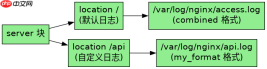
# 假设上述 http 块已存在
server {
    listen 80;
    server_name example.com;

    # 根目录使用默认日志
    location / {
        root /usr/share/nginx/html;
        index index.html;
        # 使用默认的 combined 格式
    }

    # API 接口使用自定义格式和独立文件
    location /api/ {
        proxy_pass http://127.0.0.1:8080;
        access_log /var/log/nginx/api_custom.log my_format;
    }

    # 错误日志单独记录
    error_log /var/log/nginx/error.log warn;
}
基于 $request_uri 变量的具体应用问题
在日志格式中直接使用 $request_uri 变量可以记录完整的请求 URI,包括查询字符串。这对于追踪特定 API 端点或带参数的静态资源非常有用。需要注意的是,$request_uri 是只读的,且始终包含原始请求中的 URI 部分,不会因内部重定向而改变。