






socketchannel 的 configureblocking(false) 用于将其切换为非阻塞模式,这是实现 java nio 多路复用(selector)的前提。调用该方法后,read() 和 write() 操作将立即返回,不再挂起线程等待 i/o 完成,从而允许单线程通过 selector 管理多个连接。

非阻塞模式下 read() 返回空数据时如何处理
当 read() 方法在非阻塞模式下没有数据可读时,它会直接返回 0,而不是像阻塞模式那样挂起线程。开发者必须在代码中显式检查返回值是否为 0,并执行相应的逻辑(如继续处理其他通道或休眠),否则会导致 CPU 占用率飙升。
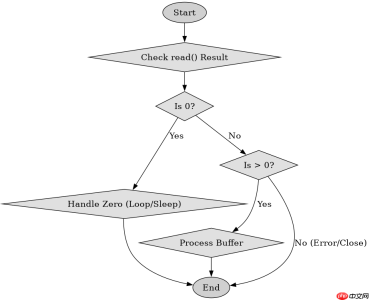
import java.io.IOException;
import java.net.InetSocketAddress;
import java.nio.ByteBuffer;
import java.nio.channels.SocketChannel;

public class NonBlockingExample {
    public static void main(String[] args) throws IOException {
        SocketChannel channel = SocketChannel.open();
        channel.configureBlocking(false);
        channel.connect(new InetSocketAddress("localhost", 8080));

        ByteBuffer buffer = ByteBuffer.allocate(1024);
        int bytesRead = channel.read(buffer);

        if (bytesRead == 0) {
            System.out.println("No data available, handle other tasks.");
        } else if (bytesRead > 0) {
            buffer.flip();
            // Process data
        }
    }
}
非阻塞 connect() 如何判断连接是否建立
在非阻塞模式下,connect() 方法会立即返回,即使 TCP 握手尚未完成。要判断连接是否真正建立,需要调用 finishConnect()。如果连接正在建立中,finishConnect() 会抛出 NotYetConnectedException;如果连接成功,则正常返回;如果连接失败,则抛出 ClosedChannelException 或其他 IO 异常。


import java.io.IOException;
import java.net.InetSocketAddress;
import java.nio.channels.SocketChannel;

public class ConnectCheckExample {
    public static void main(String[] args) throws IOException {
        SocketChannel channel = SocketChannel.open();
        channel.configureBlocking(false);
        channel.connect(new InetSocketAddress("localhost", 8080));

        try {
            while (!channel.finishConnect()) {
                System.out.println("Connection in progress...");
                Thread.sleep(100);
            }
            System.out.println("Connection established.");
        } catch (IOException e) {
            System.err.println("Connection failed: " + e.getMessage());
        }
    }
}
基于 configureBlocking(true) 恢复阻塞行为的具体问题
如果在非阻塞模式下运行一段时间后,需要恢复为阻塞行为以简化逻辑,可以再次调用 configureBlocking(true)。此时后续的 read() 和 write() 将重新进入阻塞状态,直到有数据或超时。这种切换通常用于在 NIO 框架内部处理特定同步任务,或在调试阶段临时恢复传统 I/O 行为。
Java免费学习笔记:立即使用
解锁 Java 大师之旅:从入门到精通的终极指南


