






通过 fetch api 发起请求后,利用返回的 response 对象提供的 json()、text() 等方法解析原始数据,并在 promise 链中直接对解析出的数据进行清洗转换。具体做法是在调用 .then() 时编写处理函数,将原始字段映射为业务所需格式,或过滤掉无效记录,最终返回清洗后的干净数据供后续逻辑使用。

如何处理 HTTP 错误状态码
Fetch API 默认只在网络故障时拒绝 Promise,而不会因 HTTP 404 或 500 等状态码自动报错。需要在 .then() 中检查 response.ok 属性,若为 false 则手动抛出错误,从而进入 .catch() 块进行统一异常处理。
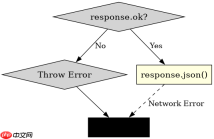
fetch('/api/data')
  .then(response => {
    if (!response.ok) {
      throw new Error(`HTTP error! status: ${response.status}`);
    }
    return response.json();
  })
  .then(data => console.log('Success:', data))
  .catch(error => console.error('Error:', error));
如何清洗并转换 JSON 响应数据
在获取到 JSON 数据后,可以使用数组方法如 map 和 filter 对数据结构进行重构。例如,将后端返回的时间戳转换为可读字符串,或剔除未激活的用户记录,确保传递给 UI 组件的数据符合预期结构。


fetch('/api/users')
  .then(res => res.json())
  .then(rawUsers => {
    return rawUsers
      .filter(user => user.isActive)
      .map(user => ({
        id: user.id,
        name: user.name.trim(),
        joinDate: new Date(user.createdAt).toLocaleDateString()
      }));
  })
  .then(cleanedUsers => console.log('Cleaned Data:', cleanedUsers));
当接口返回空数组或 null 值时程序会怎样
如果接口成功但返回空数组 [] 或 null,上述清洗代码仍能正常运行。空数组经过 filter 和 map 处理后仍为空数组,不会报错;若返回 null,则在尝试调用 .filter() 时会触发 TypeError 并被 .catch() 捕获。因此需在实际应用中增加对 null 的判断以增强健壮性。
大量免费API接口:立即使用
涵盖生活服务API、金融科技API、企业工商API、等相关的API接口服务。免费API接口可安全、合规地连接上下游,为数据API应用能力赋能!





