






通过拦截器模式实现接口请求日志记录,核心做法是重写或包装 window.fetch 方法。在原始函数执行前后分别捕获开始时间、请求配置和响应数据,计算耗时并统一输出到控制台或上报至监控服务。若需区分不同业务场景,可结合自定义属性或中间件逻辑进行过滤。

如何封装 fetch 以自动记录请求参数与响应状态?
直接回答:通过保存原始 fetch 引用并替换为自定义函数来实现。在自定义函数中,先打印请求 URL 和方法,调用原始 fetch 获取 Promise,利用 .then() 链处理成功响应并记录状态码,利用 .catch() 处理网络错误并记录异常信息,最终返回新的 Promise 对象以保持调用链兼容。
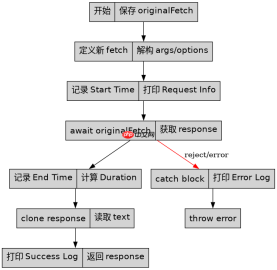
const originalFetch = window.fetch;

window.fetch = async function(...args) {
  const [url, options = {}] = args;
  const startTime = performance.now();

  console.log(`[Request Start] ${options.method || 'GET'} ${url}`);

  try {
    const response = await originalFetch.apply(this, args);
    const endTime = performance.now();
    const duration = (endTime - startTime).toFixed(2);

    // 克隆响应以便后续读取 body,同时记录状态
    const clonedResponse = response.clone();
    const data = await clonedResponse.text();

    console.log(`[Response Success] Status: ${response.status}, Duration: ${duration}ms`);
    console.log(`[Response Data Preview]`, data.substring(0, 100));

    return response;
  } catch (error) {
    const endTime = performance.now();
    const duration = (endTime - startTime).toFixed(2);

    console.error(`[Request Failed] URL: ${url}, Error: ${error.message}, Duration: ${duration}ms`);
    throw error;
  }
};

// 测试调用
fetch('/api/user', { method: 'POST', headers: { 'Content-Type': 'application/json' }, body: JSON.stringify({ id: 1 }) });
如何处理跨域预检请求(OPTIONS)的日志干扰?
直接回答:在拦截器内部判断请求方法是否为 OPTIONS 或是否包含 Access-Control-Request-Method 头。如果是预检请求,通常不需要记录详细的业务日志,或者可以单独标记为 [Preflight] 以避免混淆正常业务接口的日志流。这样可以确保日志只关注实际的数据交互。

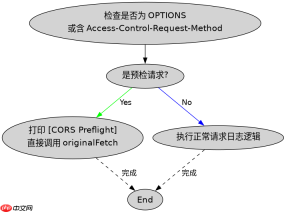
// 在上面的 fetch 拦截器基础上增加预检判断
window.fetch = async function(...args) {
  const [url, options = {}] = args;

  // 识别 CORS 预检请求
  const isPreflight = options.method === 'OPTIONS' ||
                      (options.headers && options.headers['Access-Control-Request-Method']);

  if (isPreflight) {
    console.warn(`[CORS Preflight] ${url}`);
    // 可以选择直接调用原始 fetch 而不做复杂处理,或者静默处理
    return originalFetch.apply(this, args);
  }

  // ... 其他正常请求的日志逻辑 ...
  const startTime = performance.now();
  console.log(`[Request Start] ${options.method || 'GET'} ${url}`);

  try {
    const response = await originalFetch.apply(this, args);
    // ... 成功处理 ...
  } catch (error) {
    // ... 失败处理 ...
  }
};
基于上述代码,如果请求发生超时,日志会如何表现?
直接回答:在上述代码实现中,如果请求发生超时(例如浏览器内置超时或手动设置了 signal),执行流程会进入 .catch() 块。此时会打印 [Request Failed] 标签,错误信息通常为 AbortError 或具体的超时异常,并且会记录从开始到触发超时的总耗时。需要注意的是,原生 fetch 不支持直接的超时参数,通常需要配合 AbortController 使用,当 AbortController 被中止时,抛出的错误会被拦截器捕获并记录。
大量免费API接口:立即使用
涵盖生活服务API、金融科技API、企业工商API、等相关的API接口服务。免费API接口可安全、合规地连接上下游,为数据API应用能力赋能!





