





vue如何操作dom?下面本篇文章给大家介绍一下vue3中操作dom的四种方式,希望给大家有所帮助!

最近产品经理提出了很多用户体验优化的需求,涉及到很多dom的操作。
小张:“老铁,本来开发Vue2项目操作dom挺简单的,现在开发vue3项目,突然感觉一头雾水!”
我:“没事,原理都差不多,查查资料应该没问题的!”
至此将Vue3中dom操作常见的几种方式总结一下!(学习视频分享:vue视频教程)
通过ref直接拿到dom引用
<template>
    <div>
        <div></div>
    </div>
</template><script>
import {ref} from 'vue'
const sectionRef = ref()
</script>
通过对div元素添加了ref属性,为了获取到这个元素,我们声明了一个与ref属性名称相同的变量sectionRef,然后我们通过 sectionRef.value 的形式即可获取该div元素。
适用场景
单一dom元素或者个数较少的场景

示例代码
<template>
    <div>
        <p>通过ref直接拿到dom</p>
        <div></div>
        <button>变高</button>
    </div>
</template><script>
import {ref} from 'vue'
const sectionRef = ref()
let height = 100;

const higherAction = () => {
    height += 50;
    sectionRef.value.style = `height: ${height}px`;
}
</script><style>
.demo1-container {
    width: 100%;
    height: 100%;

    .ref-section {
        width: 200px;
        height: 100px;
        background-color: pink;
        transition: all .5s ease-in-out;
    }

    .btn {
        width: 200px;
        height: 50px;
        background-color: gray;
        color: #fff;
        margin-top: 100px;
    }
}
</style>
通过父容器的ref遍历拿到dom引用
<template>
    <div>
        <div>
            <div>
                <span>{{item}}</span>
            </div>
        </div>
    </div>
</template><script>
import { ref, reactive } from 'vue'
const listRef = ref()</script>
通过对父元素添加了ref属性,并声明了一个与ref属性名称相同的变量listRef,此时通过listRef.value会获得包含子元素的dom对象
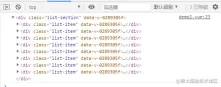
此时可以通过listRef.value.children[index]的形式获取子元素dom
适用场景
通过v-for循环生成的固定数量元素的场景


将静态 Vue 页面(index.vue)改造为动态页面(Custom.vue);稿源仅限 index.vue、其引用的 CSS 与资源路径,禁止参考仓库内其他文件。Invoke when user wants to transform a static Vue page into a dynamic data-driven page with Element UI components.
示例代码
<template>
    <div>
        <p>通过父容器遍历拿到dom</p>
        <div>
            <div>
                <span>{{item}}</span>
            </div>
        </div>
    </div>
</template><script>
import { ref, reactive } from 'vue'
const listRef = ref()
const state = reactive({
    list: [1, 2, 3, 4, 5, 6, 7, 8]
})

const higherAction = (index: number) => {
    let height = listRef.value.children[index].style.height ? listRef.value.children[index].style.height : '20px';
    height = Number(height.replace('px', ''));
    listRef.value.children[index].style = `height: ${height + 20}px`;
}
</script><style>
.demo2-container {
    width: 100%;
    height: 100%;

    .list-section {
        width: 200px;
        .list-item {
            width: 200px;
            height: 20px;
            background-color: pink;
            color: #333;
            transition: all .5s ease-in-out;
            display: flex;
            justify-content: center;
            align-items: center;
        }
    }
}
</style>
通过:ref将dom引用放到数组中
<template>
    <div>
        <div>
            <div>
                <span>{{item}}</span>
            </div>
        </div>
    </div>
</template><script>
import { reactive } from 'vue'

const state = reactive({
    list: [1, 2, 3, 4, 5, 6, 7],
    refList: [] as Array<any>
})

const setRefAction = (el: any) => {
    state.refList.push(el);
}
</script>
通过:ref循环调用setRefAction方法,该方法会默认接收一个el参数,这个参数就是我们需要获取的div元素

此时可以通过state.refList[index]的形式获取子元素dom
适用场景
通过v-for循环生成的不固定数量或者多种元素的场景

示例代码
<template>
    <div>
        <p>通过:ref将dom引用放到数组中</p>
        <div>
            <div>
                <span>{{item}}</span>
            </div>
        </div>
    </div>
</template><script>
import { reactive } from 'vue'

const state = reactive({
    list: [1, 2, 3, 4, 5, 6, 7],
    refList: [] as Array<any>
})

const higherAction = (index: number) => {
    let height = state.refList[index].style.height ? state.refList[index].style.height : '20px';
    height = Number(height.replace('px', ''));
    state.refList[index].style = `height: ${height + 20}px`;
    console.log(state.refList[index]);
}

const setRefAction = (el: any) => {
    state.refList.push(el);
}
</script><style>
.demo2-container {
    width: 100%;
    height: 100%;

    .list-section {
        width: 200px;
        .list-item {
            width: 200px;
            height: 20px;
            background-color: pink;
            color: #333;
            transition: all .5s ease-in-out;
            display: flex;
            justify-content: center;
            align-items: center;
        }
    }
}
</style>
通过子组件emit传递ref
<template>
    <div>
        <span>{{item}}</span>
    </div>
</template><script>
import {ref} from 'vue';

const props = defineProps({
    item: Number
})
const emit = defineEmits(['cellTap']);
const cellRef = ref();
const cellAction = () => {
    emit('cellTap', cellRef.value);
}
</script>
通过对子组件添加了ref属性,并声明了一个与ref属性名称相同的变量cellRef,此时可以通过emit将cellRef.value作为一个dom引用传递出去

适用场景
多个页面都可能有操作组件dom的场景

示例代码
<template>
    <div>
        <span>{{item}}</span>
    </div>
</template><script>
import {ref} from 'vue';

const props = defineProps({
    item: Number
})
const emit = defineEmits(['cellTap']);
const cellRef = ref();
const cellAction = () => {
    emit('cellTap', cellRef.value);
}
</script><style>
.cell-item {
    width: 200px;
    height: 20px;
    background-color: pink;
    color: #333;
    transition: all .5s ease-in-out;
    display: flex;
    justify-content: center;
    align-items: center;
}
</style>
<template>
    <div>
        <p>通过子组件emit传递ref</p>
        <div>
            <cell>
            </cell>
        </div>
    </div>
</template><script>
import { reactive } from 'vue'
import Cell from '@/components/Cell.vue'
const state = reactive({
    list: [1, 2, 3, 4, 5, 6, 7],
    refList: [] as Array<any>
})

const cellTapHandler = (el: any) => {
    let height = el.style.height ? el.style.height : '20px';
    height = Number(height.replace('px', ''));
    el.style = `height: ${height + 20}px`;
}
</script><style>
.demo2-container {
    width: 100%;
    height: 100%;

    .list-section {
        width: 200px;
    }
}
</style>
前端入门到VUE实战笔记:立即使用
在学习笔记中,你将探索 前端 的入门与实战技巧!


