本篇文章中主要的介绍了关于html5 main标签的居中,里面有完整的main标签的用法实例,现在让我们一起来看这篇关于html5 main标签的介绍吧
首先我们先看看html5 main标签要怎么居中:
注释:在一个文档中,不能出现一个以上的
说了这么多定义来看看main标签的居中完整代码实例吧:
html>


<meta><title>PHP中文网</title><main>
  <h1>PHP中文网</h1>
  <p>Google Chrome、Firefox 以及 Internet Explorer 是目前最流行的浏览器。</p>
  <article>
    <h1>Google Chrome</h1>
    <p>Google Chrome是由Google开发的一款免费的开源web浏览器,于2008年发布。</p>
  </article>
  <article>
    <h1>Internet Explorer</h1>
    <p>Internet Explorer由微软开发的一款免费的web浏览器,发布于1995年。</p>
  </article>
  <article>
    <h1>Mozilla Firefox</h1>
    <p>Firefox是一款来自Mozilla的免费开源web浏览器,发布于2004年。</p><div class="aritcle_card flexRow artxards">
											<div class="artcardd flexRow">
												<a class="aritcle_card_img" rel="nofollow" href="/xiazai/skill10246" title="HTML Text Extract"><img
														src="https://img.php.cn/upload/skill/001/246/273/6adaf20dee630206.jpg" alt="HTML Text Extract" onerror="this.onerror='';this.src='/static/lhimages/moren/morentu.png'" ></a>
												<div class="aritcle_card_info flexColumn">
													<a rel="nofollow" href="/xiazai/skill10246" title="HTML Text Extract" class="overflowclass">HTML Text Extract</a>
													<p class="overflowclass">从HTML页面(URL、文件或标准输入)中提取主体内容文本,去除导航、页脚、广告和模板文本。可直接传递给readability_check或其他文本工具。</p>
												</div>
												<a rel="nofollow" href="/xiazai/skill10246" title="HTML Text Extract" class="aritcle_card_btn flexRow flexcenter"><b></b><span>下载</span>
												</a>
											</div>
										</div>
  </article></main>
我把main标签里面加上了一个align属性,意思是让整个文档全部往中间对齐,来看看在浏览器中显示的效果:
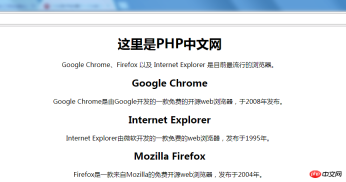
可以很清楚的看到,因为文章的大小,放不了太大的网页,只能缩小了,但是还是能很清楚的看到这些图片中间的位置的文字。
好了,本篇文章到这也就结束了(想学更多就来PHP中文网,百度搜索PHP中文网,里面有你想要的编程课程和资料),有问题的可以在下方进行提问
【小编推荐】
HTML中ul标签如何去掉点?HTML无序列表的样式实例解析
前端入门到VUE实战笔记:立即使用
在学习笔记中,你将探索 前端 的入门与实战技巧!