





这篇文章主要介绍了css如何防止页面滑动穿透,小编觉得挺不错的,现在分享给大家,也给大家做个参考。一起跟随小编过来看看吧
问题描述:
移动端当有 fixed 遮罩背景和弹出层时,在屏幕上滑动能够滑动背景下面的内容,这就是著名的滚动穿透问题。
示例demo:
样式:
<style>
.box{
width: 100%;
height: 100%;
position: relative;
}
.dialog{
width: 100%;
height: 100%;
position: fixed;
left: 0;
top: 0;
background: rgba(0,0,0,0.4);
}
.dia-con {
width: 40vw;
height: 38vw;
background: white;
margin: 30vh auto;
}
</style>
结构:
<p>
<!-- 这里有非常多的文字 -->
1测试文字测试文字测试文字测试文字测试文字测试文字测试文字测试文字测试文字测试文字测试文字测试文字
2测试文字测试文字测试文字测试文字测试文字测试文字测试文字测试文字测试文字测试文字测试文字测试文字
4测试文字测试文字测试文字测试文字测试文字测试文字测试文字测试文字测试文字测试文字测试文字测试文字
测试文字测试文字测试文字测试文字测试文字测试文字测试文字测试文字测试文字测试文字测试文字测试文字
测试文字测试文字测试文字测试文字测试文字测试文字测试文字测试文字测试文字测试文字测试文字测试文字
测试文字测试文字测试文字测试文字测试文字测试文字测试文字测试文字测试文字测试文字测试文字测试文字
测试文字测试文字测试文字测试文字测试文字测试文字测试文字测试文字测试文字测试文字测试文字测试文字
5测试文字测试文字测试文字测试文字测试文字测试文字测试文字测试文字测试文字测试文字测试文字测试文字
6测试文字测试文字测试文字测试文字测试文字测试文字测试文字测试文字测试文字测试文字测试文字测试文字
7测试文字测试文字测试文字测试文字测试文字测试文字测试文字测试文字测试文字测试文字测试文字测试文字
8测试文字测试文字测试文字测试文字测试文字测试文字测试文字测试文字测试文字测试文字测试文字测试文字
测试文字测试文字测试文字测试文字测试文字测试文字测试文字测试文字测试文字测试文字测试文字测试文字
测试文字测试文字测试文字测试文字测试文字测试文字测试文字测试文字测试文字测试文字测试文字测试文字
测试文字测试文字测试文字测试文字测试文字测试文字测试文字测试文字测试文字测试文字测试文字测试文字
测试文字测试文字测试文字测试文字测试文字测试文字测试文字测试文字测试文字测试文字测试文字测试文字
测试文字测试文字测试文字测试文字测试文字测试文字测试文字测试文字测试文字测试文字测试文字测试文字
测试文字测试文字测试文字测试文字测试文字测试文字测试文字测试文字测试文字测试文字测试文字测试文字
测试文字测试文字测试文字测试文字测试文字测试文字测试文字测试文字测试文字测试文字测试文字测试文字
测试文字测试文字测试文字测试文字测试文字测试文字测试文字测试文字测试文字测试文字测试文字测试文字
测试文字测试文字测试文字测试文字测试文字测试文字测试文字测试文字测试文字测试文字测试文字测试文字
测试文字测试文字测试文字测试文字测试文字测试文字测试文字测试文字测试文字测试文字测试文字测试文字
</p>
<p>
</p><p>
</p><h4>内容</h4>
<button>我知道了</button>
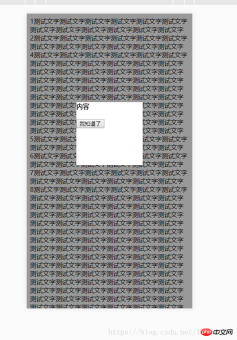
在手机页面运行上面代码如图所示: 在灰色的遮罩上滑动的时候 下面的 “测试文字” 也会跟着滑动。
解决方案一:
阻止顶层 遮罩的默认行为。阻止冒泡。
示例demo:
<style>
.modals button{width:100%;margin:0 auto;height:auto;line-height:30px;border:1px solid #4185F3;color:#fff;font-size:14px;background:#4185F3;margin:0 auto}
.modals-body{padding:30px 15px;font-size:10px;color:#666;text-align:center;background:#fff}
.sliders{cursor:not-allowed;display:block;position:fixed;overflow:hidden;z-index:103;top:0;right:0;bottom:0;left:0;width:100%;height:100%;background:rgba(20,20,20,.8)}
.modals{overflow-y:auto;max-height:95%;font-size:16px;z-index:103;border-radius:5px;background:#fff;width:50%;color:#333;display:block;box-shadow:0 0 3px rgba(0,0,0,.1);position:fixed;top:50%;left:50%;-webkit-transform:translate(-50%,-50%);transform:translate(-50%,-50%)}
</style>
<!--一个未知宽高的弹出框,水平垂直居中-->
<p></p><div class="aritcle_card flexRow artxards">
											<div class="artcardd flexRow">
												<a class="aritcle_card_img" rel="nofollow" href="/xiazai/skill11112" title="CSS工具箱(专业版)"><img
														src="https://img.php.cn/upload/skill/000/000/081/179352902380226.jpg" alt="CSS工具箱(专业版)" onerror="this.onerror='';this.src='/static/lhimages/moren/morentu.png'" ></a>
												<div class="aritcle_card_info flexColumn">
													<a rel="nofollow" href="/xiazai/skill11112" title="CSS工具箱(专业版)" class="overflowclass">CSS工具箱(专业版)</a>
													<p class="overflowclass">全功能 CSS 工程手册,覆盖性能优化、无障碍、设计系统与跨浏览器兼容。</p>
												</div>
												<a rel="nofollow" href="/xiazai/skill11112" title="CSS工具箱(专业版)" class="aritcle_card_btn flexRow flexcenter"><b></b><span>下载</span>
												</a>
											</div>
										</div>
<p>
</p><p>
用户信息丢失,请先登录
</p>
<button>确定</button>

<!--end-->
<p></p>

<script></script><script>
for(var i = 0;i<=30;i++){
$(".list").append("<p>BBBBBBBBBBBBBBBBBBBBBBBBBBBBBBBBBBB");
}
//阻止防止滚动、缩放。
$(".sliders,.modals").on("touchmove",function(event){
event.preventDefault();
});
$(".btns").on("click",function(){
$(".sliders,.modals").remove();
});
</script>
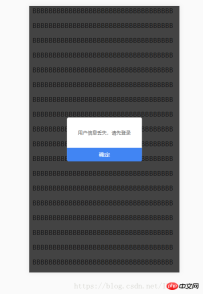
运行效果:
解决方案二:
首先设置 body 的overflow : hidden; 这样超出部分 就不会滑动。当 遮罩 消失时,在设置body的 overflow: initial; 或者设置为 scroll即可
示例demo:
<style>
body{overflow:hidden;}
.modals button{width:100%;margin:0 auto;height:auto;line-height:30px;border:1px solid #4185F3;color:#fff;font-size:14px;background:#4185F3;margin:0 auto}
.modals-body{padding:30px 15px;font-size:10px;color:#666;text-align:center;background:#fff}
.sliders{cursor:not-allowed;display:block;position:fixed;overflow:hidden;z-index:103;top:0;right:0;bottom:0;left:0;width:100%;height:100%;background:rgba(20,20,20,.8)}
.modals{overflow-y:auto;max-height:95%;font-size:16px;z-index:103;border-radius:5px;background:#fff;width:50%;color:#333;display:block;box-shadow:0 0 3px rgba(0,0,0,.1);position:fixed;top:50%;left:50%;-webkit-transform:translate(-50%,-50%);transform:translate(-50%,-50%)}
</style>
<!--一个未知宽高的弹出框,水平垂直居中-->
<p></p>
<p>
</p><p>
用户信息丢失,请先登录
</p>
<button>确定</button>

<!--end-->
<p></p>

<script></script><script>
//解决方案一:
// for(var i = 0;i<=30;i++){
//     $(".list").append("<p>BBBBBBBBBBBBBBBBBBBBBBBBBBBBBBBBBBB");
// }
// //阻止防止滚动、缩放。
// $(".sliders,.modals").on("touchmove",function(event){
//     event.preventDefault();
// });
// $(".btns").on("click",function(){
//     $(".sliders,.modals").remove();
// });
// 解决方案 二:
for(var i = 0;i<=30;i++){
$(".list").append("<p>BBBBBBBBBBBBBBBBBBBBBBBBBBBBBBBBBBB");
}
$(".btns").on("click",function(){
$(".sliders,.modals").remove();
//关键代码
$("body").css("overflow-y","initial");
});
</script>
总结:
最简单的解决方案:
body{
overflow: hidden;
}
在body上增加这个样式即可禁止滑动。
前端入门到VUE实战笔记:立即使用
在学习笔记中,你将探索 前端 的入门与实战技巧!






