JUnit怎么读取独立的测试配置文件?TestPropertySource使用方法
在junit 5中,使用@testpropertysource注解可以指定独立的配置文件路径,从而覆盖默认的配置加载行为。该注解支持classpath、file和url三种资源定位方式,通过locations属性传入具体的文件位置即可生效。如果配置文件中包含占位符,需要确保环境中存在对应的值或提供默认值,否则可能导致测试启动失败。

如何指定不同环境的配置文件?
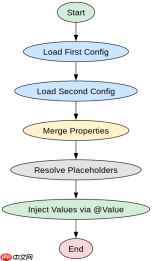
可以通过locations属性指定多个配置文件,JUnit会按顺序加载它们,后加载的会覆盖先加载的同名属性。这种方式非常适合处理多环境配置,例如开发环境和测试环境的差异。需要注意的是,如果指定的文件不存在且未设置inheritLocations为false,可能会导致异常。

使用 ElevenLabs CLI 将 ElevenLabs 代理管理为版本化的本地配置文件,而不是在仪表板中手动编辑它们
下载
当您希望在代码审查中而不是仅在托管UI中拥有代理定义时,请从本地文件初始化、验证和编辑ElevenLabs代理配置。
如何处理配置文件中的占位符解析?
当配置文件中使用占位符(如${variable})时,JUnit会自动尝试从系统属性、环境变量或已加载的属性源中解析这些值。如果无法解析,测试将抛出异常。可以通过properties属性直接定义键值对来补充缺失的值,或者在代码中注册自定义的PropertySource来解决依赖问题。
import org.junit.jupiter.api.Test;
import org.springframework.beans.factory.annotation.Value;
import org.springframework.test.context.TestPropertySource;
import org.springframework.test.context.junit.jupiter.SpringExtension;
import org.junit.jupiter.api.extension.ExtendWith;

@ExtendWith(SpringExtension.class)
@TestPropertySource(
    locations = {
        "classpath:test.properties",
        "file:./config/override.properties"
    },
    properties = {
        "db.url=jdbc:h2:mem:testdb",
        "app.name=TestApp"
    }
)
public class TestConfigExample {

    @Value("${db.url}")
    private String dbUrl;

    @Value("${app.name}")
    private String appName;

    @Test
    public void testPropertiesLoaded() {
        System.out.println("DB URL: " + dbUrl);
        System.out.println("App Name: " + appName);
    }
}
预期输出: - DB URL: jdbc:h2:mem:testdb - App Name: TestApp
上述代码展示了如何使用@TestPropertySource加载两个配置文件,并通过properties属性补充缺失的值。测试方法中通过@Value注入属性,验证配置是否正确加载。