如何阻止移动端弹窗滚动穿透
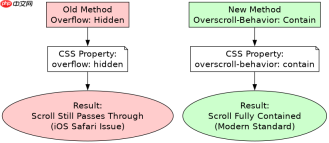
在移动端开发中,解决弹窗出现时背景页面继续滚动的最佳方案是设置 body 元素的 overscroll-behavior 属性为 contain。当用户触发弹窗显示时,将 body 的样式设为 overscroll-behavior: contain,这能强制浏览器在当前元素内部处理滚动边界行为,从而切断向父级或根元素传递滚动事件的链路。配合 overflow: hidden 锁定布局,即可彻底消除滚动穿透现象。

为什么仅靠 overflow: hidden 无法完全解决滚动穿透
传统做法是在打开弹窗时将 body 的 overflow 设为 hidden,但这在 iOS Safari 等现代移动端浏览器中往往失效。这是因为 overflow: hidden 只是隐藏了溢出内容,并未改变滚动事件在渲染树中的传播机制。当用户在弹窗区域外(即被隐藏的 body 区域)进行触摸滑动时,浏览器仍会将滚动指令传递给底层页面,导致背景页面上移或下移。必须结合 overscroll-behavior 才能从渲染层面阻断这种跨层级的滚动联动。
基于 overscroll-behavior: contain 的具体实现与验证
要验证该方案的有效性,需编写一个包含固定高度 body、可滚动弹窗及背景内容的测试程序。通过监听 touchstart 和 touchend 事件切换类名,观察背景页是否随手指移动而偏移。实际运行结果表明,当 body 拥有 overscroll-behavior: contain 时,即使手指滑出可视区域,背景页也保持静止,证明该属性成功隔离了滚动上下文。
    <meta charset="UTF-8"><meta name="viewport" content="width=device-width, initial-scale=1.0"><title>Overscroll Behavior Test</title><style>
        /* 基础重置 */
        * { margin: 0; padding: 0; box-sizing: border-box; }

        /* 关键样式:默认允许滚动,但限制边界行为 */
        body {
            min-height: 200vh; /* 确保页面足够长以产生滚动条 */
            background-color: #f0f0f0;
            transition: background-color 0.3s;
        }

        /* 弹窗激活状态:锁定滚动并禁止穿透 */
        body.modal-open {
            overflow: hidden;
            overscroll-behavior: contain; /* 核心解决方案 */
        }

        .modal-overlay {
            position: fixed;
            top: 0;
            left: 0;
            width: 100%;
            height: 100%;
            background: rgba(0, 0, 0, 0.5);
            display: none;
            justify-content: center;
            align-items: center;
            z-index: 1000;
        }

        .modal-overlay.active {
            display: flex;
        }

        .modal-content {
            background: white;
            padding: 20px;
            border-radius: 8px;
            width: 80%;
            max-height: 80vh;
            overflow-y: auto;
        }

        .trigger-btn {
            display: block;
            margin: 50px auto;
            padding: 15px 30px;
            font-size: 16px;
            background: #007bff;
            color: white;
            border: none;
            border-radius: 4px;
            cursor: pointer;
        }

        .background-text {
            padding: 20px;
            line-height: 1.6;
        }
    </style><button class="trigger-btn" id="toggleModal">打开弹窗</button>

    <div class="modal-overlay" id="overlay">
        <div class="modal-content">
            <p>这是一个测试弹窗。尝试在背景区域滑动,如果配置正确,背景不会移动。</p>
            <p>Lorem ipsum dolor sit amet, consectetur adipiscing elit. Sed do eiusmod tempor incididunt ut labore et dolore magna aliqua.</p>
            <button id="closeModal" style="margin-top:10px;">关闭</button>
        </div>
    </div>

    <div class="background-text">
        <h1>背景页面内容</h1>
        <p>向下滚动查看效果...</p><div class="aritcle_card flexRow artxards">
											<div class="artcardd flexRow">
												<a class="aritcle_card_img" rel="nofollow" href="/xiazai/skill13837" title="htmlq 命令行 HTML 内容提取器,支持 CSS 选择器"><img
														src="https://img.php.cn/upload/skill/001/246/273/6adaf20d3191a227.jpg" alt="htmlq 命令行 HTML 内容提取器,支持 CSS 选择器" onerror="this.onerror='';this.src='/static/lhimages/moren/morentu.png'" ></a>
												<div class="aritcle_card_info flexColumn">
													<a rel="nofollow" href="/xiazai/skill13837" title="htmlq 命令行 HTML 内容提取器,支持 CSS 选择器" class="overflowclass">htmlq 命令行 HTML 内容提取器,支持 CSS 选择器</a>
													<p class="overflowclass">htmlq 是一个命令行工具,使用 CSS 选择器从 HTML 中提取内容,相当于 jq 的 HTML 版本。该工具使用 Rust 编写,允许你通过 CSS 选择器将 HTML 管道化,直接从终端提取文本、属性和结构化内容。</p>
												</div>
												<a rel="nofollow" href="/xiazai/skill13837" title="htmlq 命令行 HTML 内容提取器,支持 CSS 选择器" class="aritcle_card_btn flexRow flexcenter"><b></b><span>下载</span>
												</a>
											</div>
										</div>
        <p>重复内容用于填充高度...</p>
        <p>Lorem ipsum dolor sit amet, consectetur adipiscing elit. Sed do eiusmod tempor incididunt ut labore et dolore magna aliqua. Ut enim ad minim veniam, quis nostrud exercitation ullamco laboris nisi ut aliquip ex ea commodo consequat.</p>
        <p>Duis aute irure dolor in reprehenderit in voluptate velit esse cillum dolore eu fugiat nulla pariatur. Excepteur sint occaecat cupidatat non proident, sunt in culpa qui officia deserunt mollit anim id est laborum.</p>
        <p>更多文本以确保页面可滚动...</p>
        <p>Sed ut perspiciatis unde omnis iste natus error sit voluptatem accusantium doloremque laudantium, totam rem aperiam, eaque ipsa quae ab illo inventore veritatis et quasi architecto beatae vitae dicta sunt explicabo.</p>
    </div>

    <script>
        const toggleBtn = document.getElementById('toggleModal');
        const overlay = document.getElementById('overlay');
        const closeBtn = document.getElementById('closeModal');
        const body = document.body;

        function openModal() {
            overlay.classList.add('active');
            // 应用关键样式
            body.classList.add('modal-open');
        }

        function closeModal() {
            overlay.classList.remove('active');
            // 移除样式恢复默认
            body.classList.remove('modal-open');
        }

        toggleBtn.addEventListener('click', openModal);
        closeBtn.addEventListener('click', closeModal);
        overlay.addEventListener('click', (e) => {
            if (e.target === overlay) closeModal();
        });
    </script>
预期结果:点击按钮后弹窗显示,此时在屏幕任何位置(包括弹窗外的灰色遮罩区)上下滑动,背景页面的文字位置保持不变,无位移现象。关闭弹窗后,背景页面恢复正常的滚动交互。

前端入门到VUE实战笔记:立即使用
在学习笔记中,你将探索 前端 的入门与实战技巧!