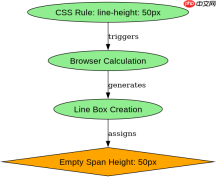
因为行内非替换元素(如 )在 css 2.1 规范中必须为包含其文本内容的行盒分配额外的垂直空间,以容纳字母的升部(ascender)和降部(descender)。设置 line-height 时,浏览器会计算该行的高度并生成一个不可见的“行框”(line box),即使没有实际内容,这个行框也会占据由 line-height 决定的高度。

为什么设置了 line-height 的行内盒子会有高度?
这是因为 CSS 规范规定,对于行内非替换元素,如果未显式指定 height,其高度将由 line-height 决定。浏览器会为每一行文本创建一个行框,行框的高度至少等于 line-height 的值。即使元素内部没有文本,只要它被渲染为一个行内元素,它就会参与行框的计算,从而获得高度。
    <meta charset="UTF-8"><title>line-height Demo</title><style>
        .empty-span {
            display: inline;
            line-height: 50px;
            background-color: lightblue;
        }
    </style><span class="empty-span"></span>
    <script>
        const span = document.querySelector('.empty-span');
        console.log('Height:', span.offsetHeight); // 输出 50
        console.log('Computed Line-height:', getComputedStyle(span).lineHeight);
    </script>
运行上述代码,控制台会输出 Height: 50,证明空 确实获得了 50px 的高度。背景色也会显示出一个 50px 高的矩形区域。
line-height 如何影响行框的计算?
line-height 的值决定了行框的最小高度。当多个行内元素在同一行时,行框的高度取所有元素 line-height 中的最大值。每个元素的垂直对齐方式(如 vertical-align)会影响其在行框内的位置,但不会改变行框本身的高度。因此,即使元素内容为空,其 line-height 仍会贡献于行框高度的计算。

htmlq 是一个命令行工具,使用 CSS 选择器从 HTML 中提取内容,相当于 jq 的 HTML 版本。该工具使用 Rust 编写,允许你通过 CSS 选择器将 HTML 管道化,直接从终端提取文本、属性和结构化内容。

    <meta charset="UTF-8"><title>line-height Interaction</title><style>
        .span1 { line-height: 30px; }
        .span2 { line-height: 60px; }
        .span3 { line-height: 40px; }
    </style><span class="span1"></span>
    <span class="span2"></span>
    <span class="span3"></span>
    <script>
        const spans = document.querySelectorAll('span');
        const parent = spans[0].parentNode;
        console.log('Parent Height:', parent.offsetHeight); // 输出 60
    </script>
运行此代码,父容器的高度将为 60px,即三个 中最大的 line-height 值。这验证了行框高度由最大 line-height 决定的规则。
如果 line-height 设置为负值会发生什么?
根据 CSS 规范,line-height 可以为负值,但会导致行框高度小于字体大小,可能引起文本重叠或裁剪。对于空元素,负值 line-height 仍会应用,但视觉效果可能不明显,因为无内容可重叠。实际开发中应避免使用负值 line-height,除非有特殊布局需求且已充分测试兼容性。
前端入门到VUE实战笔记:立即使用
在学习笔记中,你将探索 前端 的入门与实战技巧!