






在python中利用pytest对文件锁竞争进行单元测试,核心思路是使用多线程或异步任务模拟并发访问,并结合`pytest`的fixture和断言机制验证锁的正确性。具体做法是创建一个共享的文件锁对象(如使用`fcntl`或第三方库),启动多个线程尝试获取该锁,通过检查锁的状态、异常捕获或资源竞争结果来确认互斥行为是否生效。

如何模拟并发场景并验证互斥性?
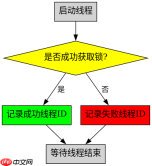
要模拟并发场景并验证互斥性,可以使用Python标准库中的`threading`模块创建多个线程,每个线程尝试获取同一个文件锁。如果锁机制正确实现,只有一个线程能成功获取锁,其他线程应阻塞或抛出异常。在pytest中,可以通过自定义fixture管理测试环境,确保每次测试都有干净的锁状态。
import threading
import fcntl
import os
import tempfile

def test_file_lock_contention():
    # 创建临时文件用于测试
    with tempfile.NamedTemporaryFile(delete=False) as tmp:
        tmp_path = tmp.name

    try:
        lock_acquired = []
        errors = []

        def acquire_lock(thread_id):
            try:
                with open(tmp_path, 'r+') as f:
                    fcntl.flock(f.fileno(), fcntl.LOCK_EX | fcntl.LOCK_NB)
                    lock_acquired.append(thread_id)
                    # 模拟一些操作
                    import time
                    time.sleep(0.1)
            except IOError:
                errors.append(thread_id)

        threads = [threading.Thread(target=acquire_lock, args=(i,)) for i in range(3)]
        for t in threads:
            t.start()
        for t in threads:
            t.join()

        # 验证:只有一个线程成功获取锁
        assert len(lock_acquired) == 1, f"Expected 1 thread to acquire lock, got {len(lock_acquired)}"
        assert len(errors) == 2, f"Expected 2 threads to fail, got {len(errors)}"
    finally:
        os.unlink(tmp_path)

if __name__ == "__main__":
    test_file_lock_contention()
上述代码展示了如何使用`fcntl.flock`在非阻塞模式下获取文件锁。运行此测试时,预期结果是只有一个线程成功获取锁,其余两个线程因无法获取锁而抛出`IOError`异常。这验证了文件锁的互斥性。
如何处理锁超时和重试逻辑?
在实际应用中,可能需要处理锁超时的情况,即当某个线程长时间无法获取锁时,应该放弃并执行其他操作。可以通过设置超时时间并在重试逻辑中使用`time.sleep`来实现。在pytest中,可以编写测试用例来验证超时和重试行为是否符合预期。


import threading
import fcntl
import os
import tempfile
import time

def test_file_lock_timeout_and_retry():
    with tempfile.NamedTemporaryFile(delete=False) as tmp:
        tmp_path = tmp.name

    try:
        lock_acquired = []
        retries = []
        max_retries = 3
        retry_interval = 0.1

        def acquire_lock_with_retry(thread_id):
            for attempt in range(max_retries):
                try:
                    with open(tmp_path, 'r+') as f:
                        fcntl.flock(f.fileno(), fcntl.LOCK_EX | fcntl.LOCK_NB)
                        lock_acquired.append(thread_id)
                        return
                except IOError:
                    retries.append((thread_id, attempt))
                    time.sleep(retry_interval)

        threads = [threading.Thread(target=acquire_lock_with_retry, args=(i,)) for i in range(2)]
        for t in threads:
            t.start()
        for t in threads:
            t.join()

        # 验证:至少有一个线程最终获取了锁
        assert len(lock_acquired) >= 1, f"Expected at least 1 thread to acquire lock, got {len(lock_acquired)}"
        # 验证:有重试记录
        assert len(retries) > 0, "Expected some retries to occur"
    finally:
        os.unlink(tmp_path)

if __name__ == "__main__":
    test_file_lock_timeout_and_retry()
这段代码演示了如何在获取文件锁时加入重试逻辑。每个线程最多尝试`max_retries`次,每次失败后等待`retry_interval`秒再重试。测试验证了至少有一个线程最终成功获取锁,并且存在重试记录。这种模式适用于需要优雅处理锁竞争的场景。
当多个线程同时释放锁时会发生什么?
当多个线程同时尝试释放同一个文件锁时,通常只有持有锁的线程才能成功释放锁,其他线程会收到错误提示。这是因为文件锁是由操作系统管理的,只有当前持有锁的进程或线程才能解锁。在pytest中,可以设计测试用例来验证这一行为,确保不会出现非法释放锁的情况。
为了验证这一点,我们可以修改之前的示例,让所有线程都尝试释放锁,然后检查是否有异常发生。以下是具体的测试代码:
import threading
import fcntl
import os
import tempfile

def test_multiple_thread_release_lock():
    with tempfile.NamedTemporaryFile(delete=False) as tmp:
        tmp_path = tmp.name

    try:
        lock_holder = None
        release_errors = []

        def acquire_and_hold_lock(thread_id):
            nonlocal lock_holder
            with open(tmp_path, 'r+') as f:
                fcntl.flock(f.fileno(), fcntl.LOCK_EX | fcntl.LOCK_NB)
                lock_holder = thread_id
                # 保持锁一段时间
                import time
                time.sleep(0.5)

        def release_lock(thread_id):
            try:
                with open(tmp_path, 'r+') as f:
                    fcntl.flock(f.fileno(), fcntl.LOCK_UN)
            except IOError:
                release_errors.append(thread_id)

        # 启动一个线程获取锁
        holder_thread = threading.Thread(target=acquire_and_hold_lock, args=(0,))
        holder_thread.start()
        holder_thread.join()

        # 现在锁已被释放,启动多个线程尝试释放锁
        releaser_threads = [threading.Thread(target=release_lock, args=(i,)) for i in range(1, 4)]
        for t in releaser_threads:
            t.start()
        for t in releaser_threads:
            t.join()

        # 验证:没有线程能成功释放锁(因为锁已经释放)
        assert len(release_errors) == 3, f"Expected all threads to fail releasing lock, got {len(release_errors)}"
    finally:
        os.unlink(tmp_path)

if __name__ == "__main__":
    test_multiple_thread_release_lock()
在这个测试中,首先由一个线程获取并保持锁,然后释放锁。接着,多个线程尝试释放同一个锁。由于锁已经被释放,所有尝试释放锁的线程都会遇到错误。这验证了文件锁的原子性和安全性,确保不会发生非法释放锁的情况。
Python免费学习笔记(深入):立即使用
在学习笔记中,你将探索 Python 的核心概念和高级技巧!


