






使用flask-restx构建swagger接口文档的核心做法是实例化api对象并绑定到flask应用,利用装饰器@api.doc()和@api.marshal_with()自动提取函数签名、参数定义和返回值结构生成json schema。配置好app.config['swagger_ui_path']后,访问该路径即可看到交互式文档。若需自定义字段描述或处理复杂嵌套类型,需在模型定义中显式指定type和description属性。

如何配置基础路由与UI访问路径?
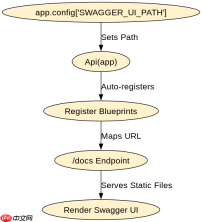
通过设置app.config['SWAGGER_UI_PATH']可以控制Swagger UI的挂载位置,默认值为/swagger-ui。在初始化Api时传入app实例会自动注册相关蓝图。开发者只需确保Flask应用启动后,浏览器访问配置的URL即可查看文档。
from flask import Flask
from flask_restx import Api, Resource, fields

app = Flask(__name__)
app.config['SWAGGER_UI_PATH'] = '/docs'
app.config['SWAGGER_UI_DOC_EXPAND'] = True

api = Api(app, version='1.0', title='Demo API', description='A simple demo')

ns = api.namespace('users', description='User operations')

user_model = api.model('User', {
    'id': fields.Integer(description='User ID'),
    'name': fields.String(required=True, description='User Name')
})

@ns.route('/<user_id>/')
class UserResource(Resource):
    @ns.expect(user_model)
    @ns.response(200, 'Success')
    def post(self, user_id):
        return {"id": user_id, "name": "test"}

if __name__ == '__main__':
    app.run(debug=True)</user_id>
运行上述代码后,访问/docs将显示包含POST /users/接口的文档页面。输入示例数据并提交可验证接口行为。
如何处理请求体中的复杂嵌套结构?
当接口需要接收嵌套JSON对象时,需使用fields.Nested定义子模型。例如订单接口包含多个商品项,每个商品项有名称和数量。通过api.model创建主模型并在其中引用子模型,Flask-RESTX会自动解析并展示层级结构。

Nodriver是Undetected-Chromedriver的官方继承者,提供异步浏览器自动化功能,可直接与Chrome DevTools Protocol通信,无需Selenium或WebDriver依赖。专为规避反机器人系统(包括Cloudflare和Imperva)的隐蔽网络自动化而构建。

item_model = api.model('Item', {
    'sku': fields.String(required=True),
    'qty': fields.Integer(default=1)
})

order_model = api.model('Order', {
    'order_id': fields.String(required=True),
    'items': fields.List(fields.Nested(item_model))
})

@ns.route('/orders/')
class OrderResource(Resource):
    @ns.expect(order_model)
    def post(self):
        return {"status": "created"}
此代码定义了包含列表型嵌套对象的请求体。Swagger UI中将展开显示items数组内的字段详情。开发者可通过修改item_model调整单个商品的字段约束。
基于程序中某个输入、条件或结果的具体问题
当请求体中包含必填字段但客户端未提供时,Flask-RESTX会返回400错误并指出缺失字段。例如在上述UserResource中,若POST请求未发送name字段,API将拒绝处理并返回具体错误信息。这种机制确保了接口契约的严格执行。
Python免费学习笔记(深入):立即使用
在学习笔记中,你将探索 Python 的核心概念和高级技巧!


